Notes
You must exit MemoDose to change pump speed and direction. But you may return
to MemoDose and keep the present dose size. To retain the MemoDose value through
a power interruption the pump must be in auto-restart.
Press STOP twice to exit MemoDose and return to manual operation.
Do not start the pump. Adjust the speed and direction showing on the display.
Press STOP twice within half a second to return to MemoDose. The display will
show the previous % dose size. The pump will dose at the new speed and direc-
tion.
MemoDose doses can be triggered remotely. See 17.1 Analogue signals and re-
mote control.
Always check the dose size when changing pump tubes, fluid, or any connecting
pipework.
17 Automatic operation with
analogue signals, remote control,
or RS232 link
The pump will normally revert to manual control when it is switched on and display
the present pump speed.
Check that the pump is ready to run before selecting automatic operation. Remote
control signals may start the pump without warning.
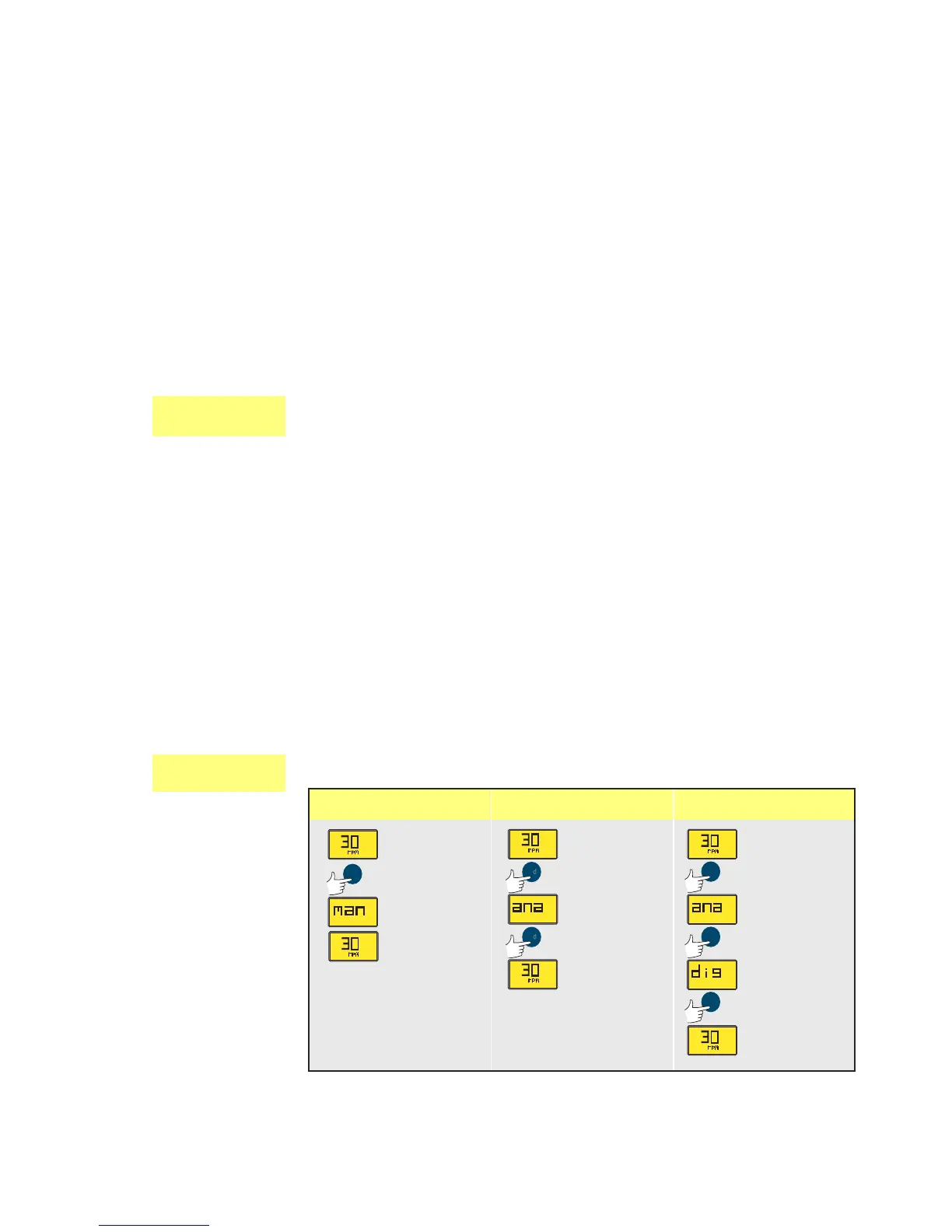
Press the MODE key to select automatic operation. The pump will respond to the
analogue and (323Du only) RS232 signal as soon as analogue is selected. The UP and
DOWN keys will be disabled. Re-press the MODE key to return to manual control.
The pump will return to the last set manual state, speed and direction.
In an emergency press the STOP key. The pump will return directly to manual con-
trol and stop.
Auto-restart will retain automatic operation while the pump is switched off.
Mode keypress
323E, 323S 323U 323Du










 To Next Page