This screen will only be displayed after successful implementation of Master Slave communications, which
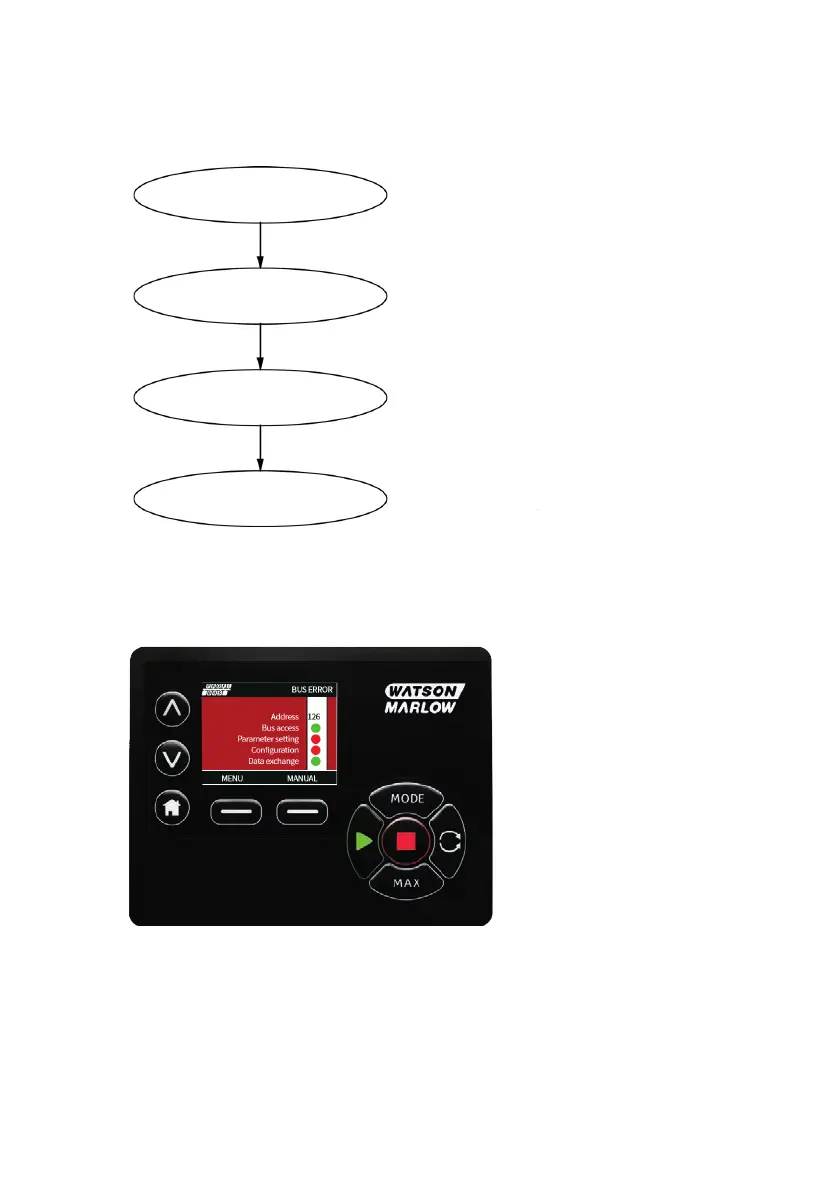
always follows the sequence shown in the diagram below.
Power ON/Reset
Parameterisation
Power ON/Reset of Master or Slave
Download of parameters into the eld device
(selected during conguration by the user)
Download of I/O conguration into the eld device
(selected during conguration by the user)
Cyclic data exchange (I/O data) and eld device
reports diagnostics
I/O Conguration
Data Exchange
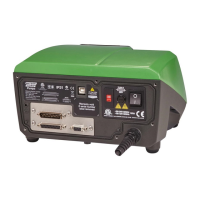
If data exchange is lost at any time, the following Bus Error screen will be displayed. The first red dot
corresponds to the stage at which the error occurred and subsequent stages will indicate a red dot
because the communication sequence halted before this point.
The screen will state 'Running' or 'Stopped', depending on how the user has set up the fail-safe function
within the PROFIBUS GSD file (see below). The MODE button gives access to the PROFIBUS settings and
the station address. When the menus are accessed, the pump is still in PROFIBUS bus mode but with no
communications. After five minutes of inactivity the pump will revert back to the home screen and
discard any unsaved changes, if there are still no communications then the BUS ERROR screen will be
displayed.
48 m-730bpn-en-08.1



 To Next Page