EasyManua.ls Logo

Wavetek 171 - Page 10

Default Icon
43 pages
Print Icon
To Next Page IconTo Next Page
To Previous Page IconTo Previous Page
Loading...
3.1
CONTROLS
AND
CONNECTORS
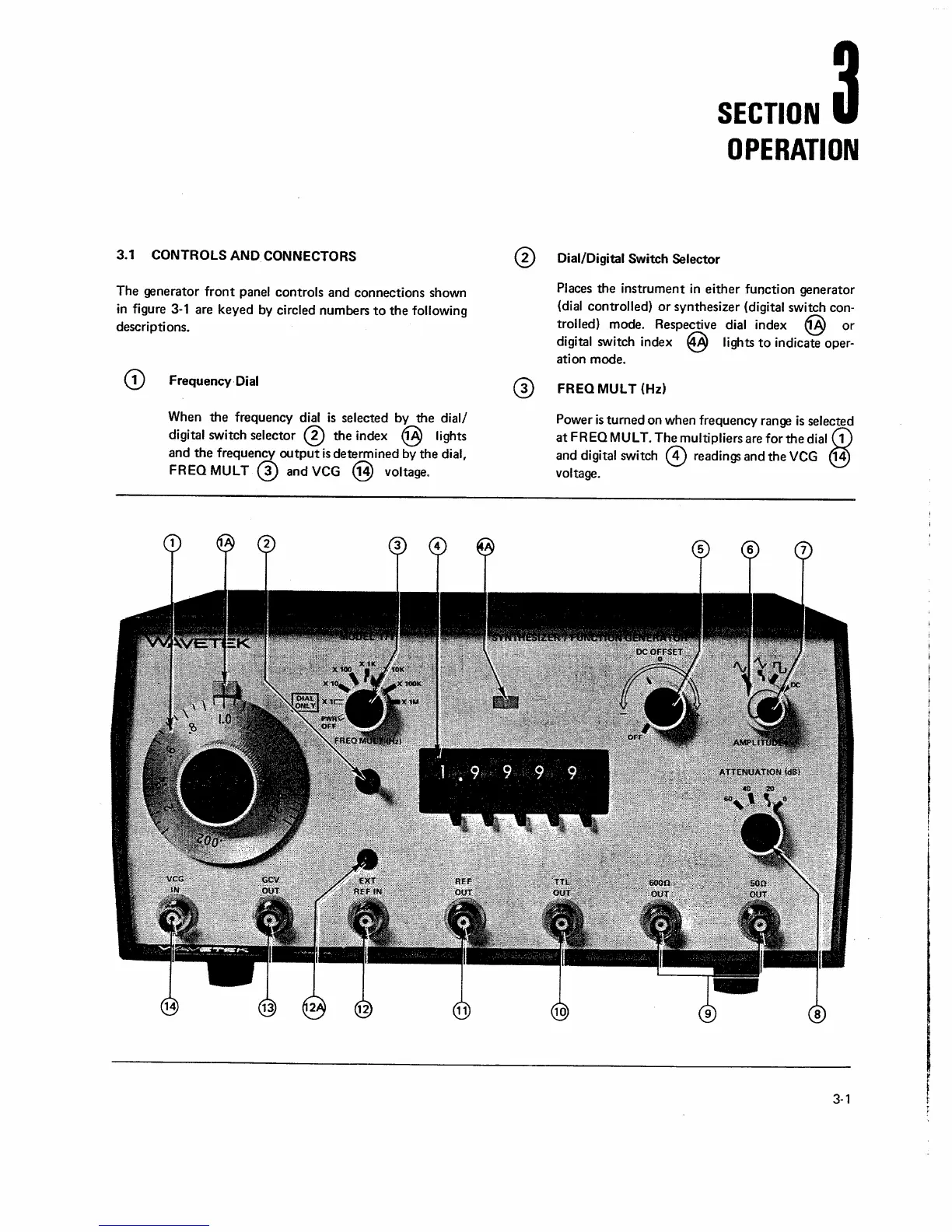
The generator
front
panel controls and connections shown
in
figure
3-1
are keyed by circled numbers
to
the
following
descriptions.
Frequency
Dial
When
the
frequency dial
is
selected by
the
dial/
digital switch
selector
@
the
index
@
lights
and
the
frequency
output
is
determined by
the
dial,
FREQ
MUL
T
@
and VCG
@
voltage.
SECTION
3
OPERATION
@
Dial/Digital Switch Selector
Places
the
instrument
in
either
function generator
(dial controlled)
or
synthesizer (digital switch
con-
trolled) mode. Respective dial index
@
or
digital switch index
@
lights
to
indicate oper-
ation mode.
@
FREQ
MUL
T (Hz)
Power
is
turned on when frequency range
is
selected
at
FREQ
MULT.
The
multipliers are for
the
dial
G)
and digital switch
@
readings and
the
VCG
@
voltage.
3-1

Other manuals for Wavetek 171