EasyManua.ls Logo

Wavetek 171 - Page 9

Default Icon
43 pages
Print Icon
To Next Page IconTo Next Page
To Previous Page IconTo Previous Page
Loading...
Step
2
3
2
3
4
s
2
3
4
5
6
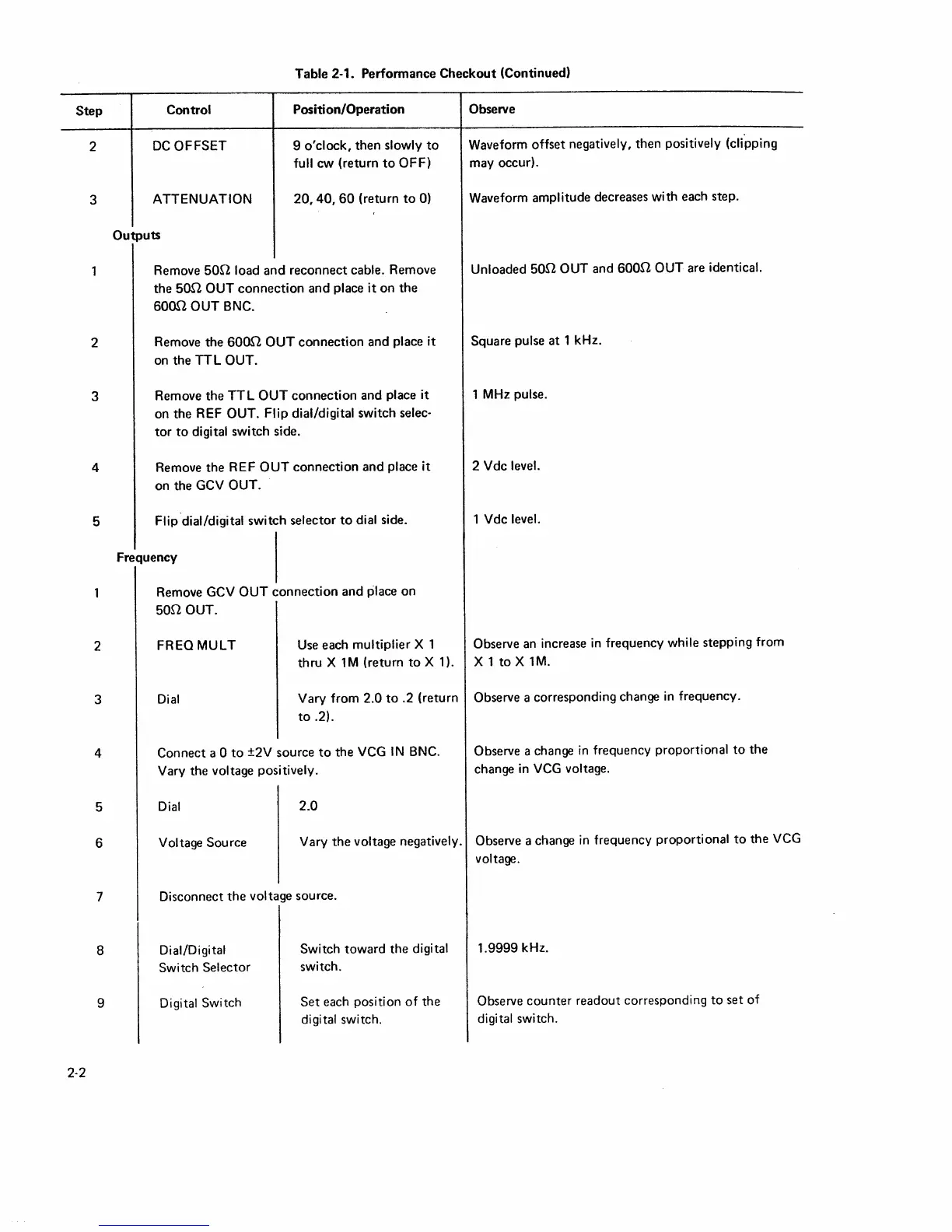
Table 2-1. Performance Checkout (Continued)
Control
DC
OFFSET
ATTENUATION
Outputs
Position/Operation
9
o'clock,
then
slowly
to
full
cw
(return
to
OFF)
20,
40,
60
(return
to
0)
Remove
son
load
and
reconnect
cable.
Remove
the
SOO
OUT
connection
and
place
it
on
the
6000
OUT
BNC.
Remove the
6000
OUT
connection
and
place
it
on
the
TTL
OUT.
Remove
the
TTL
OUT
connection
and
place
it
on
the
REF
OUT. Flip dial/digital
switch selec-
tor
to
digital switch side.
Remove
the
REF
OUT
connection
and
place
it
on the GCV
OUT.
Flip.dial/digital
switch
selector
to
dial
side.
Frequency
Remove GCV
OUT
connection
and
place
on
son
OUT.
FREOMULT
Dial
Use
each
multiplier
X 1
thru
X 1 M
(return
to
X 1
).
Vary from
2.0
to
.2 (return
to
.2).
Connect a
0
to
±2V source
to
the
VCG
IN
BNC.
Vary the
voltage positively.
Dial
2.0
Observe
Waveform offset negatively, then
positively (clipping
may occur).
Waveform
amplitude
decreases with each step.
Unloaded
son
OUT and
600n
OUT
are identical.
Square pulse
at
1
kHz.
1
MHz
pulse.
2 Vdc level.
1
Vdc level.
Observe an increase
in
frequency
while
stepping from
X 1
to
X 1M.
Observe a corresponding change
in
frequency.
Observe
a change
in
frequency proportional
to
the
change in
VCG
voltage.
Voltage Source
Vary
the
voltage negatively.
Observe a change
in
frequency proportional
to
the
VCG
voltage.
7
Disconnect
the
voltage
source.
8
9
2·2
Dial/Digital
Switch Selector
Digital Switch
Switch
toward
the
digital
switch.
Set
each position
of
the
digital
switch.
1.9999 kHz.
Observe
counter
readout corresponding
to
set
of
digital
switch.

Other manuals for Wavetek 171