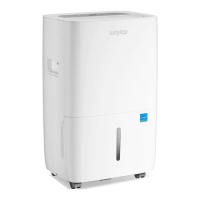
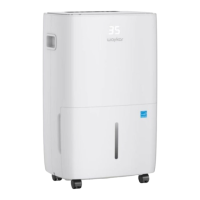
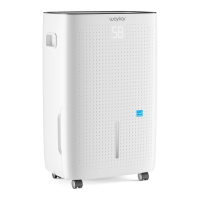
The Waykar PD606B Commercial Dehumidifier is a robust appliance designed to effectively reduce room humidity, contributing to a healthier and more comfortable living or working environment. It is suitable for a variety of settings, including family bedrooms, bathrooms, basements, offices, and storage rooms.
Function Description
The primary function of the Waykar PD606B is to remove excess moisture from the air. It operates by drawing in humid air, passing it over a cold coil where moisture condenses, and then releasing drier air back into the room. The collected water can be either manually emptied from a water tank or continuously drained through a hose. The unit features an intelligent dehumidifier control panel with an LED display, allowing users to monitor and adjust settings such as humidity levels and timer functions.
Key operational features include:
- Power off Memory Function: The device automatically resumes its working status before power off, ensuring continuous operation without needing to reset settings after a power interruption.
- Defrost Function: When operating in lower temperatures, the system automatically detects the presence of frost. If frost exists, it will defrost automatically to maintain efficiency. The compressor will stop when defrosting, and resume once the process is complete.
- Temperature Protection Function: The dehumidifier is equipped with temperature protection. If the ambient temperature is higher than 113°F (45°C), the system will enter high temperature protection, indicated by "HH" on the display, and the compressor will stop. Conversely, if the ambient temperature is lower than 39°F (4°C), the system will enter low temperature protection, indicated by "LL", and the whole machine will stop.
- Cleaning Remind Function: After approximately 30 days of continuous operation, the machine will display a cleaning reminder, prompting the user to clean the filter.
- Special Note: To prevent damage to the dehumidifier, the compressor features a 3-minute delay protection function, meaning the compressor will only start again 3 minutes after its last shutdown.
Important Technical Specifications
The Waykar PD606B is a powerful commercial dehumidifier with the following specifications:
- Model: D606B
- Power Source: 120V-60Hz
- Rated Power: 1000W
- Rated Current: 8.8A
- Moisture Removal Capacity:
- 65°F/60%RH: 47 Pints/Day
- 80°F/60%RH: 75 Pints/Day
- 86°F/80%RH: 126 Pints/Day
- 95°F/90%RH: 155 Pints/Day
- Input Power (65°F/60%RH): 515W
- Input Current (65°F/60%RH): 4.6A
- IEF (65°F/60%RH): 1.80liters/kWh
- Motor FLA: 0.85A
- Motor Compressor: RLA: 10A, LRA: 30A
- Refrigerant: R410A/450g (15.87ozs)
- Maximum Allowable Pressure: 5.5MPa
- Maximum Operating Pressure High: 4.0MPa
- Maximum Operating Pressure Low: 1.7MPa
Usage Features
The dehumidifier is designed for user-friendly operation with a clear control interface.
- Control Panel: The LED display panel shows current humidity, temperature, and various status indicators such as "Running," "Defrost," "Wet Controller," and "Water Full."
- Button Instructions:
- Power Button: Turns the machine on or off.
- Up/Down Buttons: Adjust the desired humidity setting (between 10%-98%RH) or timer settings.
- Function Button: Confirms settings and allows navigation through different functions.
- Timer Button: Initiates the auto-start or auto-stop feature, allowing users to set a time for the machine to turn off or on within a 1-24 hour window.
- Setting Humidity: Users can set the desired humidity level. The machine will automatically detect and display the room's humidity. The "Up" or "Down" buttons change the humidity selection by 1%RH decrement. The big number "88" will flash to show the setting value during this process.
- Timing Setting: The timer function allows for scheduled operation. Long pressing the "Timing" button enters the timer setting status, with the timer icon and "h" lighting up. The small number will flash, allowing adjustment of the timer in 1-24 hour increments.
- Emptying the Water Tank: When the water tank is full, the "WATER FULL" indicator will light up. The tank can be easily removed by pressing two hand buttons, pulled out, emptied, and then reinserted.
- Continuous Drainage: For extended operation without manual emptying, a continuous drainage port is available. The outlet of the water hose should be lower than the continuous drainage port by more than 6 inches to ensure proper flow. The diameter of the continuous drainage port is 0.63 inches.
Maintenance Features
Regular maintenance ensures the longevity and efficient operation of the dehumidifier.
- Before First Use: To prevent internal damage, it is crucial to leave the dehumidifier standing upright and outside its box for 24 hours before plugging it in, especially for refrigeration units.
- Cleaning the Dehumidifier Body: The exterior of the unit can be cleaned with a soft and slightly wet textile or cloth.
- Cleaning the Filter: The filter should be regularly cleaned. To do this, pull out the filter, use a vacuum cleaner to gently remove dust, or wash it with warm water and mild detergent if it's very dirty. Ensure the filter is completely dry before re-inserting it into the machine.
- Dehumidifier Storage: When storing the dehumidifier for a long period, empty the water tank, roll up the power cord, clean the filter, and place the machine in a cool and dry environment.
Safety Instructions and Notes
The manual emphasizes several safety precautions:
- Always read the manual carefully before use.
- Ensure the voltage is within the range of the label.
- Do not use the dehumidifier in applications for which it is not specified.
- Do not insert fingers or other objects into the air outlet.
- This appliance should not be used under environments below 41°F (5°C).
- The unit should be operated between 41°F (5°C) and 100°F (38°C).
- The installation and use of this machine must be in accordance with local regulations and rules.
- Consult professionals for any questions about installation.
- Always pull the plug to disconnect power, not the cable.
- Keep the machine in places not accessible to children.
- Never soak the machine in water or spray water on it when cleaning.
- Ensure the extension cable can connect with power and that no proper sockets are available.
- Report any damage to the power wire to the manufacturer or qualified staff.
- Do not place the device close to fire, heat, or devices that produce heat.
- Do not use the machine in direct sunlight, wind, or rain.
- Do not use the machine in areas affected by chemicals, medicine, or scent.
- Ensure the drainage hose is properly placed to prevent water leakage.
- Do not repair, disassemble, or modify the machine yourself.
- Always apply proper power switch.
- Connect the power cable with the switch securely.
- Do not pull the power cable to stop the operation of the machine.
Troubleshooting
The manual provides a comprehensive troubleshooting guide for common faults and solutions, including issues like the unit not powering on, water tank not in proper position, room temperature being too high or low, poor dehumidification efficiency, and loud noise during operation. For persistent issues, customers are advised to contact Waykar Customer Service at support@waykar.com.
Warranty and Customer Support
Waykar offers a 12-month warranty covering defects in materials and workmanship. The warranty does not cover normal wear and tear, abuse, mishandling, accidents, exposure to liquid or infiltration of foreign particles, or servicing/modification by unauthorized parties. Customers can extend their warranty to 1 year by registering their product online. Customer support is available via email at support@waykar.com or through their website www.waykar.com. Live chat and 24-hour support are also available.

 Need help?
 General

 To Next Page