QUICKSTART | BASIC USAGE
3
1 - Placement. Find a flat, dry counter space with access
to a power outlet. The KEY is made to be usable in 100v -
240v regions without the need for a separate
transformer. It uses a C13 style cable (like a computer
does) that can be purchased locally as needed.
2 - Remove from box. Using both hands, carefully pull the
KEY strai ght out of the packaging. Use caution - it's heavy.
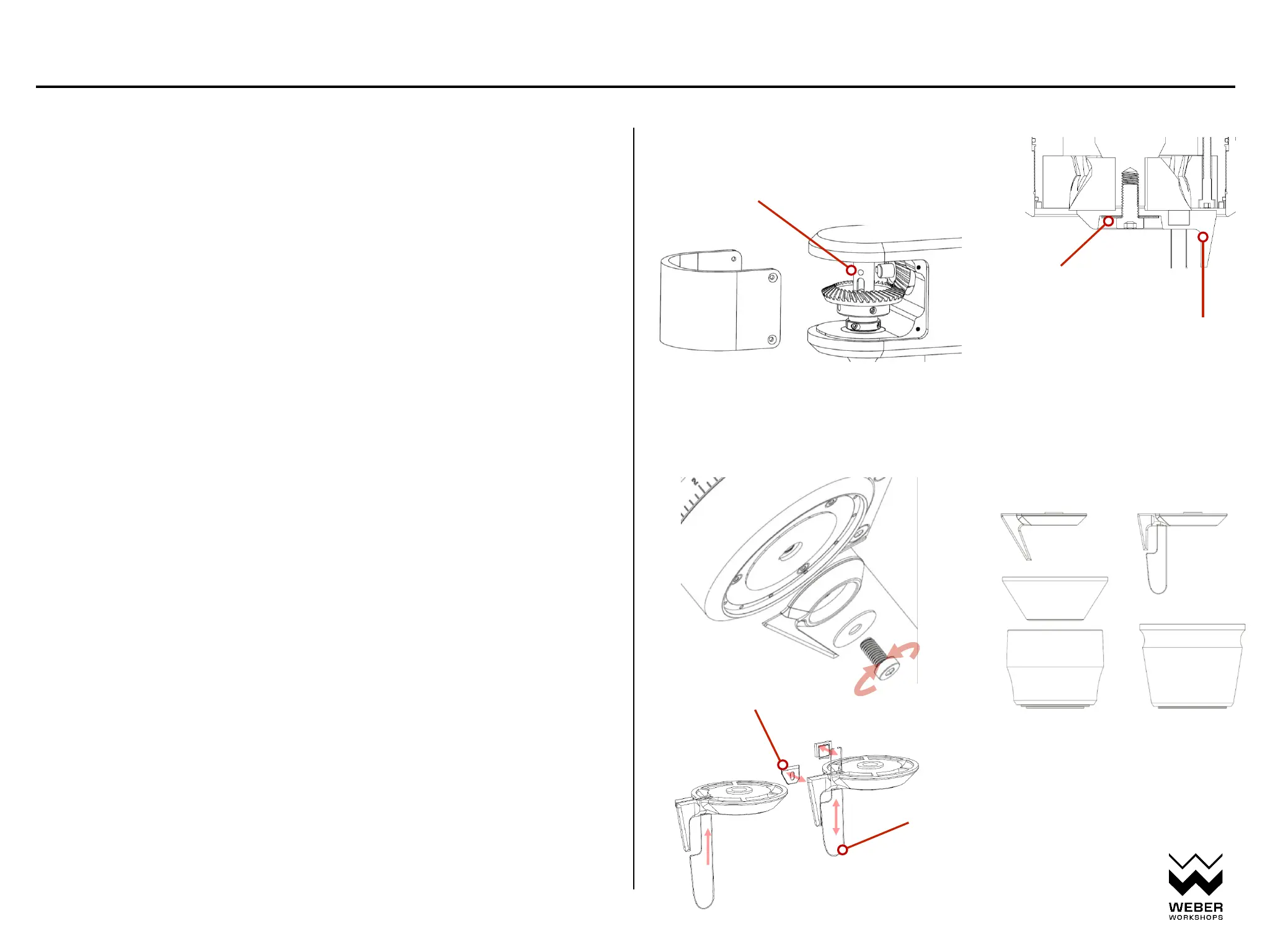
3 - Attach Magic/Static wiper. Lay the grinder on its side
on a clean towel or cloth. Use t he included 5mm hex key to
remove the screw holding the lower axle cap in place.
Remove t he axle cap and store for safekeepi ng. You ma y
need to dump some coffee beans into the funnel and use a
rubber glove to hold t he shaft securel y enough to remove
the screw (tapping the end of the allen key abruptl y wil l
also help). Re-use the screw and thread it through the
washer and wiper; then using the 5mm hex key, securely
tighte n the screw.
If the bottom bolt is stuck and cannot be
removed (the shaft turns with it), you can
remove the gearbox cover and place a metal
rod (or Allen key) through the hole in the
shaft to lock it in place.
the magic wiper has a replaceable stirring
rod in case it gets bent or damaged. Push
out the insert block on backside of wiper
(needs to be removed from machine) to
swap the stirring attachment.
Choose magic tumbler or standard tumbler wiper
STANDARD MAGIC
release
tighten
WARNING: Shut down mains power before removing gearbox cover.
The gears can be a pinch-point for fingers when e xposed.
standard or magic wiper
IMPORTANT! metal washer
swapable shim sticker
Copyright 2023 Weber Workshops, manual version Mk ii


 To Next Page