• Nearobjectsaroundwhichthelinecan
wrapsuchassmallposts,trees or fence
wi_e.
• For mowingorsweep[ng, usefullthrotfiefor
a good clean job.
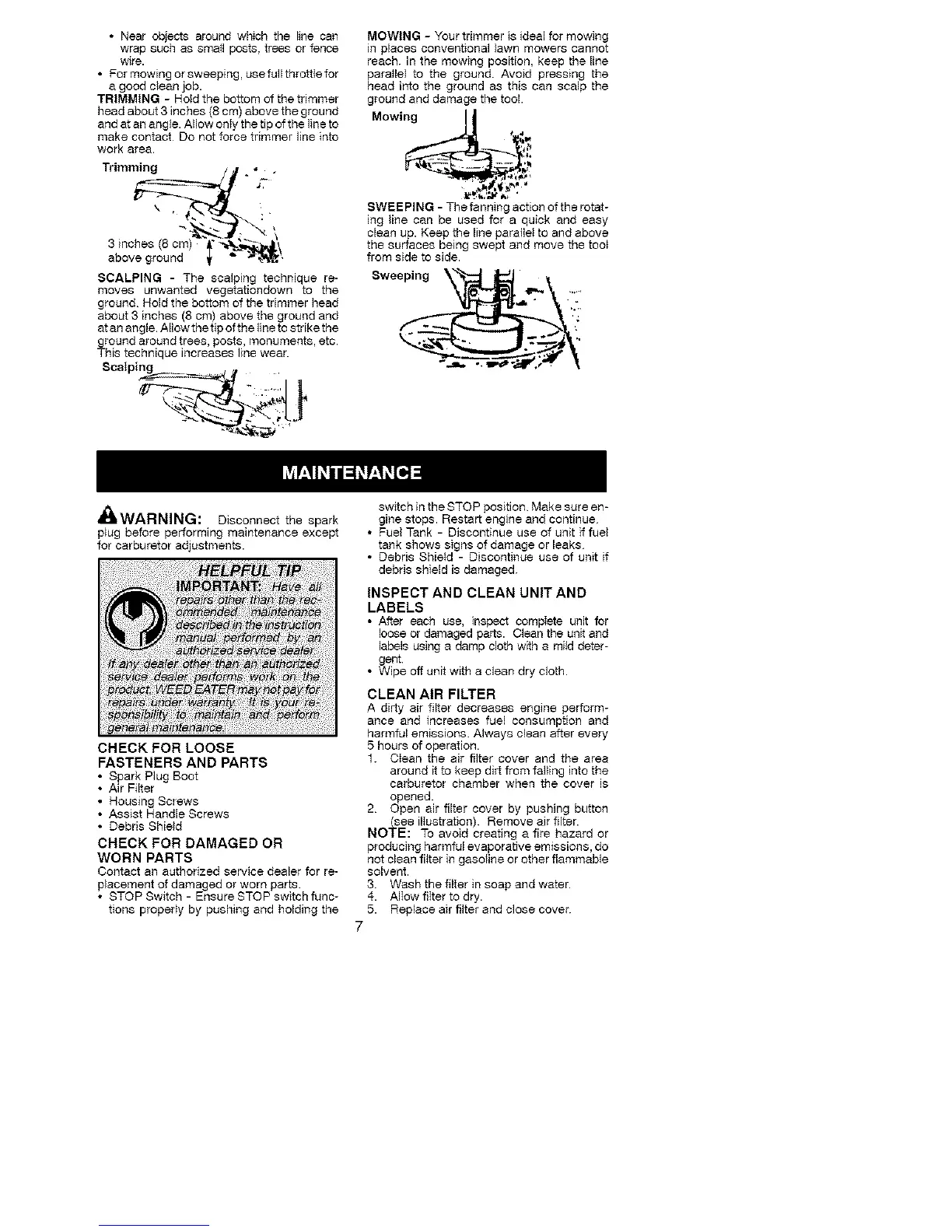
TRIMMING -HoId the bottom of the trimmer
head about 3 inches (8 cm) above the ground
and at an angle. AHow onty the tip of the line to
make contact Do not force trimmer line into
work area.
Trimming / • _"
3 inches (8 cm) "_,"_-_.'_\
above ground _, _" _-_',
SCALPING - The scalping technique re-
moves unwanted vegetafiondown to the
ground Hold the bottom of the trimmer head
about 3 inches (8 cm) above the ground and
atan angle. A[Iowthetip of the lineto strike the
ground around trees, posts, monuments, etc.
This technique increases line wear.
Scalping
Jt
MOWING - Your trimmer is ideal for mowing
in places conventional lawn mowers cannot
reach. In the mowing position, keep the line
para}lel to the ground. Avoid pressing the
head into the ground as this can scalp the
ground and damage the tool.
Mowin_
SWEEPING - The fanning action of the rotat-
ing line can be used for a quick and easy
clean up. Keep the line parallel to and above
the surfaces being swept and move the too_
from side to side.
Sweeping_
•iii:
dmWARNING: Disconnect the spark
p}ug before performing maintenance except
for carburetor adjustments.
CHECK FOR LOOSE
FASTENERS AND PARTS
• Spark Plug Boot
• Air Filter
• Housing Screws
• Assist Handle Screws
• Debris Shield
CHECK FOR DAMAGED OR
WORN PARTS
Contact an authorized service dealer for re-
placement of damaged or worn parts
• STOP Switch - Ensure STOP switch func-
tions propedy by pushing and holding the
switch in the STOP position Make sure en-
gine stops. Restart engine and continue
• Fuel Tank - Discontinue use of unit if fuel
tank shows signs of damage or leaks
• Debris Shietd - Discontinue use of unit if
debris shield is damaged
INSPECT AND CLEAN UNIT AND
LABELS
• After each use, inspect compIete unit for
loose or damaged parts. Clean the unit and
labels using a damp cloth w_h a mild deter-
gent.
• Wipe off unit with a clean dry cloth.
CLEAN AIR FILTER
A dirty air filter decreases engine perform-
ance and increases fuel consumption and
harmful emissions. Always clean after every
5 hours of operation.
1. CIean the air filter cover and the area
around it to keep dirt from faliing into the
carburetor chamber when the cover is
opened.
2 Open air filter cover by pushing button
(see ilIustraben). Remove air filter.
NOTE: To avoid creating a fire hazard or
producing harmful evaporative emissions, do
not clean fi{ter in gasotine or other flammable
solvent.
3 Wash the filter in soap and water.
4. AlIow fiIter to dry.
5. Replace air filter and close cover.



 To Next Page