10 iPump Quick Start Guide
800009-02 Rev.B
Press Display / Field Details Screen Type
k)
RF-MOD/FEC RATIO:
QPSK 3/4
User Input -
Selectable
RF modulation is QPSK.
Available forward error
correction ratios are 1/2, 2/3,
3/4, 5/6, and 7/8.
l)
PROGRAM NUMBER:
00001
User Input -
Editable
Number of program to select
from stream.
m)
TAG SITE:
<Unused>
n)
SAVE ALL CHANGES?
YES<ENT> NO<ESC>
User Input -
Selectable
Press
ENTER
to save or
ESC
to cancel all RF Setup changes.
If you are satisfied with all data entered, press
ENTER
to save
your changes. Pressing either
ENTER
or
ESC
(which cancels all
changes) completes your RF setup and returns you to the Current
Channel screen. If all settings are correct and the red
ALARM
LED remains lit, there may be a problem with the antenna, its
position, or cable connections. Consult the iPump Reference
Manual for more troubleshooting help.
7
77
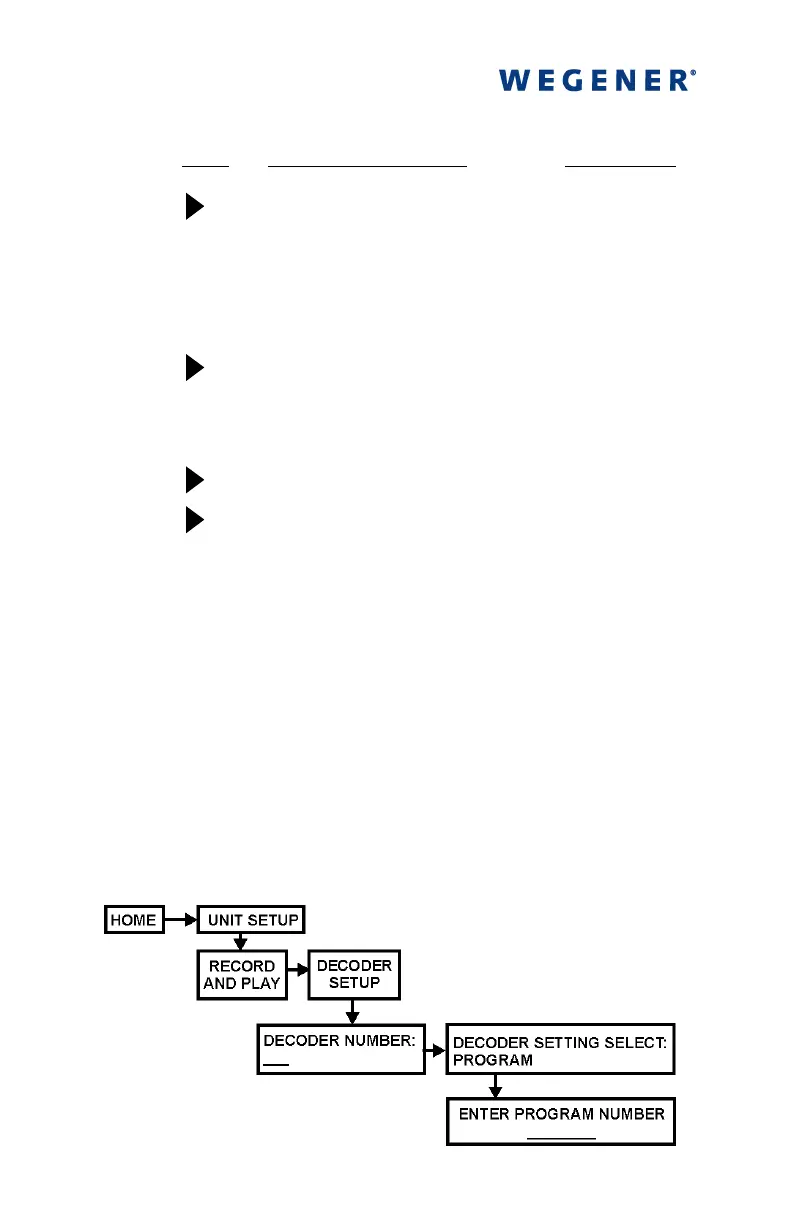
7 To configure your iPump's decoder output,
To configure your iPump's decoder output,To configure your iPump's decoder output,
To configure your iPump's decoder output,
navigate from the Home screen to the Decoder Setup screen as
follows:



 To Next Page