EasyManua.ls Logo

Weider 8925 - Page 18

Weider 8925
32 pages
Print Icon
To Next Page IconTo Next Page
To Previous Page IconTo Previous Page
Loading...
_
46;
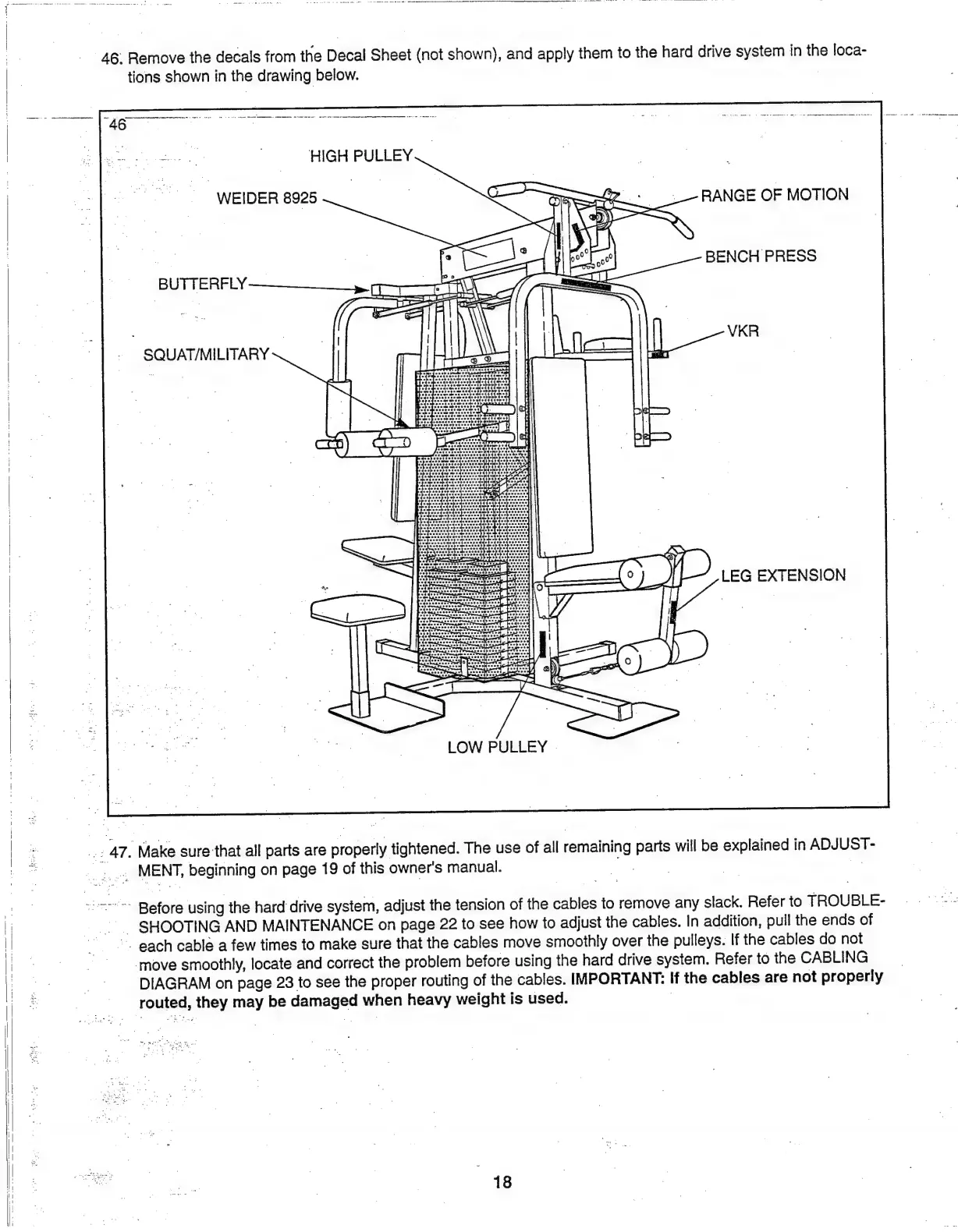
Remove
the
decals
from
the
Decal
Sheet
(not
shown),
and
apply
them
to
the
hard
drive
system
in
the
loca-
tions
shown
in
the
drawing
below.
46
аманы
HIGH
PULLEY
|.
WEIDER
8925
RANGE
OF
MOTION
|
|
z
BENCH
PRESS
BUTTERFLY.
|
|
VKR
SQUAT/MILITARY
T
247.
Make
sure
that
all
parts
are
properly
tightened.
The
use
of
all
remaining
parts
will
be
explained
in
ADJUST-
222
MENT,
beginning
on
page
19
of
this
owner's
manual.
ту
Before
using
the
hard
drive
system,
adjust
the
tension
of
the
cables
to
remove
any
slack.
Refer
to
TROUBLE-
25
SHOOTING
AND
MAINTENANCE
on
page
22
to
see
how
to
adjust
the
cables.
In
addition,
pull
the
ends
of
©.
each
cable
a
few
times
to
make
sure
that
the
cables
move
smoothly
over
the
pulleys.
If
the
cables
do
not
move
smoothly,
locate
and
correct
the
problem
before
using
the
hard
drive
system.
Refer
to
the
CABLING
DIAGRAM
on
page
23
to
see
the
proper
routing
of
the
cables.
IMPORTANT:
If
the
cables
are
not
properly
routed,
they
may
be
damaged
when
heavy
weight
is
used.
|

Related product manuals