7
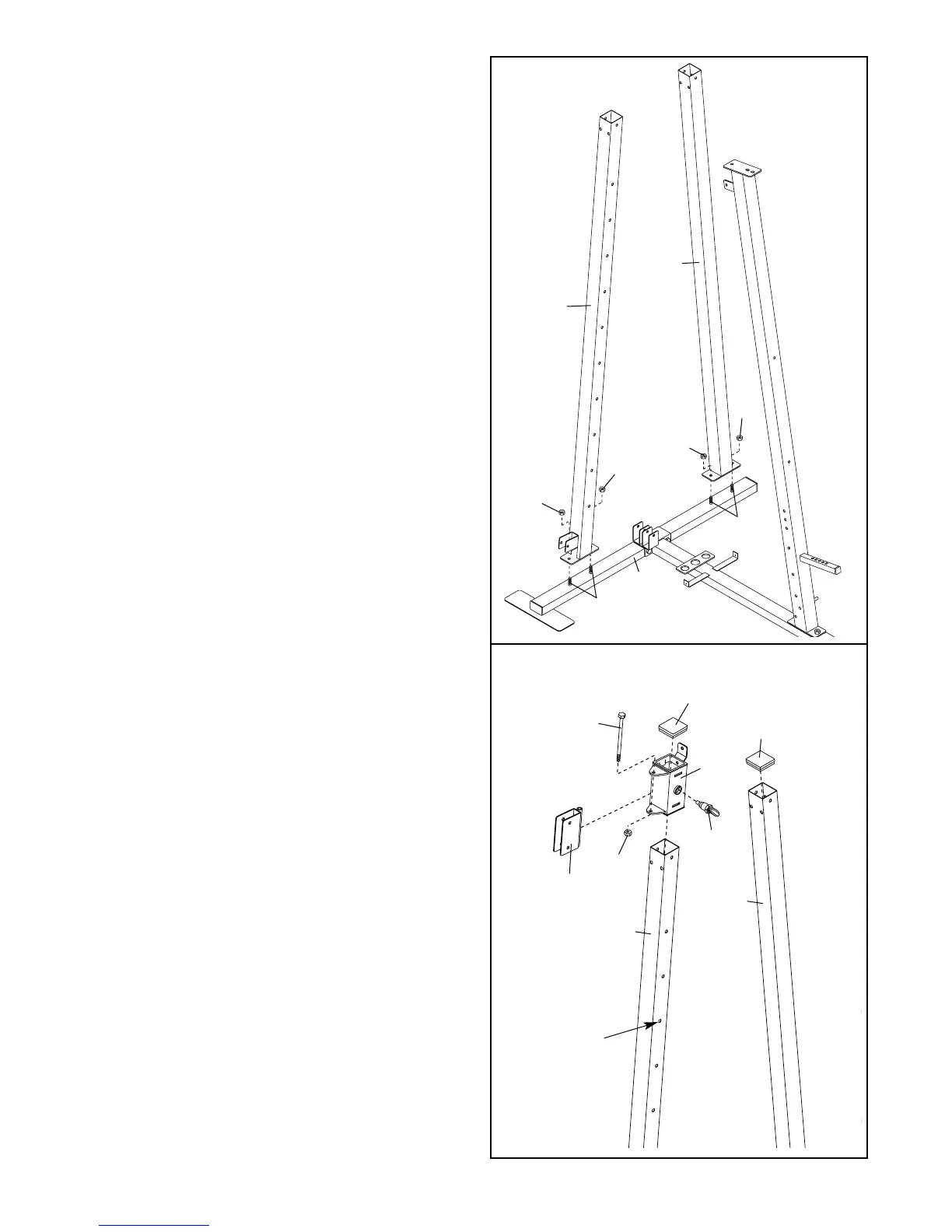
3. Attach the Support Upright (88) to the Stabiliser
(5) with the indicated two M10 x 55mm Carriage
Bolts (1) and two M10 Nylon Locknuts (21). Make
sure the Support Upright leans toward the
center of the Stabiliser.
Attach the Carriage Upright (84) to the Stabiliser
(5) with the indicated two M10 x 55mm Carriage
Bolts (1) and two M10 Nylon Locknuts (21).
Do not tighten the M10 Nylon Locknuts (21)
yet.
4. Turn the Carriage Knob (73) counter clockwise
and pull it out as far as it will go. Slide the
Carriage (89) onto the Carriage Upright (84) and
engage the Knob into one of the adjustment holes
in the Upright. Fully tighten the Knob. Make sure
the Carriage is oriented as shown. Be careful
not to scratch the decals on the Upright as
you slide the Carriage over them.
Attach the Swivel Bracket (81) to the Carriage
(89) with an M10 x 155mm Bolt (60) and an M10
Nylon Locknut (21). Do not overtighten the M10
Nylon Locknuts; the Swivel Bracket must be
able to pivot easily.
Press two 60mm Square Inner Caps (101) into
the top of the Carriage Upright (84) and the
Support Upright (88).
3
84
88
21
21
21
21
1
5
1
81
4
21
89
60
84
Adjustment
Hole
88
73
101
101




 To Next Page