8
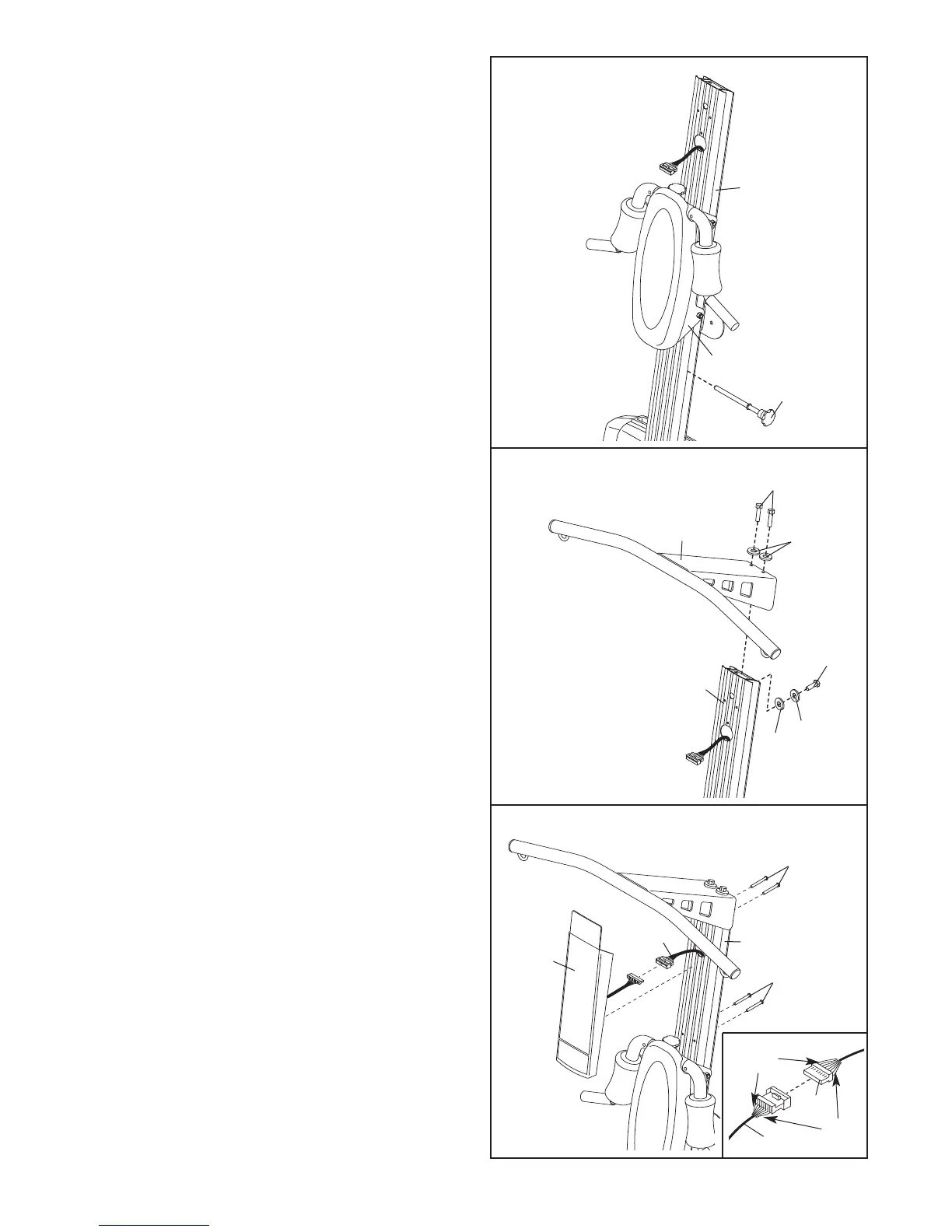
6. Attach the Top Frame (37) to the Upright (2) with
two M10 x 25mm Button Screws (88), an M10 x
75mm Button Screw (84), three M10 Lock
Washers (75), and an M10 Washer (106).
6
75
106
84
2
75
88
37
5. Insert the Squat Pin (66) into the Upright (2).
S
lide the Squat Carriage (19) onto the Upright (2).
5
19
2
66
7. Pull the excess Upper Wire Harness (71) out of
the Upright (2). Insert the connector on the
Console (67) into the socket on the Upper W
ire
Harness. The connector should slide easily into
the socket and snap into place.
If the connector
does not slide easily and snap into place, turn it
over and then insert it.
Make sure that the connector and wires appear
as shown in the inset drawing. IF THE CONNEC-
TOR IS NOT INSERTED PROPERLY, THE CON-
SOLE MAY BE DAMAGED WHEN THE POWER
IS TURNED ON.
Push the excess Upper Wire Harness (71) into
the Upright (2).
Attach the Console (67) to the Upright (2) with
four M4 x 70mm Screws (53).
7
53
71
67
2
53
71
67
Black
W
ire
Red
Wire









 To Next Page