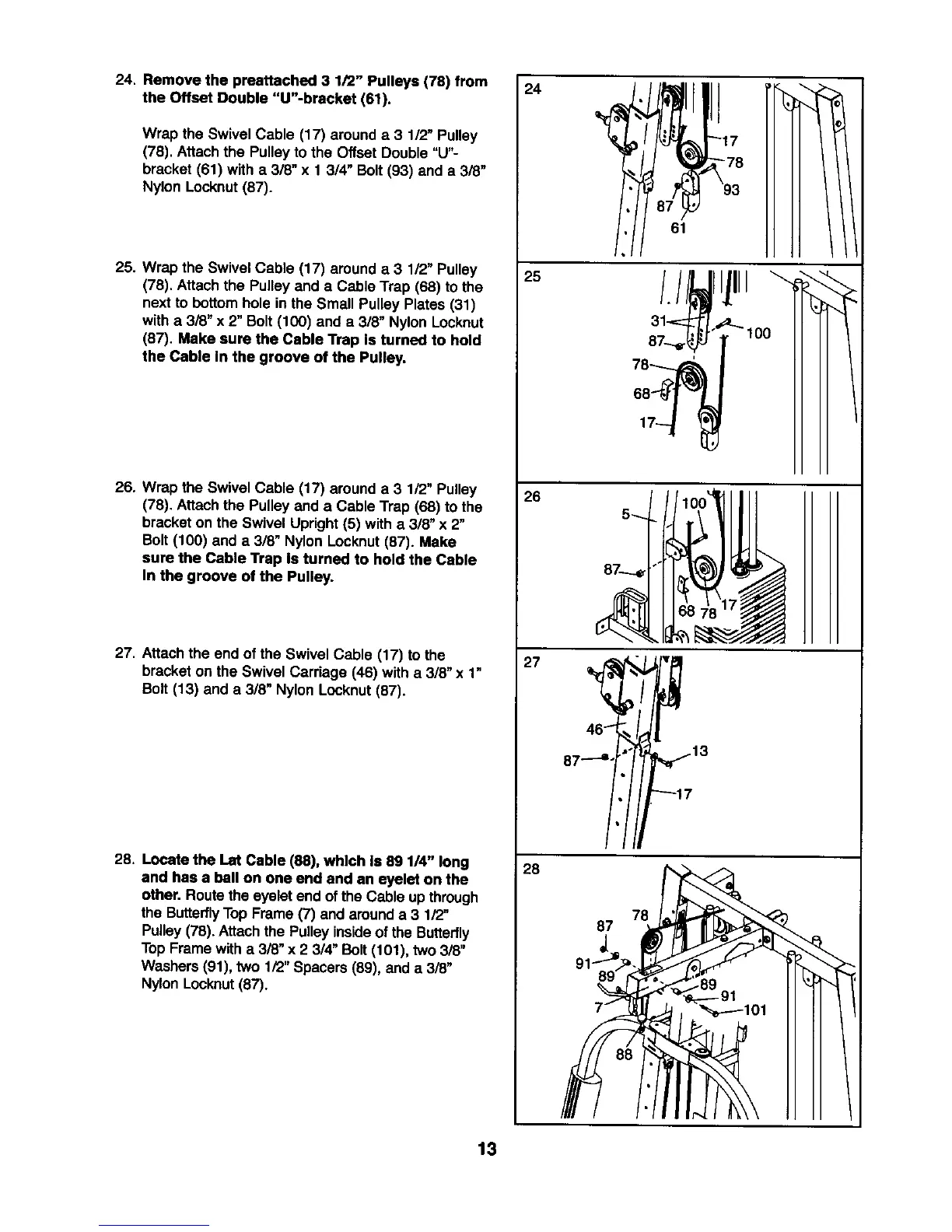
24. Remove the preettached 3 1/2" Pulleys (78) from
the Offset Double "U"-bracket (61).
Wrap the Swivel Cable (17) around a 3 1/2" Pulley
(78). Attach the Pulleyto the Offset Double "U"-
bracket (61) with a 3/6" x 1 3/4" Bolt (93) and a 3/8"
Nylon Locknut(87).
25. Wrap the Swivel Cable (17) arounda 3 112"Pulley
(78). Attach the Pulleyand a Cable Trap (68) to the
nextto bottom hole in the Small Pulley Plates (31)
with a 3/8" x 2" Bolt (100) and a 318"Nylon Locknut
(87). Make sure the Cable Trap Is turned to hold
the Cable In the groove of the Pulley.
26. Wrap the Swivel Cable (17) around a 3 1/2" Pulley
(78). Attach the Pulley and a Cable Trap (68) to the
bracket on the Swivel Upright (5) with a 3/8" x 2"
Bolt(100) and a 3/8" Nylon Locknut(87). Make
sure the Cable Trap is turned to hold the Cable
In the groove of the Pulley.
27. Attachthe end of the Swivel Cable (17) to the
bracket on the Swivel Carriage (46) with a 3/8" x 1"
Bolt (13) and a 3/8" Nylon Locknut(87).
28. Locate the Let Cable (88), which Is 89 1/4" long
and has a ball on one end and an eyelet on the
other. Routethe eyelet end of the Cable upthrough
the ButterflyTop Frame (7) and arounda 3 1/2"
Pulley(78). Attach the Pulleyinsideof the Butterfly
Top Frame witha 3/8" x 2 3/4" Bolt (101), two 3/8"
Washers (91), two 1/2"Spacers (89), and a 3/8"
NylonLocknut(87).
24
25
26
27
28
61
87 _r_13
_17
13










 To Next Page