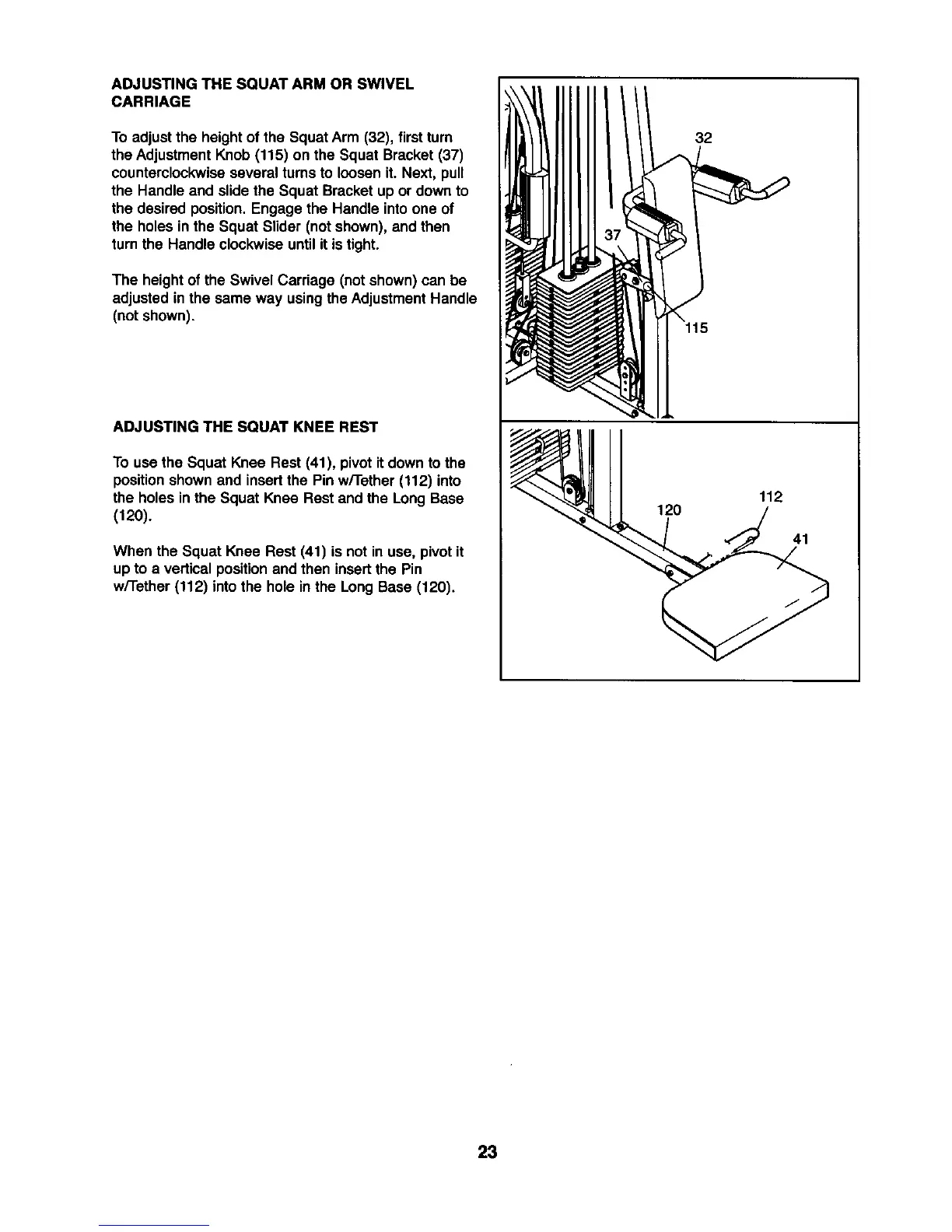
ADJUSTING THE SQUAT ARM OR SWIVEL
CARRIAGE
To adjustthe heightof the SquatArm (32), first turn
the AdjustmentKnob (115) on the Squat Bracket(37)
counterclockwiseseveral turns to loosen it. Next, pull
the Handle and slide the Squat Bracket up or down to
the desired position.Engage the Handle into one of
the holes in the Squat Slider (not shown), and then
turnthe Handle clockwise untilit istight.
The heightof the Swivel Carriage (not shown) can be
adjusted in the same way using theAdjustmentHandle
(not shown).
ADJUSTING THE SQUAT KNEE REST
To usethe Squat Knee Rest (41), pivot it down tothe
positionshownand insert the Pin w/Tether (112) into
the holes inthe Squat Knee Rest and the LongBase
(120).
When the Squat Knee Rest (41) is not in use, pivotit
up to a verticalpositionand then insertthe Pin
w/Tether (112) into the hole in the LongBase (120).
32
115
120
112
41
23









 To Next Page