48
June, 2016
TEMPERATURE CONTROLS
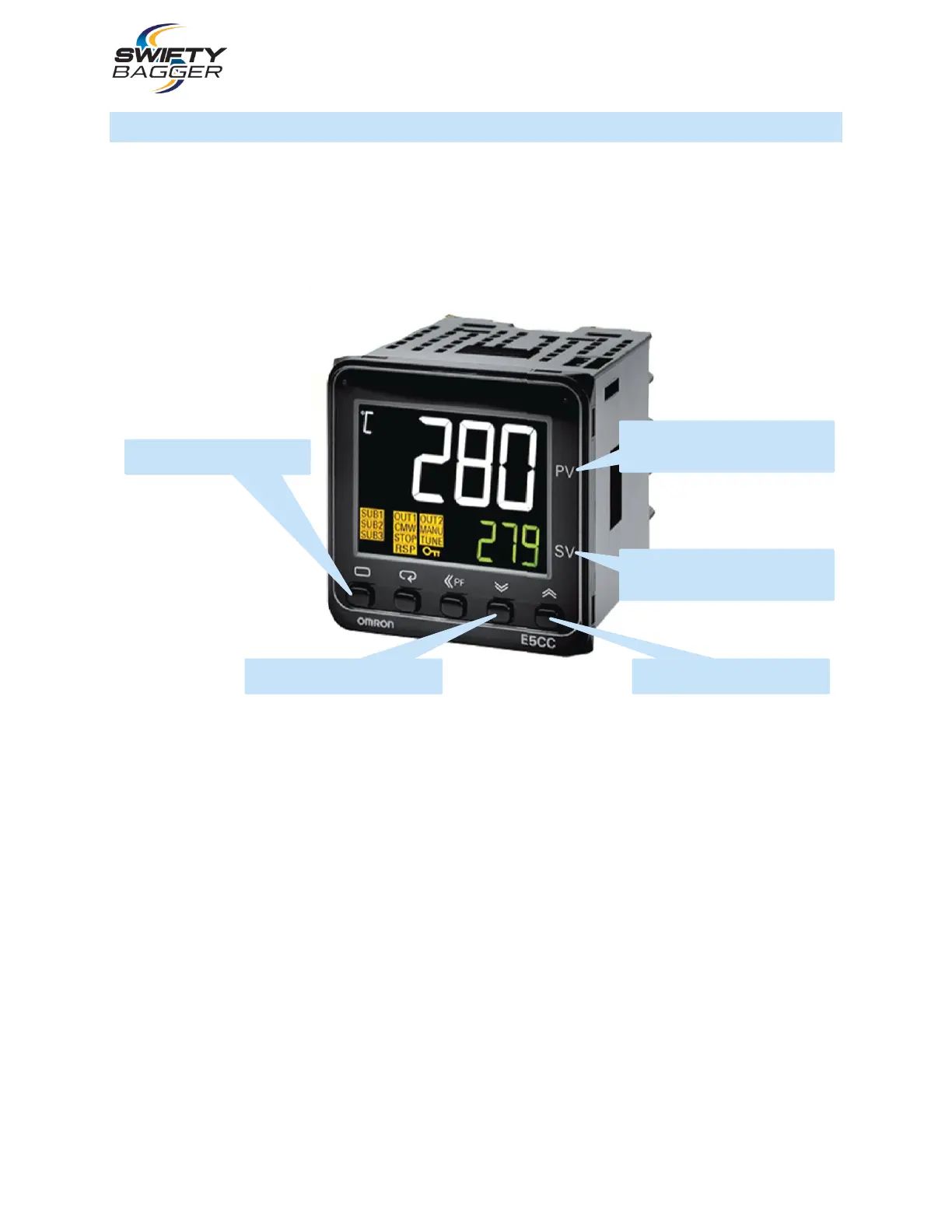
The Temperature Controls are located below the H.M.I. Touch Screen; the operator will note that there
are two controllers in this location. These controls are responsible for the temperature of the Hot Jaws in
the Heat Seal and Quench Station.
The Temperature Control screens on the left hand side of the Control Box is responsible for the front jaw
whereas the temperature control screen on the right hand side is responsible for the rear jaw
1. Turn On Heater - Press the toggle button and then press the arrow down button which will display
RUN and the heater will now be activated, press the toggle button a second time to return to the run
screen. “Out” will flash confirming the heater is now on, and heater temperature will begin to rise.
2. Turn Off Heater – Press the toggle button and the press the arrow up button. The display will now
read STOP, press the toggle button a second time to return to the run screen “stop” will flash
confirming the heater is now off and the temperature will begin to decrease.
3. Use the up and down arrow keys to raise or lower the set temperature.
PRESENT VALUE
(CURRENT TEMPERATURE)
(
SET VALUE
(TEMP. SET BY OPERATOR)
(



 To Next Page