53
June, 2016
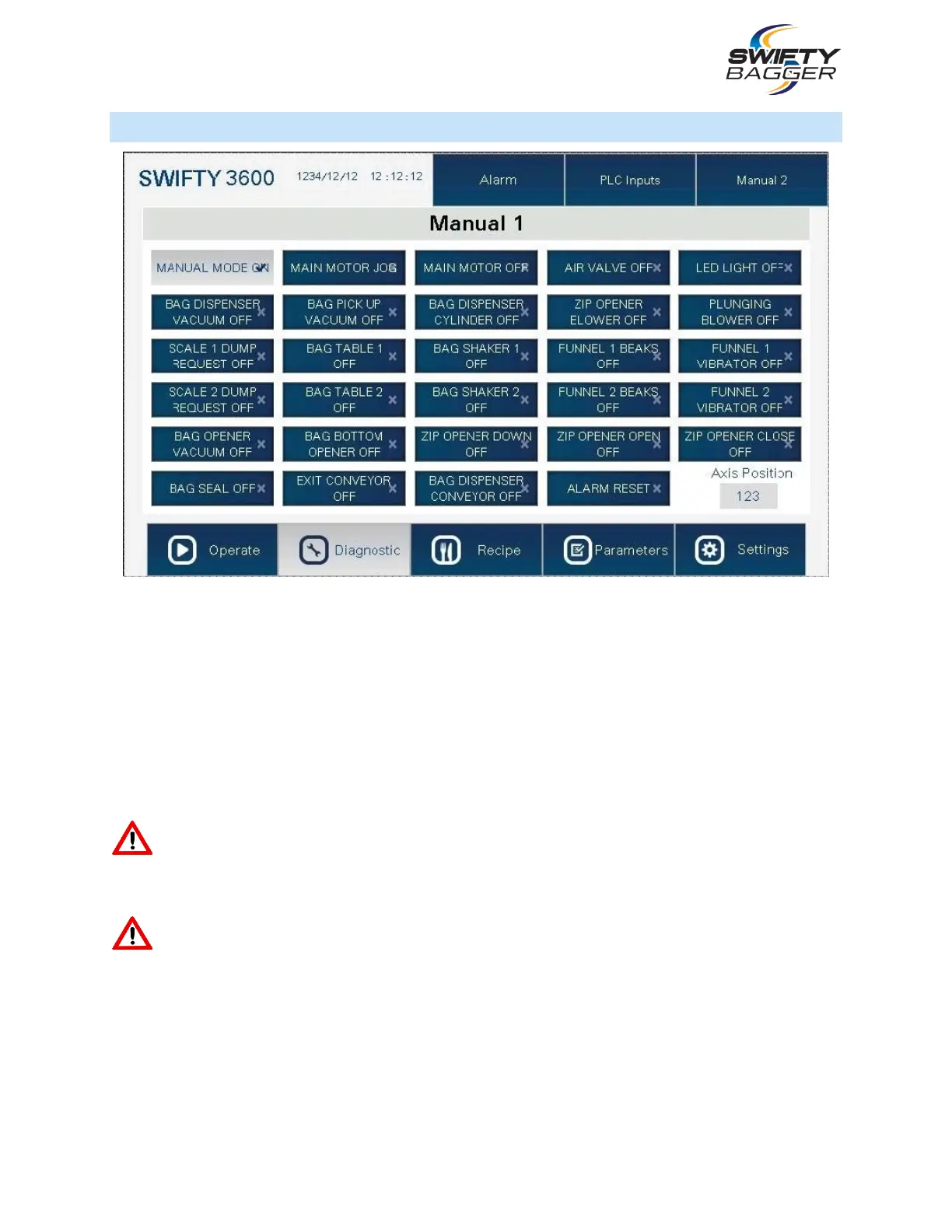
DIAGNOSTIC SCREEN
ALARM: Pressing the Alarm button will display the Alarm Screen, containing all alarm history for the
machine.
P.L.C. INPUTS: Pressing the P.L.C. Inputs button will display the P.L.C. Inputs 1 Screen, which contains
a list of P.L.C. inputs and access to other Screens displaying more P.L.C. inputs.
MANUAL 2: Pressing the Manual 2 button will display the Manual 2 Screen.
ALARM RESET: Pressing this button will clear any active alarms.
L.E.D. LIGHT: Pressing this button will turn on an LED light on the interior of the machine, press again to turn off.
MANUAL MODE: Pressing this button enables the manual use of the mechanical assemblies of the
machine, displaying “Manual Mode ON” when in manual mode. The other buttons in the manual 1
and manual 2 screens can only work when manual mode is enabled. “Manual Mode OFF” will
display when the machine remains set in automatic mode.
AIR VALVE: Pressing this button circulates air to the machine’s pneumatics, displaying “Air Valve
ON” when in manual operation mode. “Air Valve OFF” will display when there is no air supplied to
the pneumatics. This must be turned on before testing any pneumatics on this Screen.
BAG DISPENSER VACUUM: The Bag Dispenser assembly is part of the Bag Loading Station, drawing bags
towards the Bag Pick Up assembly. Pressing this button once will activate the Bag Dispenser’s suction cups and
display the words “Bag Dispenser Vacuum ON.” The vacuum will remain active until the button is pressed
again. When inactive the button will display the words “Bag Dispenser Vacuum OFF.”



 To Next Page