65
June, 2016
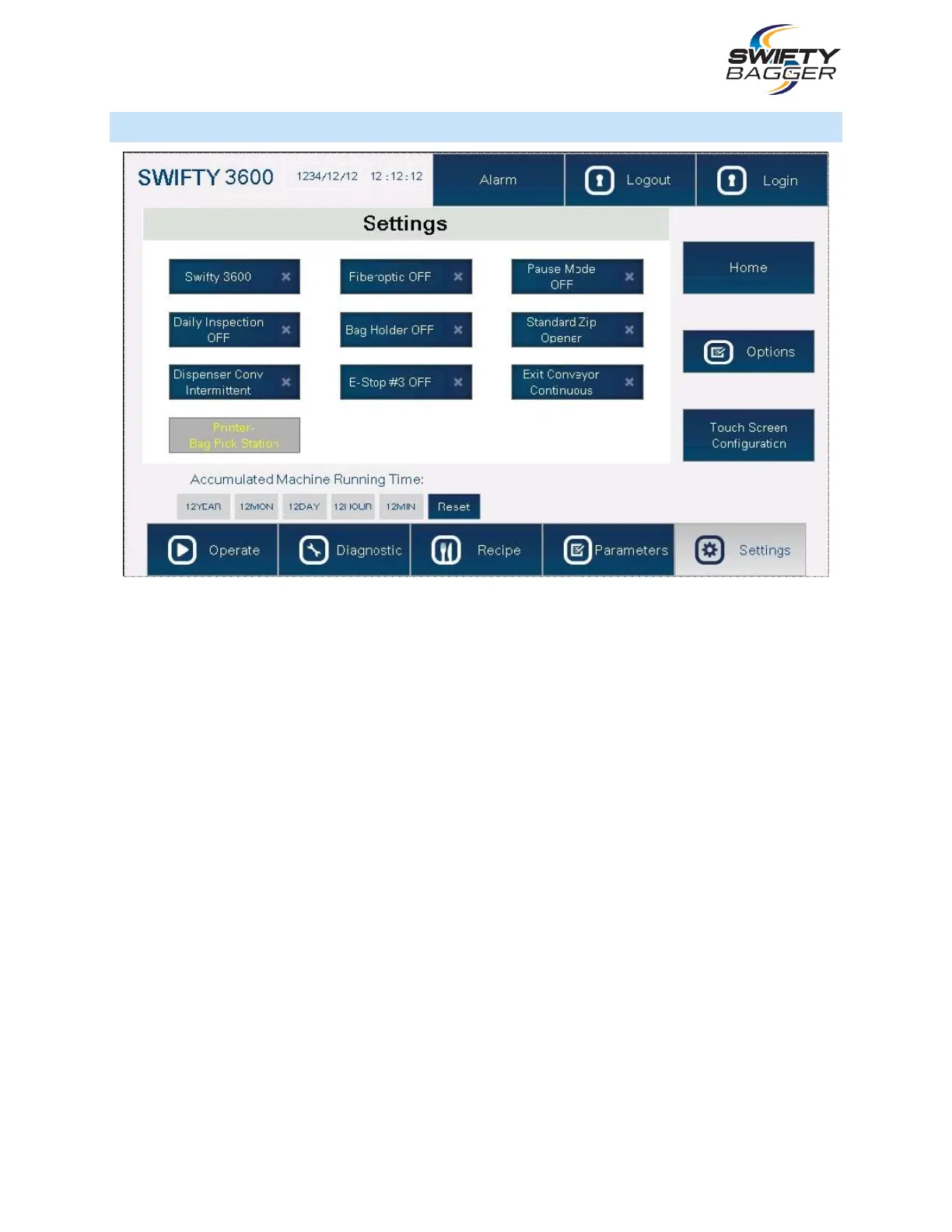
SETTINGS SCREEN
SWIFTY 3600/1200: Pressing this button will toggle between the Swifty 1200 and Swifty 3600 H.M.I.
software configurations. Ensure the correct machine software is loaded prior to operation.
DAILY INSPECTION: Enables or disables the inspection checklist submenu.
DISPENSER CONVEYOR INTERMITTENT: Enables or disables use of the Bag Loader’s conveyor.
PRINTER BAG PICK STATION: Enables or disables the use of the Printer.
FIBER OPTIC: Enables or disables the fiber optic sensor on the Bag Blower’s plunger.
BAG HOLDER: Enables or disables the Bag Holder from activating.
E-STOP #3: Enables or disables the use of the remote E-Stop button, which may be installed seperately.
PAUSE MODE: Enables or disables the machine’s ability to pause should there be a failure to detect a
signal from an interfaced scale (filling machine.)
STANDARD ZIP OPENER: Pressing this button will toggle between the use of the Standard Zipper
Opener or the more advanced version of the Zipper Opener, should they be equipped on the machine.
EXIT CONVEYOR CONTIUOUS: Enables or disables use of the exit conveyor.
OPTIONS: Pressing this button will open the Options submenu.
TOUCH SCREEN CONFIGURATION: Pressing this button will bring up the Touch Screen’s settings.



 To Next Page