3 / 4
Green: Door handing was
successful. Proceed to next step.
Red: Door handing was
unsuccessful. Make sure the lock
interior and batteries are correctly
installed. Perform step 4B again.
If the door handing process is
still unsuccessful after a second
attempt, see the Manual Door
Handing section on page 4.
If the bolt does not move,
make sure the batteries
are correctly installed, and
perform step 4B again.
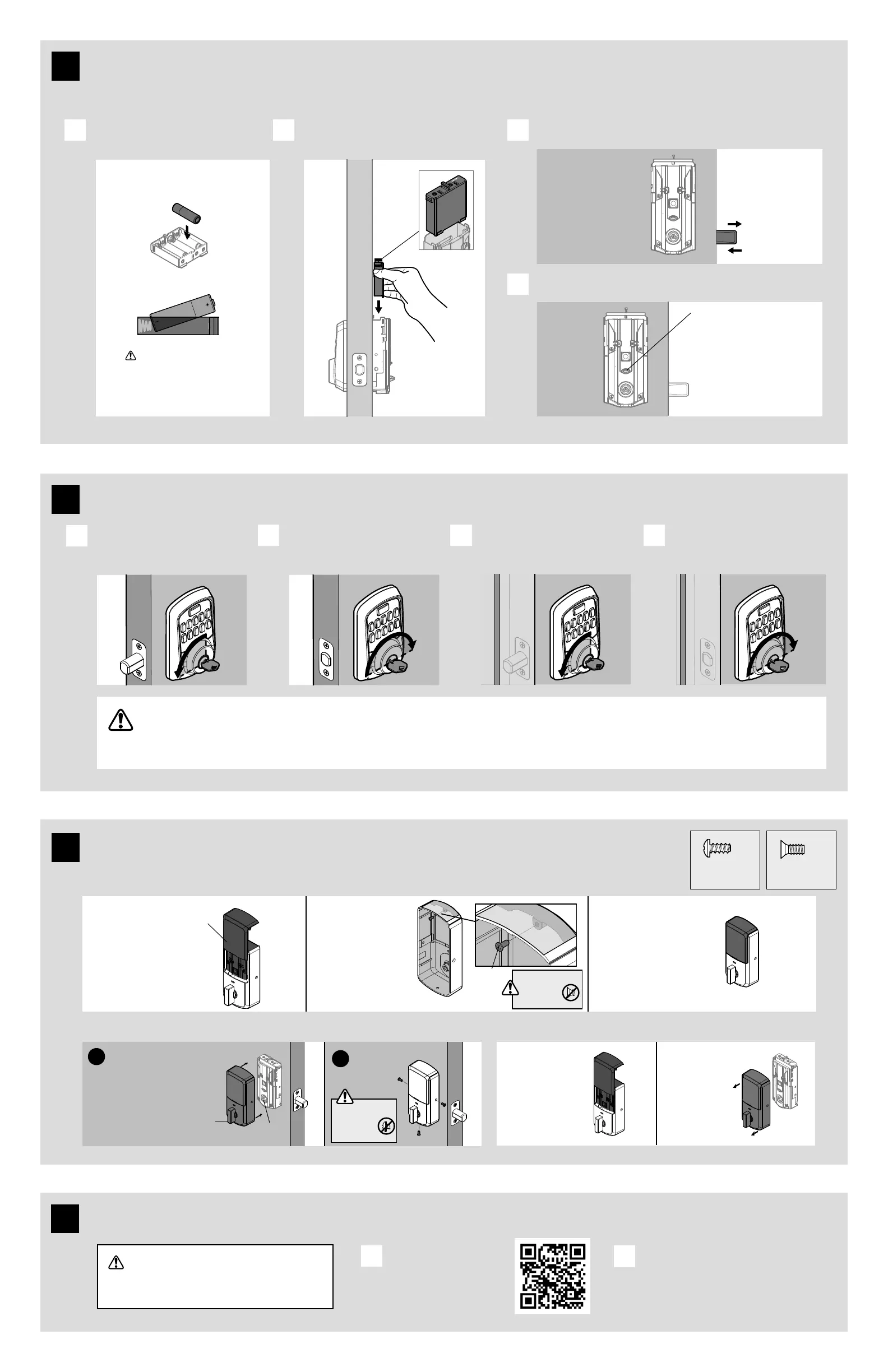
Install 4 AA batteries in the battery pack. With the door open, install the battery
pack to initiate auto-handing.
The latch will retract and extend to learn the orientation of the door.
The Status LED will indicate success or failure.
A B C
D
Note: The latch
bolt will only
retract half way.
Ensure correct polarity.
For best results, use
new, non-rechargeable
Alkaline batteries only.
With the door open, insert the key to
extend the latch. Ensure that the latch
extends smoothly.
Turn the key 180° to retract the latch.
Ensure that the latch
retracts smoothly.
Close the door. Insert and rotate
the key to lock the door. Ensure
that the door locks smoothly.
Turn the key 180° to retract the latch.
Ensure that the door
unlocks smoothly.
A
B C D
If your door does not lock and unlock smoothly, make sure you replaced your previous latch and strike with those supplied in the box.
If you still experience locking errors, call Weiser Support to order a Warped Door Service Kit.
Weiser Support: 18005019471
6410968611
actual size
For
Lock
Bag
actual size
Download the app and create an account
The Weiser app is needed to use this lock. If
this lock was professionally installed (or installed
by someone other than the homeowner), make
sure this step is performed by the homeowner.
Download the
Weiser app by scanning
the QR code or visiting
www.weiserlock.com/app
on your smartphone.
Create your account and follow the setup
instructions in the Weiser app.
A
B
8
6
Test the lock and check door alignment
5
Install the batteries and perform the door handing process
This step will teach your lock the orientation of your door and is crucial to lock operation.
7
64109 (3x)
When the window
is locked, you will
need to remove
the entire interior
cover and screws to
access the battery
pack and buttons.
For additional
security, you
may choose to
lock the window
by installing the
security screw.
The window on
the interior cover
is unlocked by
default for easier
access to the
battery pack
and buttons.
Important Information about the interior cover
Cover Installation Battery Pack Access
Install cover.
Note: You may
need to rotate
the turn piece
to align with the
turn piece shaft.
turn piece
turn piece
shaft
Install
screws.
a
b
If the window is
unlocked, slide
up the window
to access the
battery pack.
window
Install the interior cover
68611
If the window
is locked,
remove the
interior cover
and screws
to access the
battery pack.
Ensure you are using
the correct screws.
Using incorrect
screws will
damage the product.
Ensure you are using
the correct screws.
Using incorrect
screws will
damage the product.
(1x)
(3x)
(1x)



 To Next Page