The Welch Allyn CareTemp Touch Free Thermometer is a non-contact infrared thermometer designed for quick and accurate temperature measurement, primarily for human body temperature. It is intended for professional use in healthcare settings.
Function Description:
The CareTemp Touch Free Thermometer measures body temperature without physical contact, minimizing the risk of cross-contamination and enhancing patient comfort. It utilizes infrared technology to detect thermal radiation emitted from the forehead. The device features a clear LCD display that shows temperature readings in either Celsius or Fahrenheit. It includes a memory function to recall previous measurements and a timer function. The thermometer is designed for ease of use, with simple button functions for measurement, memory recall, and unit selection.
Important Technical Specifications:
- Temperature Measurement Range: The thermometer operates within an ambient temperature range of 16°C to 40°C (60.8°F to 104°F).
- Measurement Accuracy: When calibrated, the thermometer provides readings within +/- 0.2°C (+/- 0.4°F) of the set point.
- Distance for Measurement: Optimal measurement distance to the patient's forehead is 4 to 6 cm.
- Battery: The device is battery-powered, and a low battery indicator (empty battery symbol flashing at 1 Hz) alerts the user when the battery level drops below 10%.
- Automatic Shut-off: The thermometer automatically shuts off after 60 seconds of inactivity to conserve battery life.
- Error Messages: The device displays specific error messages for various conditions:
- "Err" (Ambient temperature error): Indicates the operating environment is outside the 16°C to 40°C range.
- "Lo" (Low patient temperature): Indicates a measurement lower than 34°C (93.2°F).
- "Hi" (High patient temperature): Indicates a measurement higher than 43°C (109.4°F).
- "Err" with an upward arrow (Out of range distance): Indicates the thermometer is too far or too close to the patient's forehead.
- Empty battery symbol: Indicates battery less than 10%.
Usage Features:
- Touch-Free Measurement: Allows for hygienic temperature taking without direct patient contact.
- Intuitive Controls: Features dedicated buttons for measurement, memory recall ("MEM"), and Celsius/Fahrenheit unit selection ("C/F"). A "timer" button is also present.
- Memory Function: Stores previous temperature readings for easy recall and tracking.
- Temperature Scale Selection: Users can switch between Celsius and Fahrenheit as needed.
- Quick Measurement: Designed for rapid temperature acquisition.
- Calibration Mode: The device can be put into a special "calibration mode" for testing and verification of accuracy. This mode is accessed by simultaneously pressing the "MEM" and "timer" buttons for 3 seconds. The display will show a test screen, then switch to battery and timer icons. After two beeps, pressing the "measure" button will show a dash with either °F or °C, indicating it's ready for calibration.
- Error Guidance: Provides clear error messages on the LCD, along with suggested actions to resolve the issue. For example, for ambient temperature errors, it suggests moving to a warmer/cooler room and allowing 30 minutes for acclimation. For out-of-range distance errors, it suggests verifying the thermometer is 4 to 6 cm away from the center of the patient's forehead.
Maintenance Features:
- Battery Replacement: The device is designed for user-replaceable batteries, indicated by the "Dead battery error" message.
- Cleaning: The DFU (Directions for Use) CD provides instructions for proper cleaning of the thermometer.
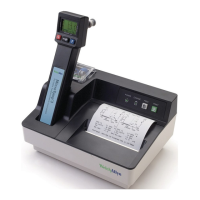
- Calibration Check: The CareTemp Touch Free Thermometer can be checked for functional calibration accuracy using the Welch Allyn 9600 Plus Calibration Tester with a specific adapter (CareTemp 9600 Plus Adapter). This external adapter allows for calibration testing at three set point levels across the temperature range without voiding the warranty.
- Calibration Setup: The 9600 Plus CareTemp Adapter requires assembly with a 9600 plus calibration tester, 9600 power supply, power cable, mounting bracket, and two screws. Installation involves attaching the adapter to the 9600 plus calibration tester using the mounting bracket and screws, and connecting the power supply.
- Calibration Procedure:
- Power up the 9600 plus tester and adjust the set point.
- Wait for the adapter's temperature LED to turn on and the Ready LED to flash until the temperature stabilizes within +/- 0.05°C of the set point. The 9600 Plus LCD will stop flashing, and the Adapters Ready LED will stop flashing when stable (+/- 0.25°C of Set Point).
- Place the CareTemp thermometer into "calibration mode" as described above.
- Remove the dust cover from the adapter, place the CareTemp thermometer in the adapter with the lens pointing down, and press the measure button.
- Remove the thermometer from the tester and read its display. If the temperature is within +/- 0.2°C (+/- 0.4°F) of the set point, the thermometer is within calibration.
- Important considerations during calibration:
- The thermometer remains in calibration mode for 60 seconds before shutting off.
- Allow at least 1 minute between temperature measurements to avoid incorrect readings.
- The thermometer is sensitive to ambient temperature changes; avoid holding it between measurements and perform tests away from heating or cooling sources.
* Repeating Calibration: To repeat the test, follow steps 1-3. If using only one calibration tester, set the 9600 Plus to the next Set Point and wait for stabilization.
* Returning to Normal Mode: To exit calibration mode, wait 60 seconds for the thermometer to shut off.
- Warranty: The thermometer comes with a 2-year warranty from the date of purchase, covering defects in material and workmanship. No repair service is offered; defective units are replaced under warranty. Shipping costs for returns are generally the customer's responsibility, though specific arrangements may apply for international returns. The warranty is void if the instrument is not used according to manufacturer's instructions, and it does not cover breakage, tampering, misuse, neglect, accidents, modification, shipping damage, or batteries. It is only extended to the original purchaser.
- Returned Device Evaluation: Thermometers returned under warranty are evaluated using the procedure detailed in the 9600 Plus calibration tester manual to determine failure. The original warranty remains in effect from the date of original purchase.

 Need help?
 General











 To Next Page