EasyManua.ls Logo

Welch Allyn PanOptic 11820 - User Manual

Welch Allyn PanOptic 11820
28 pages
Print Icon
To Next Page IconTo Next Page
Loading...
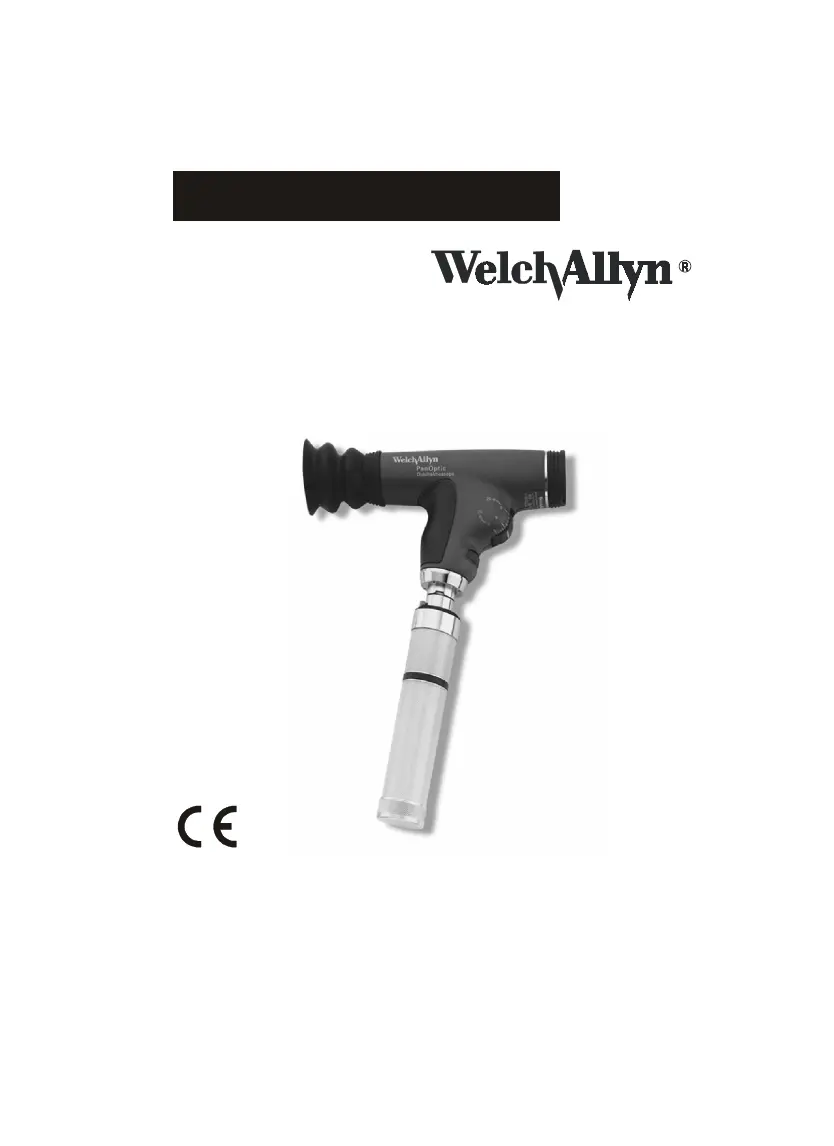
PanOptic
Ophthalmoscope
118 Series
Operating
Instruction
Manual
Eye Care Menu
Service Manual

Other manuals for Welch Allyn PanOptic 11820

Questions and Answers

  • B
    Brian WoodardAug 18, 2025
    How to fix Welch Allyn PanOptic 11820 with no light output?
    • J
      juliafisherAug 18, 2025
      If your Welch Allyn Medical Equipment has no light output, there are several potential causes: * The aperture dial may be in-between positions. Try rotating the aperture dial. * The lamp may be burned out. Replace the lamp using Welch Allyn part number 03800. * The wrong lamp, an incorrect Welch Allyn lamp, or a non-Welch Allyn lamp may be installed. Replace the lamp using Welch Allyn part number 03800. * The battery handle may be completely discharged. Charge the handle, check the battery, and/or the charger.
  • C
    Christine MartinAug 20, 2025
    Why is the light dim on my Welch Allyn PanOptic 11820 Medical Equipment?
    • H
      hermancarlaAug 21, 2025
      A dim light output on your Welch Allyn Medical Equipment could be due to a few reasons: 1. The lamp pin may not be engaged in the slot. Ensure the lamp is inserted with the pin firmly seated. 2. There might be a film on the optics. Clean the lenses with the provided cleaning cloth. 3. The handle may not be fully charged. Charge the handle, and check the battery and/or the charger.
  • B
    Brooke TownsendAug 23, 2025
    What to do if there's glare in the view of Welch Allyn Medical Equipment?
    • C
      Cody MoraAug 23, 2025
      If you're experiencing glare in the view of your Welch Allyn Medical Equipment, it's likely due to fingerprints or dirt on the objective (Patient’s Side) lens. Clean the objective lens with the provided cleaning cloth.
  • B
    Breanna CampbellAug 26, 2025
    Why is the spot not centered on my Welch Allyn PanOptic 11820?
    • V
      vblackAug 26, 2025
      If the spot is not centered on your Welch Allyn Medical Equipment, the aperture dial may not be centered. Move the aperture dial to the full detent position.
  • L
    Larry MerrittAug 27, 2025
    What to do if I can't get a sharp focus with Welch Allyn PanOptic 11820 Medical Equipment?
    • V
      valenciajonathanAug 27, 2025
      If you cannot obtain a sharp focus or are getting a hazy view with your Welch Allyn Medical Equipment, the lenses are likely dirty. Clean the lenses with the provided cleaning cloth.
  • R
    rkingAug 29, 2025
    Why can't Welch Allyn PanOptic 11820 achieve full view?
    • J
      jameswardAug 30, 2025
      If your Welch Allyn Medical Equipment is not achieving the full or expected view, ensure that the eyecup is slightly compressed during the procedure. The unit might not be in the proper operating position.
  • T
    Thomas ChurchSep 1, 2025
    What to do if Welch Allyn Medical Equipment cannot attach to power handle?
    • A
      Amy RobinsonSep 1, 2025
      If your Welch Allyn Medical Equipment cannot attach to the power handle, it may be because the lamp is not fully inserted. Insert the lamp with the pin firmly seated in the slot.
  • O
    Omar SkinnerSep 3, 2025
    What to do if Welch Allyn PanOptic 11820 has dim light output?
    • A
      Amber MeyersSep 3, 2025
      If the light output of your Welch Allyn Medical Equipment is dim: 1. Ensure the lamp pin is correctly engaged in the slot by firmly seating it. 2. Clean the lenses with a clean, soft, optical-grade cleaning cloth to remove any film. 3. Charge the handle fully and check the battery and charger to ensure they are functioning correctly.
  • W
    wilsonandreaSep 5, 2025
    Why is there glare in the view of my Welch Allyn PanOptic 11820 Medical Equipment?
    • C
      Catherine HoweSep 5, 2025
      Glare in the view of your Welch Allyn Medical Equipment can be caused by fingerprints or dirt on the objective lens (patient’s side). Clean the objective lens with a clean, soft, optical-grade cleaning cloth.
  • D
    davidmelendezSep 8, 2025
    What to do if Welch Allyn Medical Equipment spot is not centered?
    • Z
      Zachary SanchezSep 8, 2025
      If the spot is not centered on your Welch Allyn Medical Equipment, move the aperture dial to the full detent position.

Summary

Symbols

Warnings and Cautions

The PanOptic Ophthalmoscope

Set-up Instructions

Attaching Ophthalmoscope Head to Power Source

Instructions for connecting the PanOptic Ophthalmoscope head to a Welch Allyn power source by aligning cutouts and turning 90 degrees.

Attaching Patient Eyecup

Procedure for inserting and twisting the PanOptic Patient Eyecup until it locks into place.

Attaching Corneal Viewing Lens

Conducting an Examination

Apertures and Filters

The Eye

Lamp Replacement Instructions

Cleaning and Repair Instructions

General Cleaning Instructions

Guidelines for cleaning the PanOptic Ophthalmoscope, including specific requirements for lenses and housing.

Troubleshooting

Accessory and Replacement Parts List

Service Information

North American Service Contacts

Contact details for Welch Allyn Technical Service Department in the USA and Canada for instrument service.

International Service Information

PanOptic Ophthalmoscope Warranty

Specifications

Welch Allyn PanOptic 11820 Specifications

General IconGeneral
CategoryOphthalmoscope
Model11820
Field of View25 degrees
Magnification5X
Light SourceHalogen
Power SourceRechargeable battery
AperturesLarge
FiltersRed-free
CompatibilityWelch Allyn 3.5 V power handles

Related product manuals