3 / AUTO-DARKENING FILTER (ADF) CONTROLS & FEATURES – Cont’d
c. SENSITIVITY CONTROL
This adjusts the sensitivity of the arc sensors to best suit the welding task & sur-
rounding environment. Low sensitivity helps prevent the ADF reacting other nearby
light sources. High sensitivity may be required if welding on low current &/or when
TIG welding. Low to mid sensitivity is recommended for most welding applications.
d. SHADE ADJUSTMENT
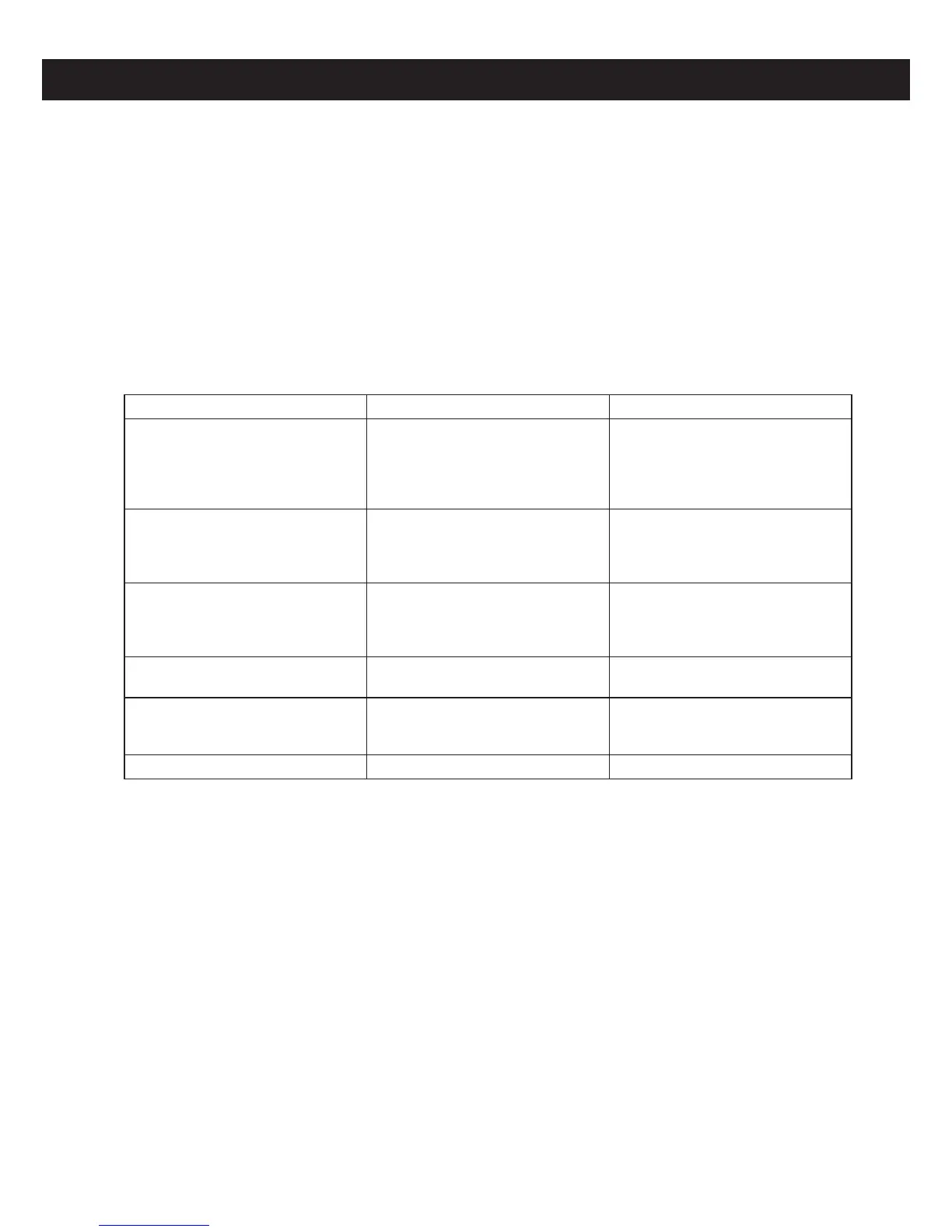
The following chart shows recommended shade levels for dierent welding applica-
tions.
Welding Application Arc Current in Amps Protective Shade No.
Stick Electrode (MMA)
Less than 40
40-80
80-175
175-300
300-500
9
10
11
12
13
MIG
Less than 100
100-175
175-300
300-500
10
11
12
13
TIG
Less than 50
50-100
100-200
200-400
8-10
11
12
13
Air Carbon Arc Gouging
Less than 500
500-700
12
13
Plasma Arc Cutting
Less than 80
80-150
150-350
8-9
10-11
12-13
Gas Welding & Cutting - 5-6
e. DELAY ADJUSTMENT
This adjust the time the ADF takes to switch from dark back to light when welding
stops.
Short delay time is best for tack welding and short welds. A longer delay may be
required if welding heavier materials, where the weld pool emits bright light for a
brief period.
f. WELD/GRIND SWITCH
(Excludes Promax 180)
Switching to ‘Grind’ mode will ‘lock’ the ADF into the light shade mode so that it will
not activate whilst the operator is grinding.
WARNING: Never use the helmet for welding whilst the ADF is switched to ‘Grind’.
WARNING: Always wear safety spectacles or goggles under the helmet when
grinding.


 To Next Page