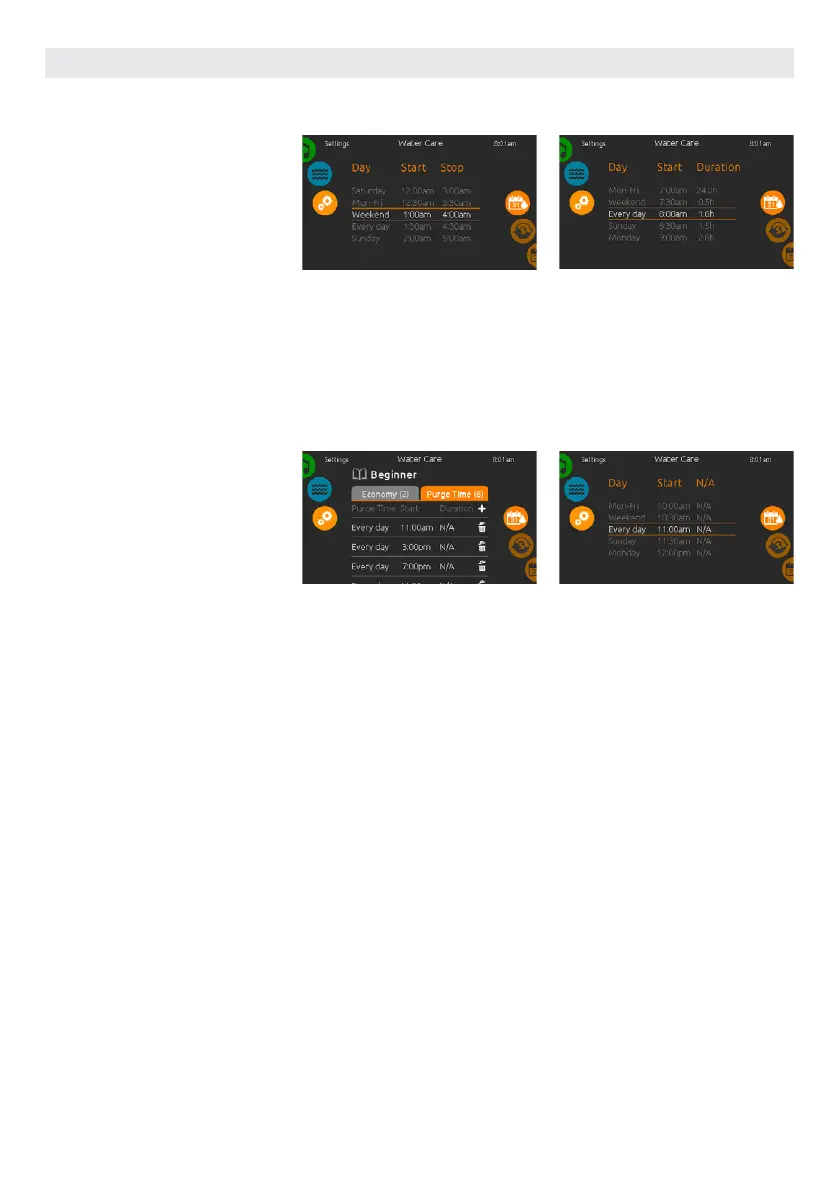
MODIFYING WATER CARE SCHEDULES
You can modify the programmed
schedules by selecting one and adjust-
ing the schedule.
You have several possibilities for the
schedule (Mon-Fri, weekend, every day,
or single days). The schedules will be
repeated every week. The time and du-
ration are set in 30 minute increments.
PURGES
Touch the Purge tab to change the
purge settings. You can add purges by
touching the « + » symbol.
To delete a schedule, touch the gar-
bage can icon at the right end of the
desired line.
Once you have set the schedule, use
the calendar icon to go back.
You can modify the programmed
purges by selecting one and adjusting
the schedule.
You have several possibilities for the
schedule (Mon-Fri, weekend, every day,
or single days). The schedules will be
repeated every week. The time and du-
ration are set in 30 minute increments.
Once you have set the purge,
use the calendar icon to go back.
In Economy mode, the set point will be
reduced by 20°F, which means that the
heating system will not be engaged
unless the temperature falls to 20°F below
the hot tub's set temperature.
The filtration schedule shown on the
screen will apply to the main filtration
pump, most likely pump 1. If your hot tub
uses a circulation pump configured to
run 24 hours, the screen will show you the
purge setting instead of filtration. The
purges are pre-programmed for a fixed
number of minutes, therefore the dura-
tion will be set to N/A on the screen, and
only the start time can be modified.
USER INTERFACE SMART TOUCH
64



 To Next Page