DATE AND TIME
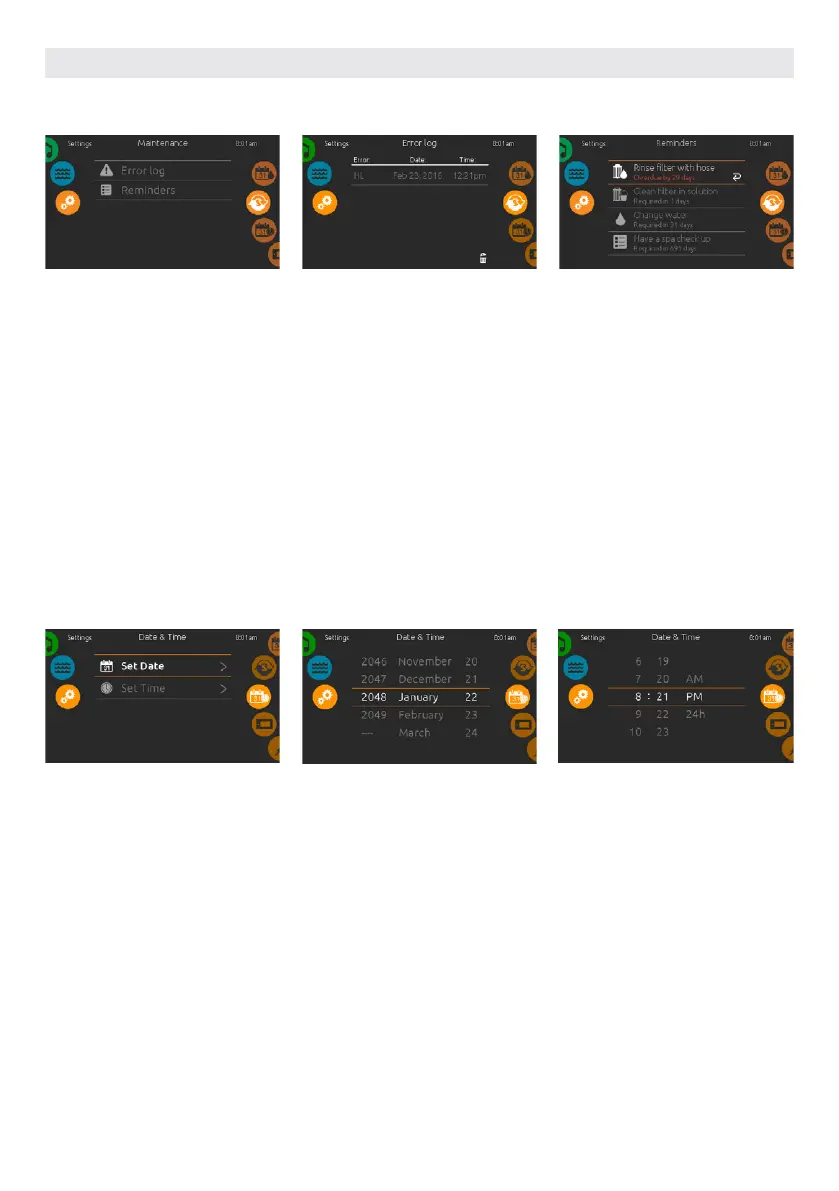
To modify date and time settings, slide
the right wheel until the date and time
icon is highlighted in the middle.
Simply touch the line of the item you
want to change.
SET DATE
Here you can adjust the year, month
and date. Simply swipe up and down
the column you want to change, and
select the desired value. When done,
touch the calendar icon at the right of
the screen.
SET TIME
Here you can change the hour, minute
and time format. Simply swipe up and
down the column you want to change,
and select the desired value. When
done, touch the calendar icon at the
right of the screen
DATE AND TIME
MAINTENANCE
To modify maintenance settings, slide
the right wheel until the maintenance
icon is highlighted in the middle.
From the Maintenance page you can
access the following:
• Error log
• Reminders
Simply touch the line of the item you
want to change.
ERROR LOG
Errors are archived by the system. Drag
the list Up and Down to move through
the list. Errors are archived chronologi-
cally, from the most recent at the top to
the oldest at the bottom.
The Error log page shows the error
code, the date of the error, and the
time.
Touching the garbage can icon will de-
lete the Error log (with a confirmation).
REMINDERS
Smart Touch keypad will provide
reminders about maintenance required
on your hot tub, like rinsing or cleaning
the filter. Every task has its own dura-
tion, based on normal use.
The reminders menu allows you to
check the time left before maintenance
is required, as well as to reset the time
once a task has been completed.
To reset a task, select it by pressing
the curved arrow, then confirm when
prompted. Once you have confirmed,
the task will be reset.
MAINTENANCE & ERROR LOG
USER INTERFACE SMART TOUCH
65



 To Next Page