9 of 20 Wellness Supply Group V002
4. Assembly Instructions
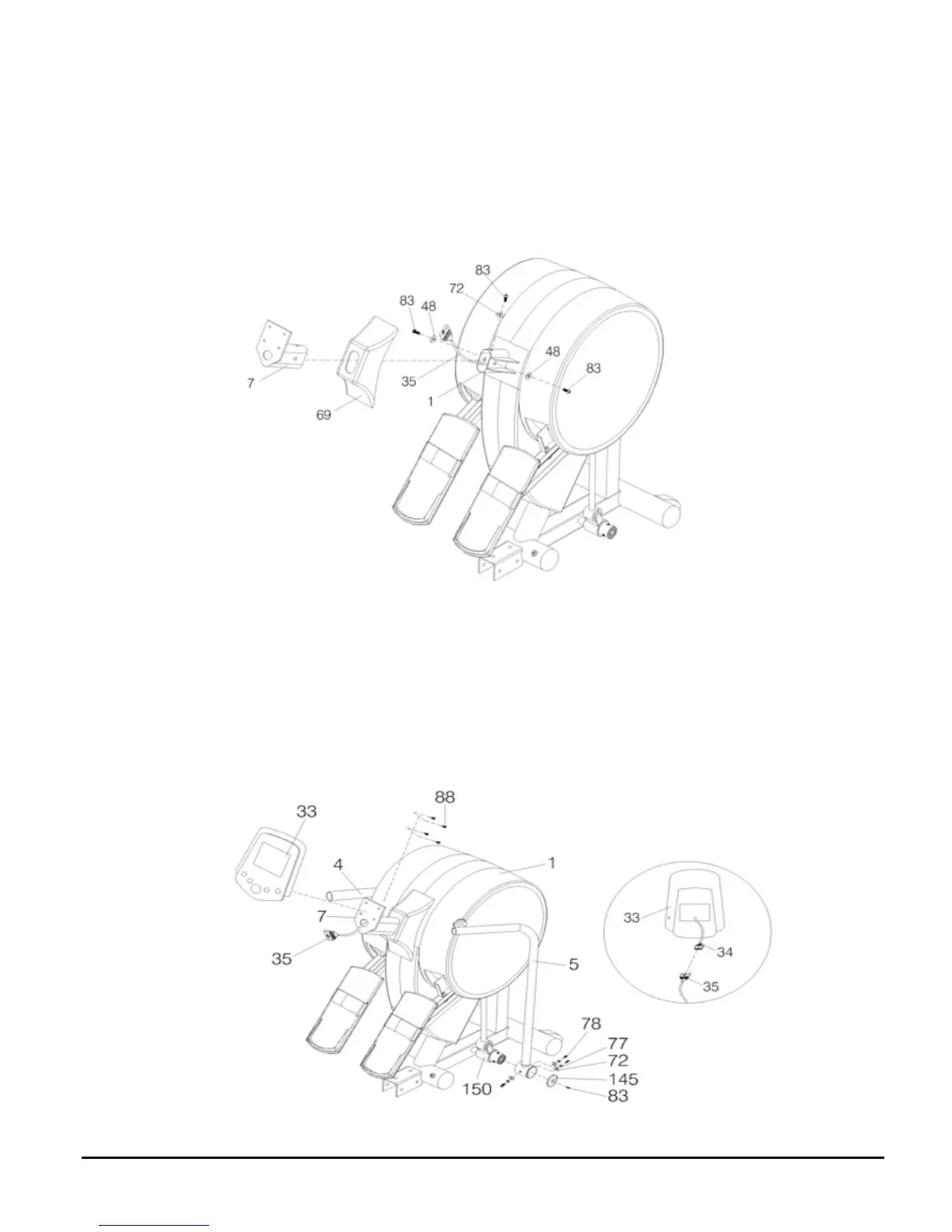
Step 1
1. Insert the Computer Post (7) to Ornament Cover (69) then pull the Control Wire (35)
through the hole on the Computer Post (7).
2. Stabilize the Computer Post (7) to the Main Fame (1) using Washer (48) and Bolt (83).
Step 2
1. Connect the Control Wire (34) from the Computer (33), behind the Control Wire (35) of the
Computer Post (7).
2. Attach the Computer (33) to the Computer Post (7) using Bolt (88).
3. Connect the Moving Handle Set Post (5) and the Handle Connection (150) using Screw
(78), Spring Washer (77) and Washer (72). Stabilize the Pedal Foot Cover (145) using Bolt
(83).!



 To Next Page