W9 Manual Page 29 - Revision: 10-06-2023
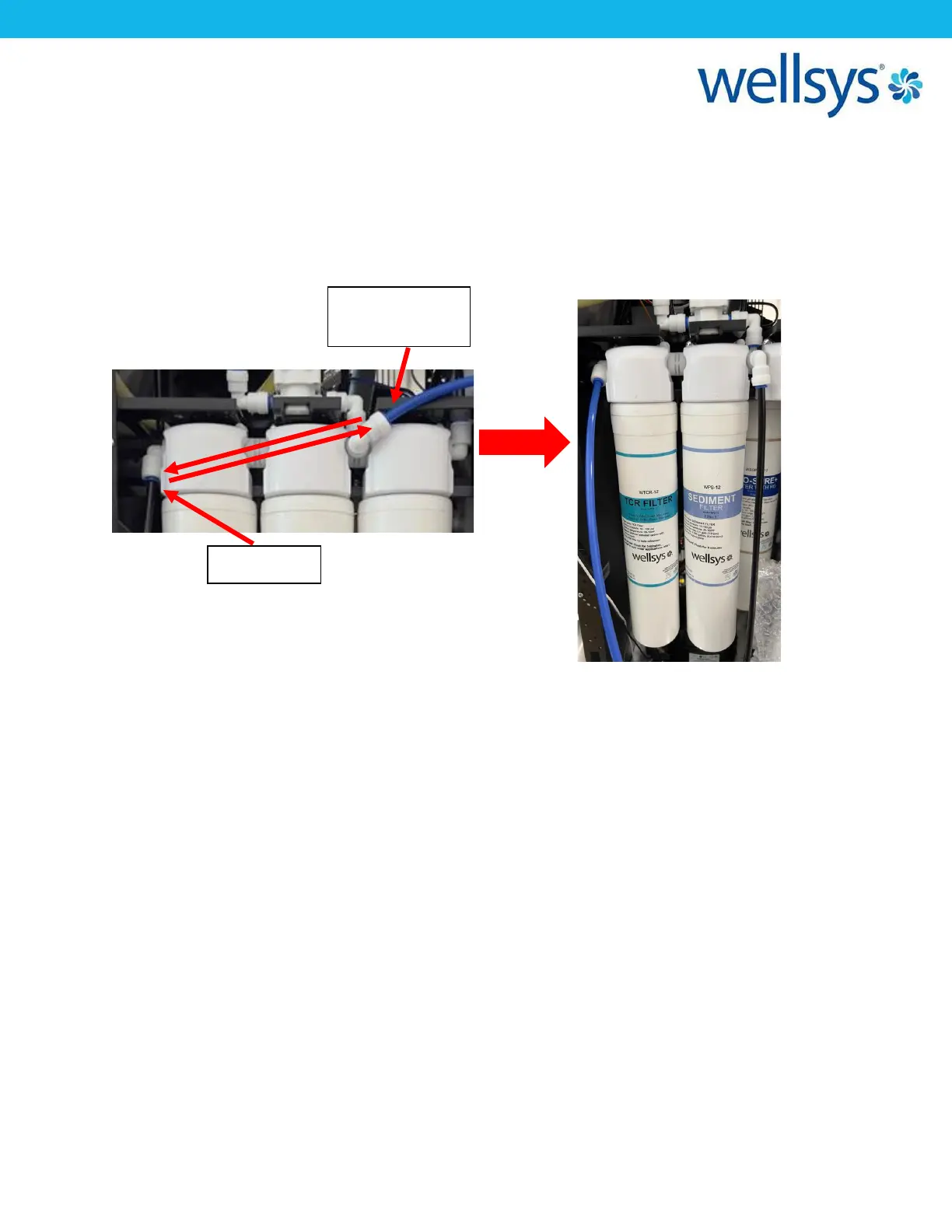
11. Return the RO Filter (or UF Filter) to the right most head. Last filter to flush is the TCR
filter, but it must be flushed in the OPPOSITE FLOW DIRECTION as the others. Remove
and reinstall the sediment filter into the second (middle) head. Now, swap the tube
connections of the supply and flush water. Then, install the TCR filter into the left-most
head. Open the supply valve and allow 2 gallons to flush through the TCR filter.
12. Return all filters to original position and restore original plumbing configurations (From
left to right on back row: TCR, Biosure; From left to right on front row: Sediment,
PreCarbon, RO). Ensure all tubing to fitting connections are tight and secure and that
the RO filter is connected to the drain as it was during flushing.
13. Return the PCB and mounting bracket to its original position. Return the lower front
panel and drip tray as well.
14. The filtration system is now ready to use. The water supply valve can be turned on, and
the unit can move forward to the next installation step.


 To Next Page