Installation Guide (cont.)
04
10
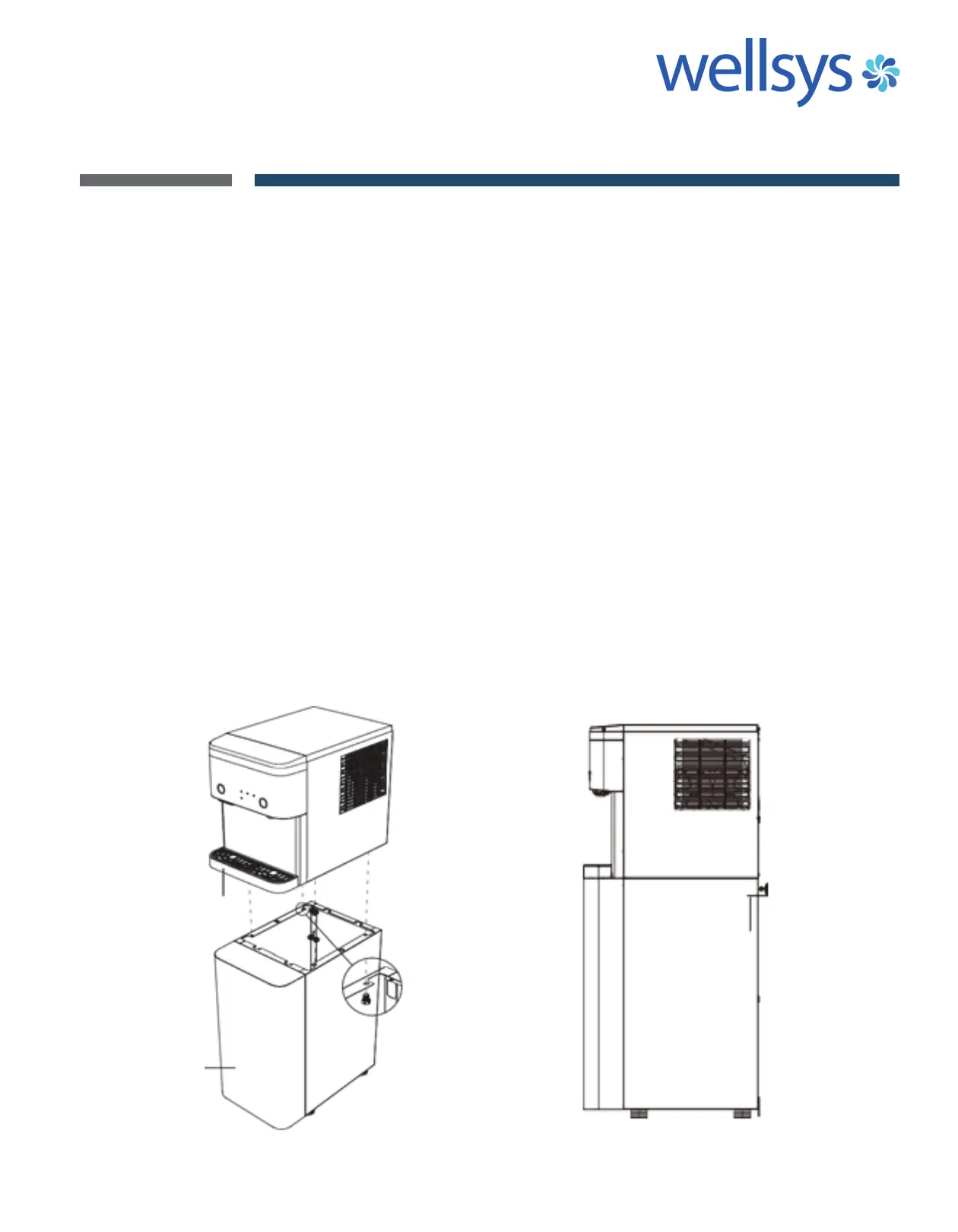
STAND FASTENING
1. Remove drip tray of Product & the Front Cover of Stand.
2. After placing the Product on the Stand, place your hand behind the
Stand to secure the M6 hexagonal bolts. (4X)
2a) After tightening, make sure it is stable and there is no
danger of falling.
3. Once fixed, restore back the Drip Tray of Product & the Front Cover
of Stand.
BRACKET FASTENING
1. Place the braket on the wall at the installation site and mark the
positions. (2x)
1a) There is only one bracket that could be fixed on the top or
bottom side of the stand.
2. Drill two holes in the marked position to fix the bracket to the wall.
3. Ensure the product is fixed with the wall-mounted bracket, so that
the product does not fall when it is pushed.
DRIP
TRAY
FRONT
COVER OF
STAND
BRACKET


 To Next Page