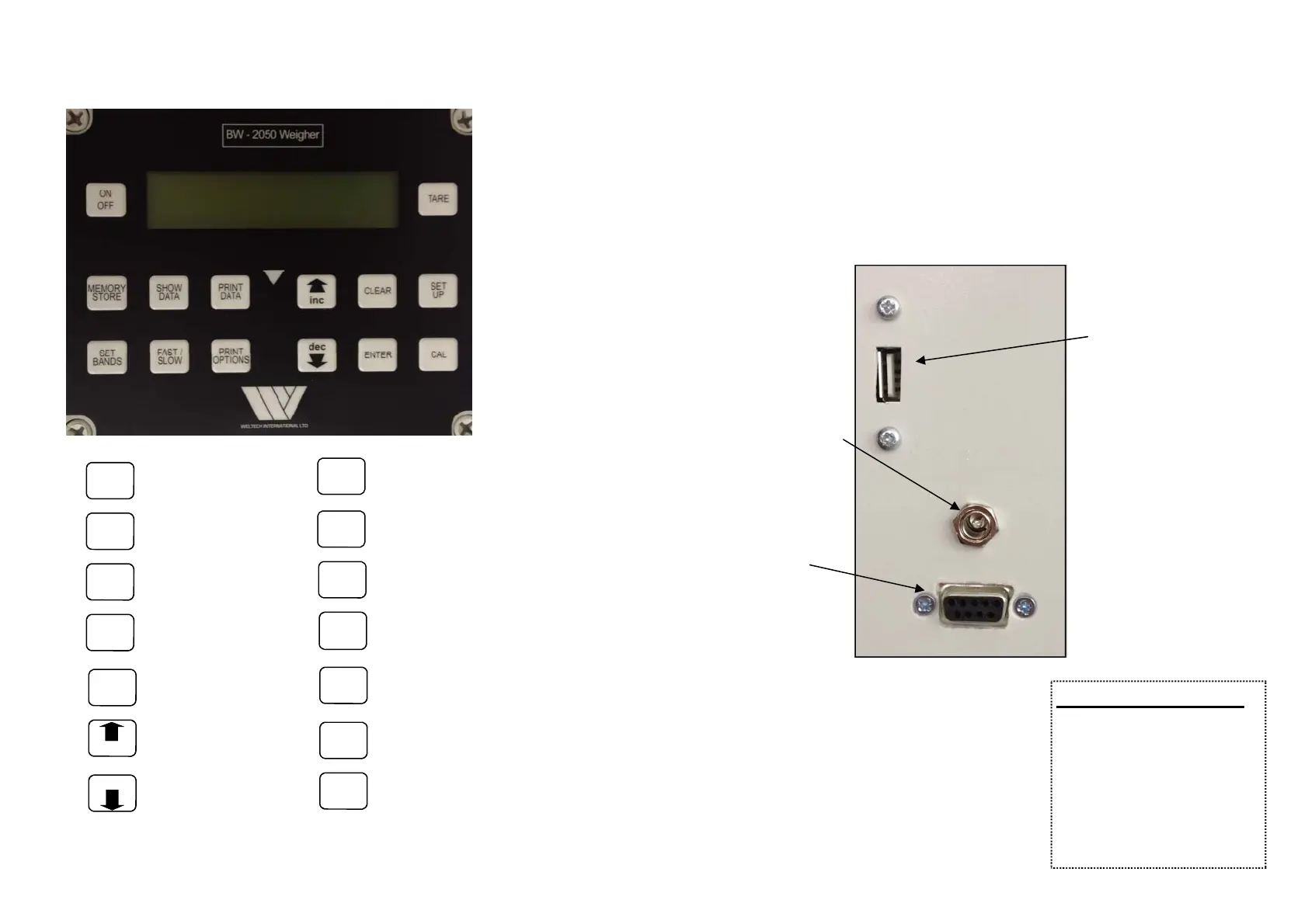
KEYPAD
14
PCOPERATION
A PC may be connected to the RS232 connector to output the data.
Once the computer is connected and the soware is ready to accept
data, then press the PRINTDATAto output the data.
15
ON
OFF
Turns unit
ON and OFF
TARE Tares weight
MEMORY
STORE
Stores data
SHOW
DATA
Displays data
PRINT
DATA
Prints data
INC
DEC
Increase sengs
Decrease sengs
CLEAR
Clear data stored
SET
UP
Engineers sengs
SET
BANDS
Set grading bands or
target weights
FAST/
SLOW
Selects between fast or slow weighing
PRINT
OPTIONS
Set type of printout.
Stascs,Histogram, Each.
ENTER
Enters data into store/
command
CAL
Sets zero, tare and
calibraon
Charging Socket
RS232 Output
Printer & Computer
USB STICK Socket if
fied (Oponal)
CommunicaonSengs
Bits per second 9600
Data Bits 8
Parity None
Stop Bits 1
Flow Control None


 To Next Page