
 Need help?
Do you have a question about the WELTECH BW-2050 and is the answer not in the manual?
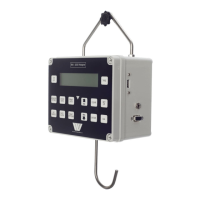
Details the physical control panel of the BW-2050 weigher, including its buttons and functions.
Step-by-step guide on how to calibrate the BW-2050 weigher using a calibration weight.
Procedure for taring the weigher to account for the shackle's weight, ensuring accurate measurements.
Restores the weigher to its original factory default settings, requiring confirmation.
Sets the display format to either metric or USA units for measurement.
Configures the maximum weight capacity and enables full operational features.
Allows setting the current time and date, including hours, minutes, day, month, and year.
Configures data storage for houses/pens and allows selection of the storage location.
Sets up printer communication, line feed, and print data delay for output.
Defines weight capacity, units, grading lamp behavior, and filter settings.
Manages button functions, Bluetooth, and display backlight behavior.
Configures stability, filter settings, and zero adjustments for accurate readings.
Controls weight display freeze, evenness calculation, and acceptance limits.
Manages display hiding, language selection, deviation methods, and fast mode.
Details automatic power off and how to exit settings, saving or discarding changes.
Procedure to clear previously stored weighing data from the weigher's memory.
Explains normal operation, setting time/date, units, and target weights for evenness.
Guide on selecting storage houses/pens and starting the weighing process for birds.
Instructions for viewing data by house number and selecting specific data points.
Customizes printouts to include every bird, histogram, summary, or group data.
Details on writing data to a USB stick for computer transfer and potential issues.
Configures grading lights and weight bands for sorting birds by weight categories.
Details the information included in printouts when statistics are enabled.
Describes printouts that list the weight of every individual bird weighed.
Explains how bird weights are presented in 20-gram bands for histogram output.
Identifies the location of the charging socket and serial RS232 output connector.
Explains the visual indicators for battery status: full, 50%, and empty.
Describes the 'LOW BATTERY' warning and behavior when the battery is depleted.
Procedure to check battery voltage, charging voltage, and charging rate.
Details the function of each button on the BW-2050 weigher's key pad.
Explains how to connect the weigher to a PC for data output via RS232.
Lists the standard communication settings for data transfer (e.g., Baud rate, Data Bits).
Lists available commands accepted by the serial port for remote operation.
Step-by-step guide for transferring weighing data to a USB stick and accessing it on a PC.
Guidance on handling, cleaning, and avoiding damage to the rugged BW-2050 unit.
Information regarding the expected lifespan of the unit's rechargeable batteries.
Company overview, product manufacturing, and commitment to improvement.
Contact details for service, repairs, and inquiries for the BW-2050 weigher.
 General
| Brand | WELTECH |
|---|---|
| Model | BW-2050 |
| Category | Control Panel |
| Language | English |

 To Next Page