5
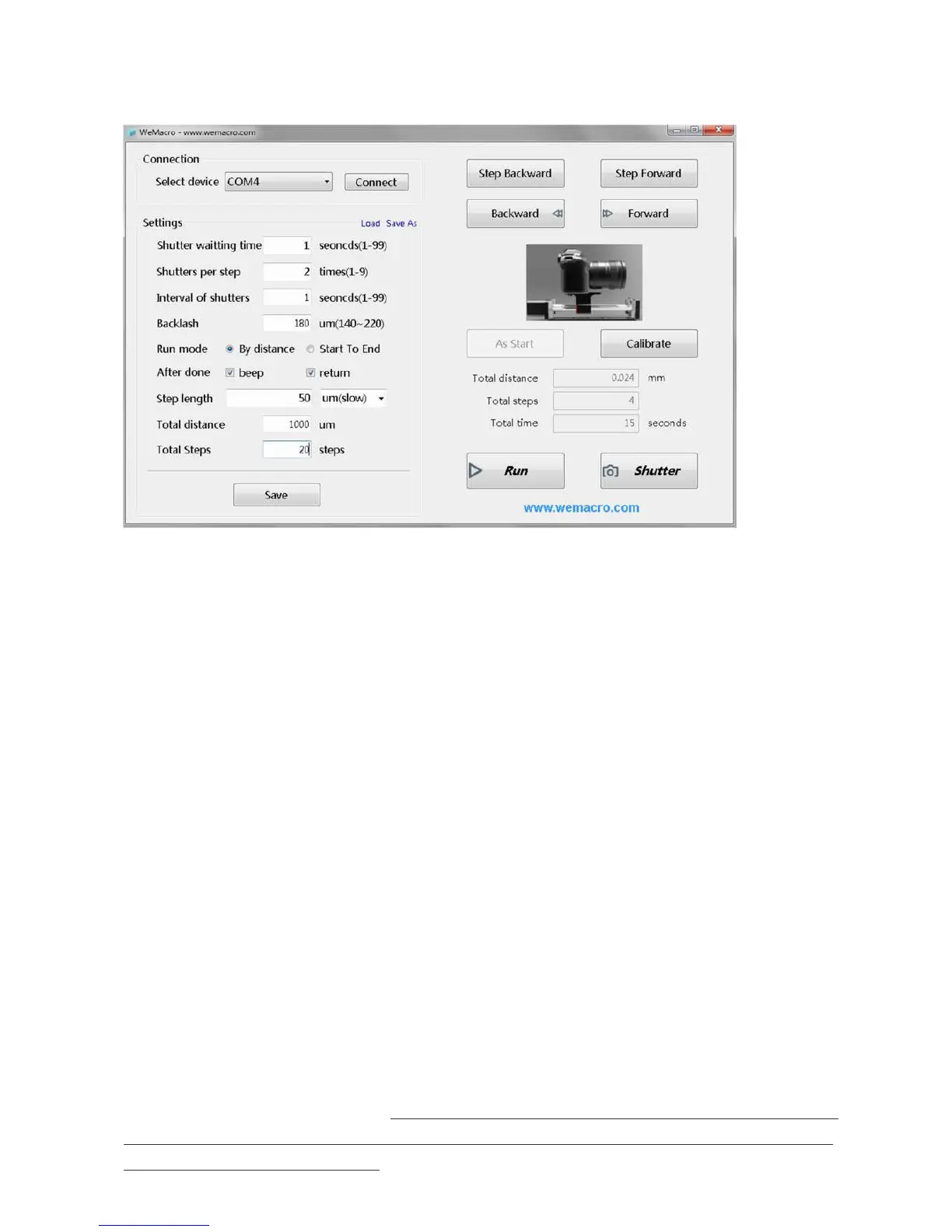
This means you only need to decide how long the total distance you want the rail move and how long the single step is. The
program will calculate how many steps it will take.
If you change” total distance”, the steps number will change accordingly.
If you change” step length”, the steps number will change accordingly also. Press “save” then you can adjust the lens position by
pressing forward or backward. When the camera reach the position, press “RUN” to start. It will show how long time it will take.
The program also provide backlash compensation function. Tick “return” and press “Calibrate” after the rail return to the starting
position. The rail will compensate the backlash by itself.
When the rail is running, the “run” button will show as “STOP”. If it be pressed, the rail will stop.
The ”stop” button need to be pressed to switch to ”run” when it finish running.
2,Start to End mode
Tick “Start to End”and “return”.Input single step length you want then press”Save”.Make sure there is “As start” button at right
side.If it shows “As End” just press one time to switch it.
Then press forward or backward to adjust position.If you want to move fast,you can set 1mm as single step length.When the
position is close to where you want to start,change back the step length and press forward(forward only) to reach the starting
point. If you forward 1mm, then back 1mm and forward 1mm. Real distance is only 1mm,but the rail will travel 2mm.
Press “As start” to set as starting point.Then press forward and step forward to find ending point.(forward direction only).Press
“As End” the rail will go back to starting point, then press “calibrate”to compensate. Now you can press “Run”to start. The
program will do the rest. If you want to run one more time, please remember to press “Calibrate” after the rail go back to starting
point.
NOTES
“shutter waiting time” or “settle time” means the time between the rail travel and trigger the shutter in each step. Sometime it
depends on the recharging time of flash light. Some cameras, such as Canon, will need more time to process after it take dozens of
pictures. If the camera system is busy at that time, the trigger signal will not work by using the normal extension cable. Please use the
extension cable for Canon only in the small bag.


 To Next Page
 Loading...