3
Software Guide
There are 4 systems can control the rail
1, Windows (Please find the program at download page)
2, Mac OS by USB or Bluetooth 4.0 (Please find the program at download page)
3, iOS by Bluetooth 4.0 (Please search “WeMacro” at app store)
4, Android by OTG or Bluetooth 4.0 (Please find the program at download page)
1 Windows, please install the driver first.
You can download the control software and driver at http://www.wemacro.com/?p=509
There are videos in our website www.wemacro.com “Software setting page”
Install driver first,
Windows system driver file is ch341ser.exe , then extract the whole wemacro folder to your computer. Double click
wemacro.exe to run. Press “F4” to switch language. (Chinese and English) Please turn on the control box first and connect it
with USB cable.
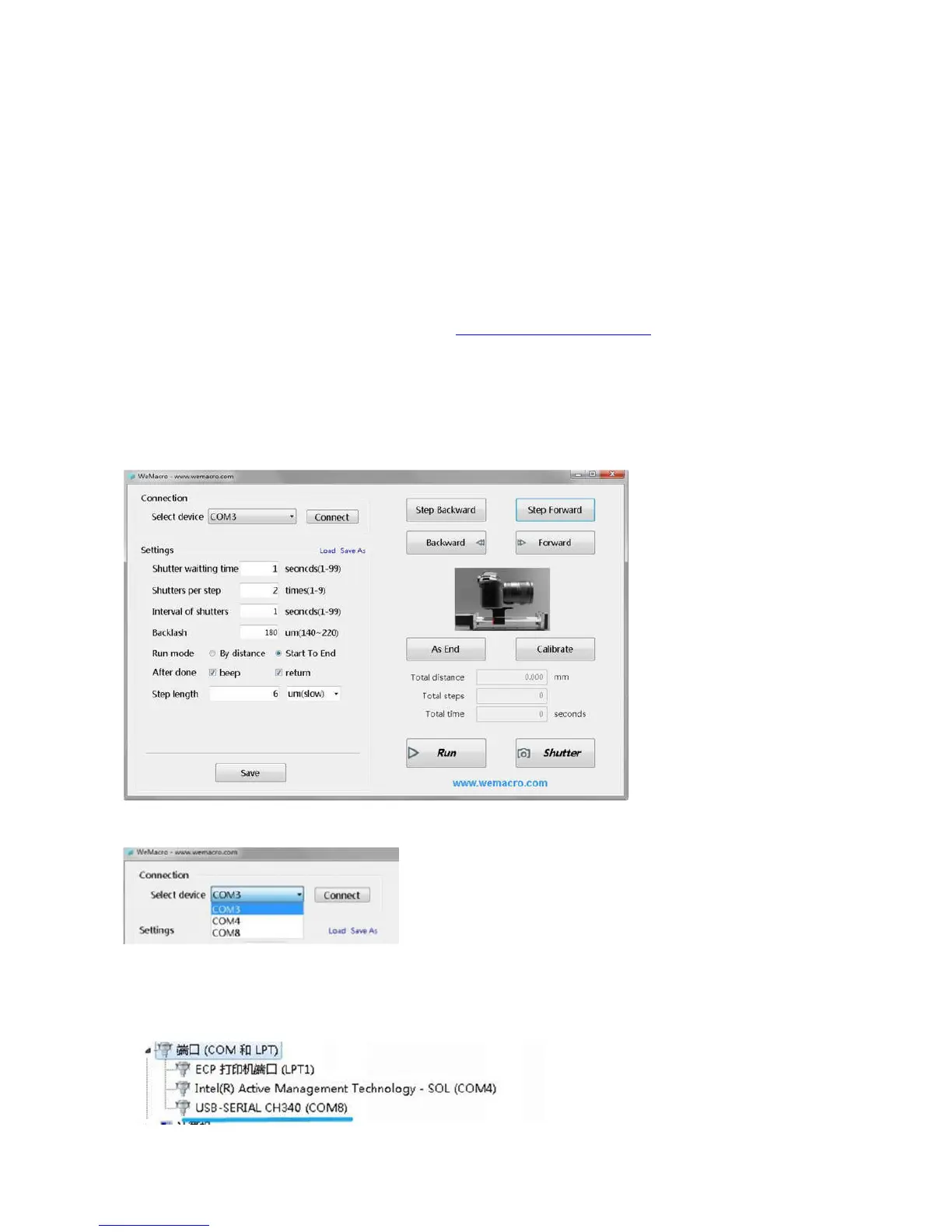
Windows System: Choose the relevant port in top left part, then click “Connect”
You can find which port to choose in device manager page.
The port will show as below in device manager.
2 Mac OS by USB or Bluetooth 4.0


 To Next Page