6
“shutter per step“ means how many times you want in each step. It’s quite useful in HDR photography or Mirror lock-up.
“Interval of shutters” means if you set few times of shutter in each step. The gap between every shutter should longer than your
exposure time.
Backlash: Please set it to 220micron( it compensate the gap between screw thread inside of the rail when you set
“return” after stacking, or from start to end mode. Please press ” Calibrate” after the rail moving back to the starting
point or any moving back action. It can also reduce the view shift in changing direction. )
Also you can “save” the setting or load the setting which you used before.
Notice: The shutter signal may be affected if you are using camera software such as Canon’s EOS utility or Nikon’s Camera
ControlPro Liveview , Helicon remote on PC. You can turn off Liveview in PC software before run the rail.
If you want to use EFSC function on camera, please use a HDMI wire to connect with an external display. About EFSC function,
it’s very useful with continuous light in high magnification over 5X.
Android and iOS Bluetooth version:
(disconnect USB cable from PC or Mac)
Android: Stay close to the control box within 2 meters. Open the app in the phone then wait about 5 seconds, the app will show
“Remote device connected”. If the app do not show this message , you can slide to second page then slide back to first page of
app. Wait about 5 seconds the message should appear. Before open the app, please make sure you are not running this app in
background already. (Sometimes you need restart Bluetooth function if it can’t connect at first time.)
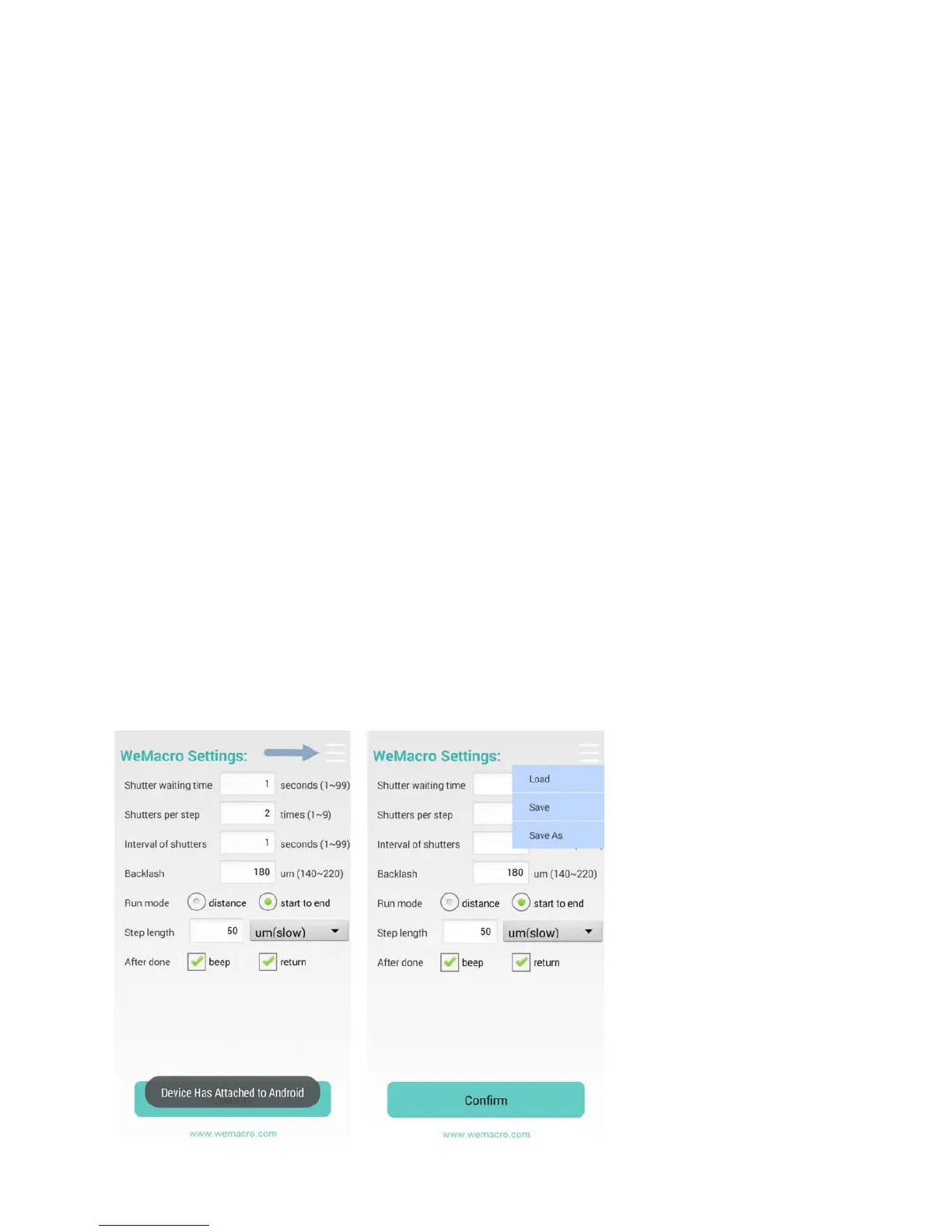
You can press the area where the arrow point at. To load or save settings in your phone’s SD card. As below:
You can save or load setting in WeMacro‘s directory.
iOS: Search ”wemacro” in app store. Turn on the Bluetooth function,Open the wemacro app,the Bluetooth mark will blink when
it connect.
You can press the area where the arrow point at. To load or save settings in your phone’s SD card. As below:
You can save or load setting in wemacro ‘s folder.The setting file should be named as ABC.txt.(file type .txt in Android,file
type .wm in iOS)The file in iOS can not be deleted but can be revised. If you need delete the method, you can delete the
app then reinstall it. But all methods will lose.


 To Next Page
 Loading...