
 Need help?
Do you have a question about the Weslo Cadence C62 and is the answer not in the manual?
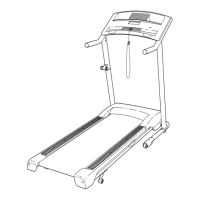
The Weslo Cadence C62 treadmill is a home exercise machine designed to provide a cardiovascular workout. It features a walking belt, handrails, a console for controlling settings and displaying workout data, and a folding design for convenient storage. The treadmill is intended for in-home use only and is not suitable for commercial, rental, or institutional settings.
The primary function of the Weslo Cadence C62 treadmill is to facilitate walking or running exercise. Users can adjust the speed of the walking belt and the incline of the treadmill to customize their workout intensity. The console provides real-time feedback on exercise metrics such as time, distance, speed, calories burned, fat calories burned, and heart rate.
The treadmill offers both manual mode and personal trainer programs. In manual mode, users can manually control the speed and incline using buttons on the console. The console also features four certified personal trainer speed programs, which automatically adjust the treadmill's speed to guide users through an effective workout.
A key feature of the Cadence C62 is its iFIT.com interactive technology. This allows the treadmill to connect to external audio devices (like CD players, portable stereos, home stereos, or computers) to play special iFIT.com CD and video programs. These programs provide a personal trainer experience, automatically controlling the treadmill's speed and incline while offering guidance and motivational music. Additionally, when connected to a computer with internet access, users can access iFIT.com programs directly from the website, further expanding their workout options.
The treadmill is equipped with a safety key and clip system. The clip should be attached to the user's waistband, and the key inserted into the console. If the key is pulled from the console, the walking belt will stop, acting as an emergency stop mechanism.
Before starting any exercise program, users are advised to consult a physician, especially if they are over 35 or have pre-existing health problems. The treadmill should be placed on a level surface with adequate clearance around it (at least eight feet behind and two feet on each side) to ensure safe operation and proper air circulation. A mat should be placed under the treadmill to protect the floor or carpet.
To begin a workout, the user plugs in the power cord (ensuring it's connected to a surge suppressor meeting specific UL standards), stands on the foot rails, attaches the safety clip to their clothing, and inserts the key into the console.
In manual mode, the walking belt can be started by pressing the "Start" button or the "Speed" up arrow. Speed can be adjusted in 0.1 mph increments using the "Speed" buttons, or by holding the buttons down for 0.5 mph increments. The incline can be adjusted using the "Incline" buttons. To stop the walking belt, the "Stop" button is pressed.
For personal trainer speed programs, users select a program from the console and then press "Start" or "Speed" up arrow. The treadmill will automatically adjust speed according to the program. Users can manually override speed settings if desired, but the treadmill will return to the program's next setting when a "chirp" sound is heard.
When using iFIT.com CD or video programs, the treadmill needs to be connected to the appropriate audio/video device using the provided audio cable and adapters. Once connected, users select the iFIT.com mode on the console, insert the CD or videocassette, and press "PLAY" on their external device. The program will then control the treadmill's speed. Similarly, for iFIT.com web programs, the treadmill is connected to a computer, the iFIT.com mode is selected, and the program is initiated through the website.
Heart rate can be measured using the built-in thumb pulse sensor. Users place their thumb on the sensor while standing still on the foot rails for approximately 15 seconds for an accurate reading. The console displays the heart rate, along with calories and fat calories burned.
The treadmill is designed to be folded for storage. Before folding, the incline should be set to its lowest level, and the power cord unplugged. The user lifts the treadmill frame until it is in a vertical position, where a storage latch secures it. To move the treadmill, it is tilted back onto its front wheels. To lower the treadmill for use, the latch knob is pulled, and the frame is slowly lowered to the floor.
Regular maintenance is crucial for the longevity and proper functioning of the Weslo Cadence C62 treadmill. Users are instructed to inspect and properly tighten all parts of the treadmill regularly. The walking belt is coated with a high-performance lubricant called PERFORMANT LUBE™. Users are explicitly warned against applying silicone spray or other substances to the walking belt or walking platform, as this can damage the belt and cause excessive wear. If lubricant transfers to the top of the belt or carton during shipping, it should be wiped off with a soft cloth and a mild, non-abrasive cleaner.
Troubleshooting steps are provided for common issues:
The manual emphasizes that servicing beyond these procedures should be performed by an authorized service representative. Users are warned not to remove the motor hood unless instructed by an authorized service representative.
 General
| Speed | 0-10 MPH |
|---|---|
| Foldable | Yes |
| Display | LCD |
| Speed Range | 0-10 MPH |
| Running Area | 16 x 50 inches |
| Incline | Manual |
| Programs | 6 |
| Incline Levels | 2 |
| Running Surface | 16 x 50 inches |


 To Next Page