7
6
7
54
54
6
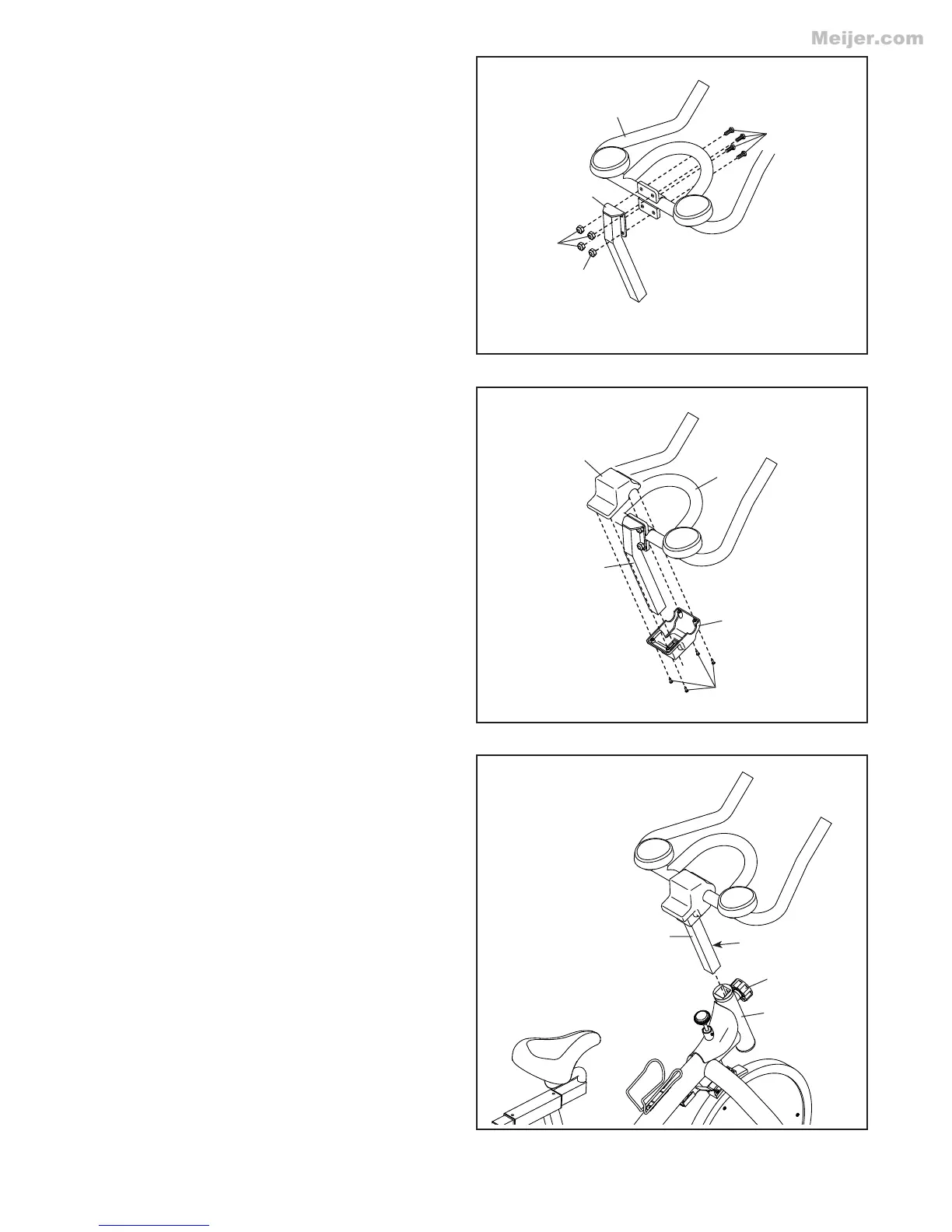
7. Slide the Lower Handlebar Cover (67) upward
onto the Handlebar Post (6).
Attach the Lower Handlebar Cover (67) and the
Upper Handlebar Cover (66) to the Handlebar
Post (6) with four M4 x 15mm Screws (50).
8. Loosen the indicated Adjustment Knob (34)
and pull it outward. Next, insert the Handlebar
Post (6) into the Frame (1). Move the Handlebar
Post upward or downward to the desired posi-
tion, and release the Adjustment Knob into a
hole in the Handlebar Post. Make sure that the
Adjustment Knob is engaged in a hole in the
Handlebar Post. Then, tighten the Adjustment
Knob.
67
66
34
50
7
1
6
6
7
8
6. Attach the Handlebar (7) to the Handlebar Post
(6) with four M8 x 15mm Button Bolts (45) and
four M8 Locknuts (54).
45
Holes




 To Next Page