14
HOW TO USE A PACE PROGRAM
Put on the chest pulse sensor if desired.
For the console to display your heart rate, you
must wear the chest pulse sensor (see page 9).
Turn on the console.
To turn on the console, press the On/Reset button
or begin pedalling.
Select one of the four pace programs.
Each time
the console
is turned on,
the manual
mode will be
selected. To
select a
pace pro-
gram, press
the Program
button repeatedly until the number 1, 2, 3, or 4
appears in the upper right corner of the display.
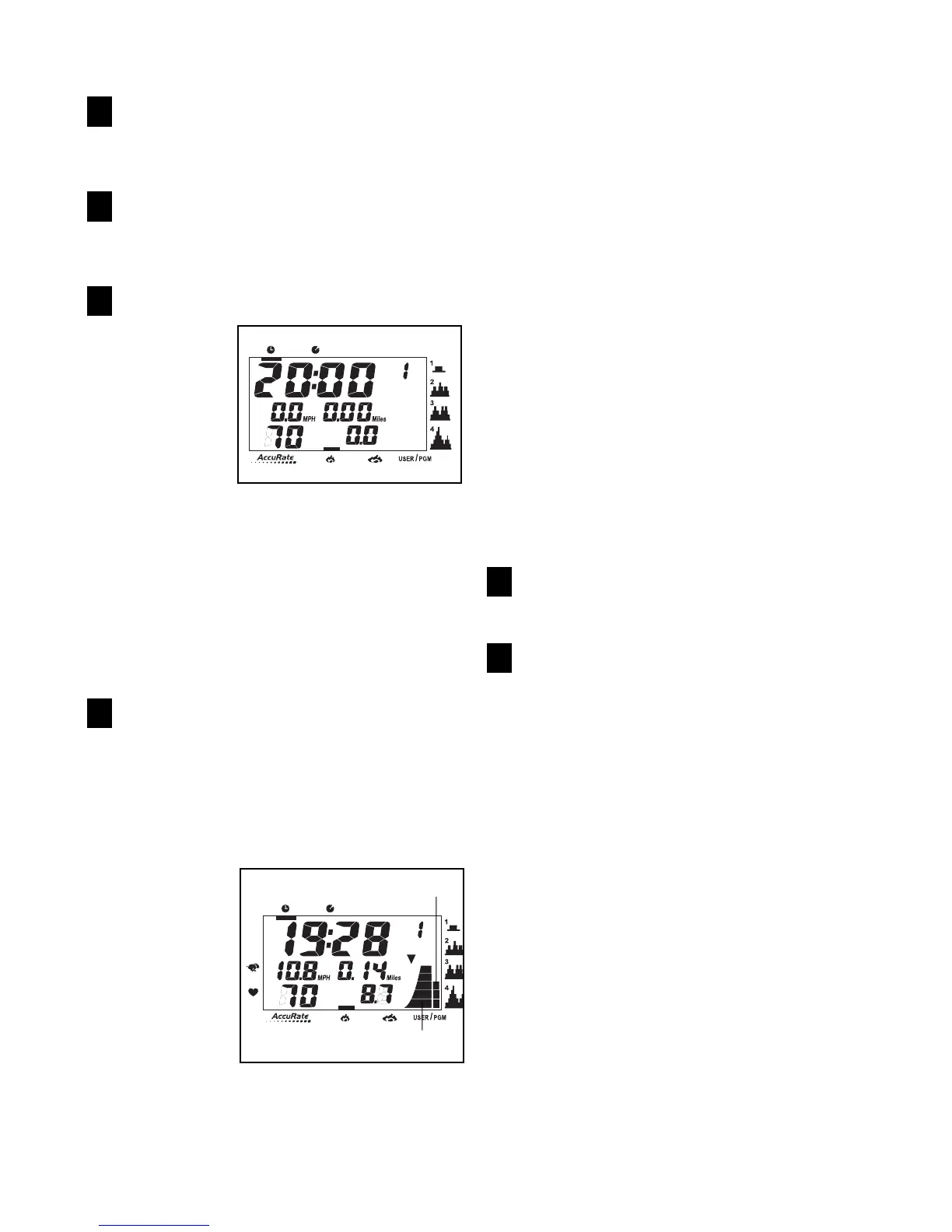
The four small profiles on the right side of the
console show how the target pace setting will
change during the programs. For example, profile
number 1 shows that during program 1, the target
pace setting will increase near the beginning of
the program, and then decrease near the end.
Start the program.
To start the program, begin pedalling. Each pro-
gram consists of either twenty or thirty, one-
minute periods. One target pace setting is pro-
grammed for each period. (The same target pace
setting may be programmed for consecutive peri-
ods.)
The target
pace set-
tings for the
program will
be shown by
the target
pace indica-
tor in the dis-
play. (The
pace indica-
tor will show
your actual pedalling pace.) As the target pace
indicator changes in height during the program,
adjust your pedalling pace so that both indicators
are at the same height. If your pedalling pace is
slower than the current target pace setting, an
arrow will appear next to the pace indicators to
prompt you to increase your pace; if your pace is
faster than the target pace, an arrow will prompt
you to decrease your pace.
Important: The target pace settings for the
program are intended only to provide a goal.
Your actual pace may be slower than the tar-
get pace settings, especially during the first
few months of your exercise program. Make
sure to exercise at a pace that is comfortable
for you.
During the program, adjust the resistance of the
exercise cycle as desired by turning the resist-
ance knob.
The display will show the time remaining in the
program. If you continue exercising after the pro-
gram is completed, the display will continue to
show your exercise feedback.
Follow your progress with the display.
See step 5 on page 12.
To turn off the console, stop pedalling.
See step 6 on page 13.
6
5
4
3
2
1






 To Next Page