Method and Procedure
Field Operations Support MP-2009-12-004/ Issue 11/Date: 2/9/2011
Process Owner: Centralized Operations - Field Operations Support
Information contained in this document is proprietary
Unauthorized disclosure outside CenturyLink Corporation is prohibited
19
Legacy CenturyTel should follow the process below:
Static IP Configuration
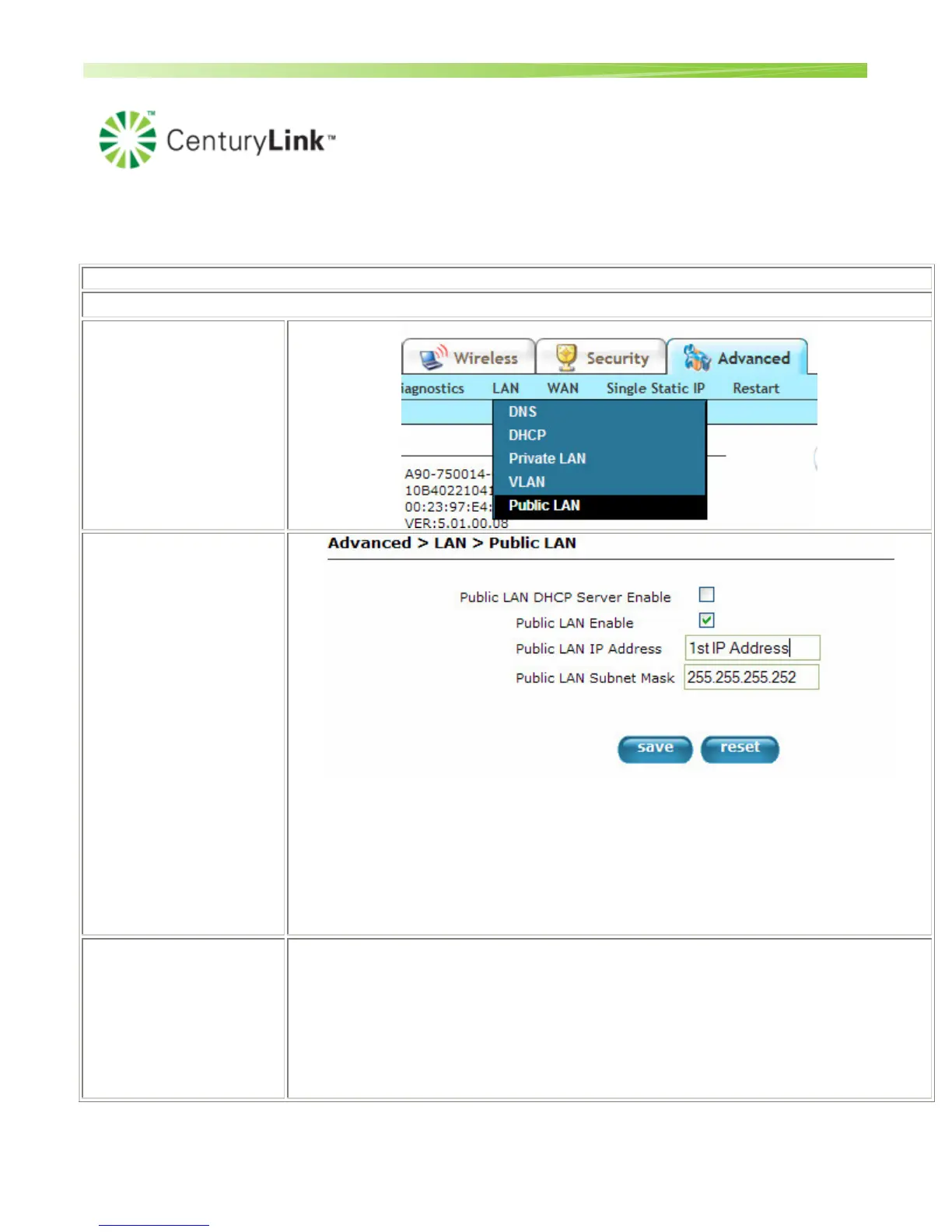
In the Customer's
Westell device, change
the Public IP addressing
and click on the
"Advanced" Tab, "LAN"
and choose "Public
LAN".
Configure the Public
LAN screen.
Clicking "Save" will
require a reboot. Click
"OK"
• Public LAN DHCP Server Enable: unchecked
• Public LAN Enable: checked
• Public LAN IP Address: The first of the two Static IPs for the customer.
• Public LAN Subnet Mask: 255.255.255.252 Note: The Subnet Mask may be
different depending on the number of IP addresses the customer has.
The Westell is now
configured. You will now
need to setup the
secondary devices by
configuring their LAN
Settings.
• IP Address: The 2nd Static IP address assigned to this customer
• Subnet Mask: 255.255.255.252
• Default Gateway: The 1st Static IP address assigned to this customer. This is the
same IP address that you installed on the Westell router above.
• DNS Servers: These will be based on the customer's location.


 To Next Page