Method and Procedure
Field Operations Support MP-2009-12-004/ Issue 11/Date: 2/9/2011
Process Owner: Centralized Operations - Field Operations Support
Information contained in this document is proprietary
Unauthorized disclosure outside CenturyLink Corporation is prohibited
8
8.0 INSTALLATION GUIDE
Action
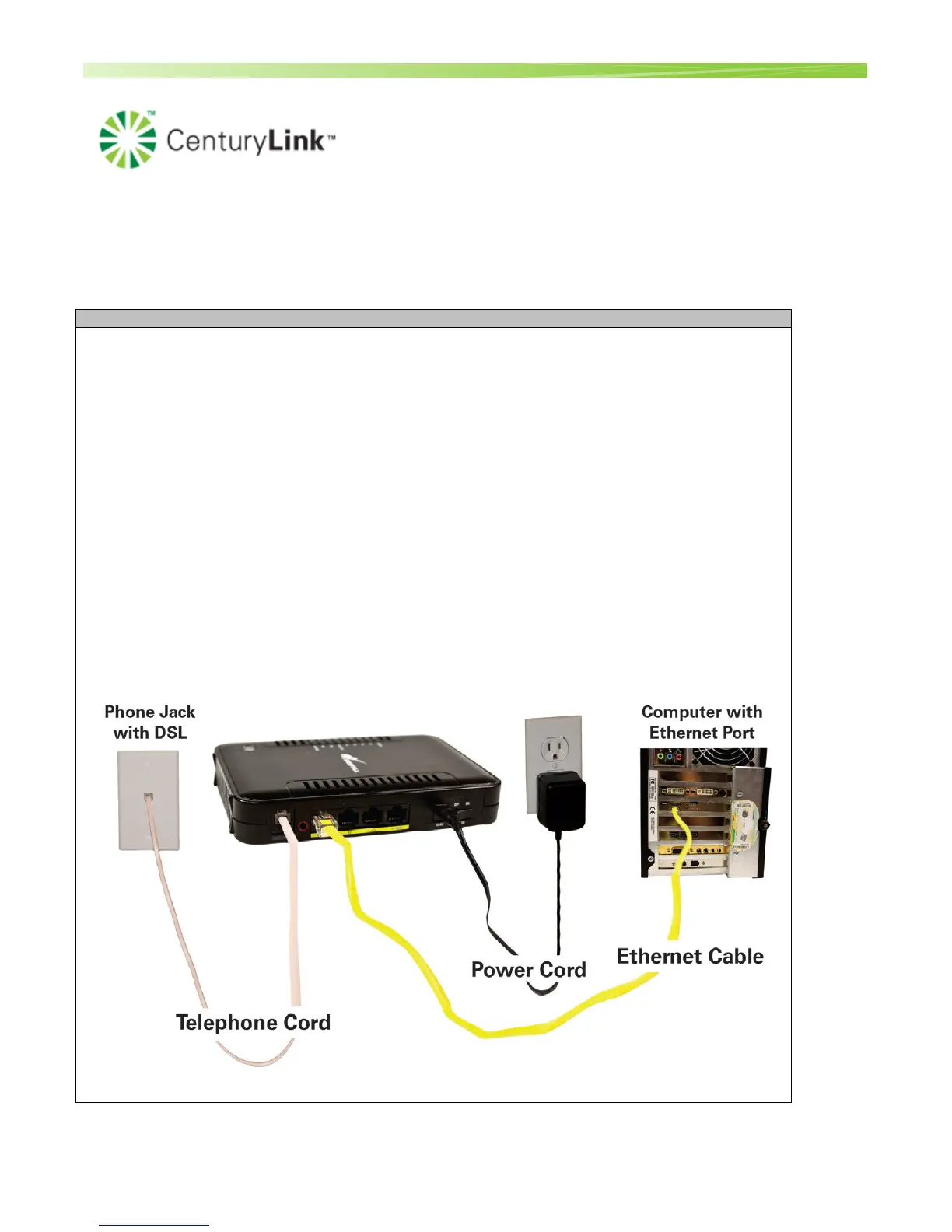
Install Gateway
NOTE: The Westell 7500 is pre-configured to automatically auto detect the
connection parameters (DHCP, PPPoE , VPI, VCI).
With the launch of version 22, the gateway includes an automated installation process known
as Home Device Manager (HDM). HDM automatically configures the gateway, walks the
customer through creation of their CenturyLink username/password, installs CenturyLink
Help (for residential customers) and takes the customer to the CenturyLink portal.
Technicians must complete the Home Device Manager (HDM) set-up procedure during gateway
installation (or replacement). Refer to the Associated Documents section of this document for the Full
Installation Guide M&P.
1. Turn your computer on.
2. Start browser (Internet Explorer)
• The gateway will automatically attempt to connect via DHCP or PPPoE. If successful
the HDM (Home Device Manager) flow will start. The auto detection will take
around 1-2 minutes.


 To Next Page