Method and Procedure
Field Operations Support MP-2009-12-004/ Issue 11/Date: 2/9/2011
Process Owner: Centralized Operations - Field Operations Support
Information contained in this document is proprietary
Unauthorized disclosure outside CenturyLink Corporation is prohibited
27
Here’s an example of what the protocol would be if the customer had 4 Static IPs:
• IP Pool 65.2.2.10-13
• Gateway 65.2.2.9
• Subnet 255.255.255.252
• Pool size 4
• Modem is going to be assigned 65.2.2.10 (Modem should be provisioned for the first IP in the
pool)
• 3 devices on the network will be hard set to 65.2.2.11-65.2.2.13 including DNS.
• Other network devices that need access but not static can be set to DHCP and the modem will
function as a gateway for the IP it was assigned: 65.2.2.10
Westell 7500 FTTx Configuration
(Reminder: Currently Legacy Embarq & Converted states use a Zyxel P330 for FTTx installations)
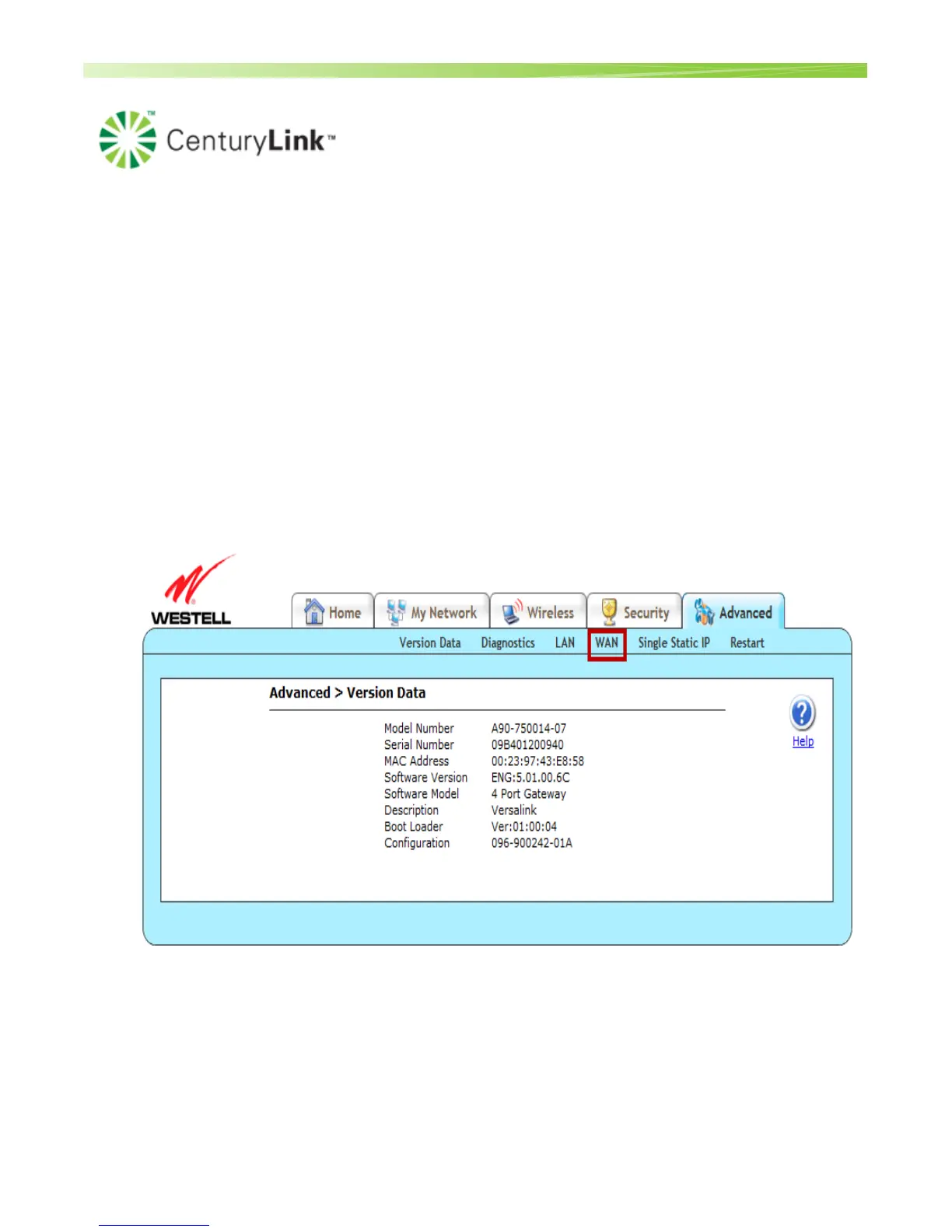
1. To change the connection from DSL to FTTx in the interface, click Advanced and then WAN
2. Click VersaPort link under the WAN menu.


 To Next Page