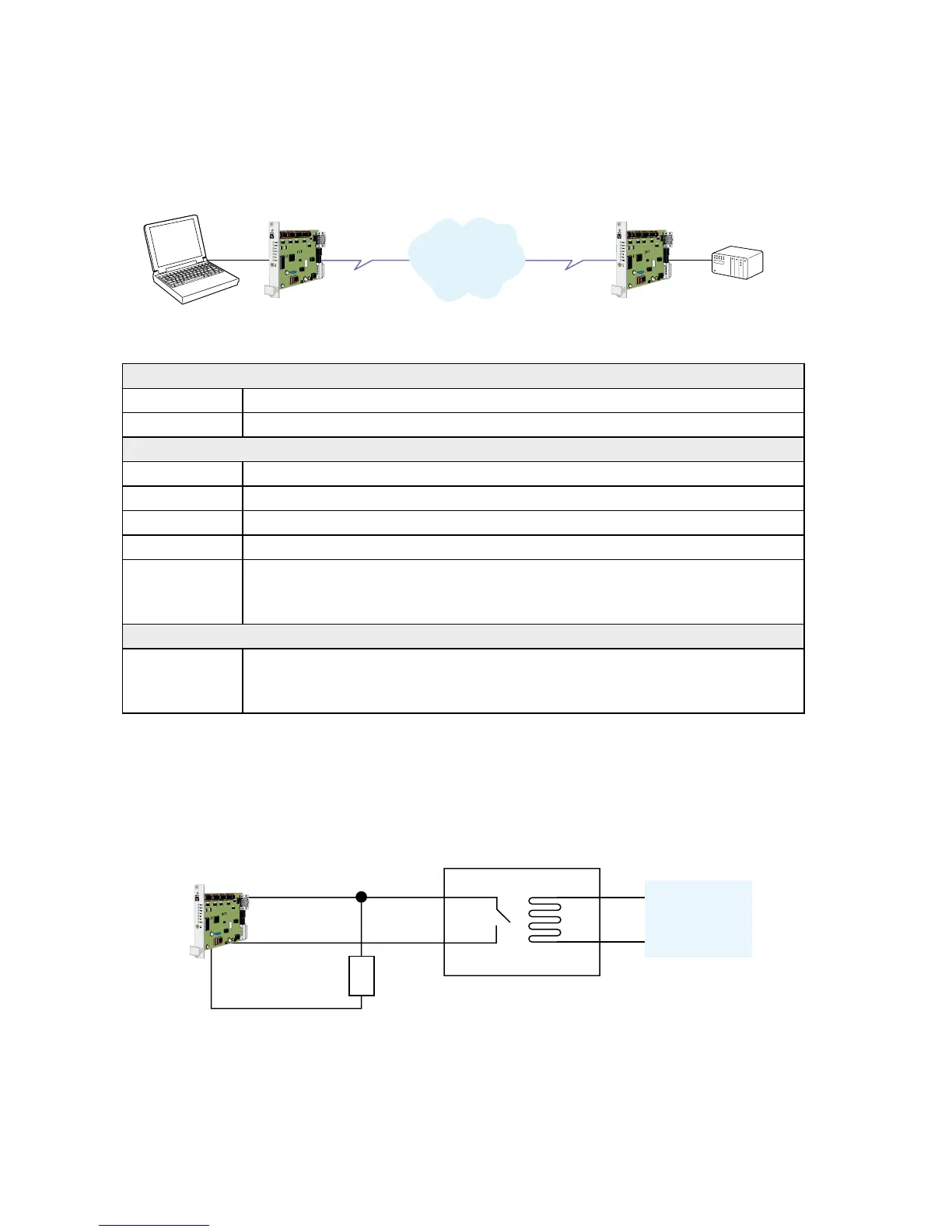
Application example
… TR-36 connected to TR-36 with DTR signal call
Configure the units
AT&F Set the unit to factory default.
AT&W Store default settings.
Set up the connection – The dialling modem
AT&Z0=”nnn” Store the number of the remote modem in the dialling TR-36.
AT&S0 Set DSR signal always high (if this signal is used to trig the DTR).
AT&B1 Activates automatic DTR dialling if DTR switches from low (OFF) to high (ON).
AT&W Save settings.
Switch DTR
from OFF
to ON
The modem will now dial the phone number stored in the first location of the
telephone number table (AT&Z0=<nnn>)
Set up the connection – The answering modem
ATA Enter the answer command when RING comes from the
network or set up ATS0=1 to auto answer on 1 RING signal
(or more than 1).
Relay
External
application
10 kohm
May be required in harsh environments.
NOTE: If no valid DTR signal can be provided by external application, the modems DSR signal can
be used to trig the transmission. Connect the DSR signal via a relay, or other potential
free contact, to the DTR signal. A 10 kohm pull down resistor should also be connected
between the DTR and a signal that is always low e.g. the DCD.



 To Next Page