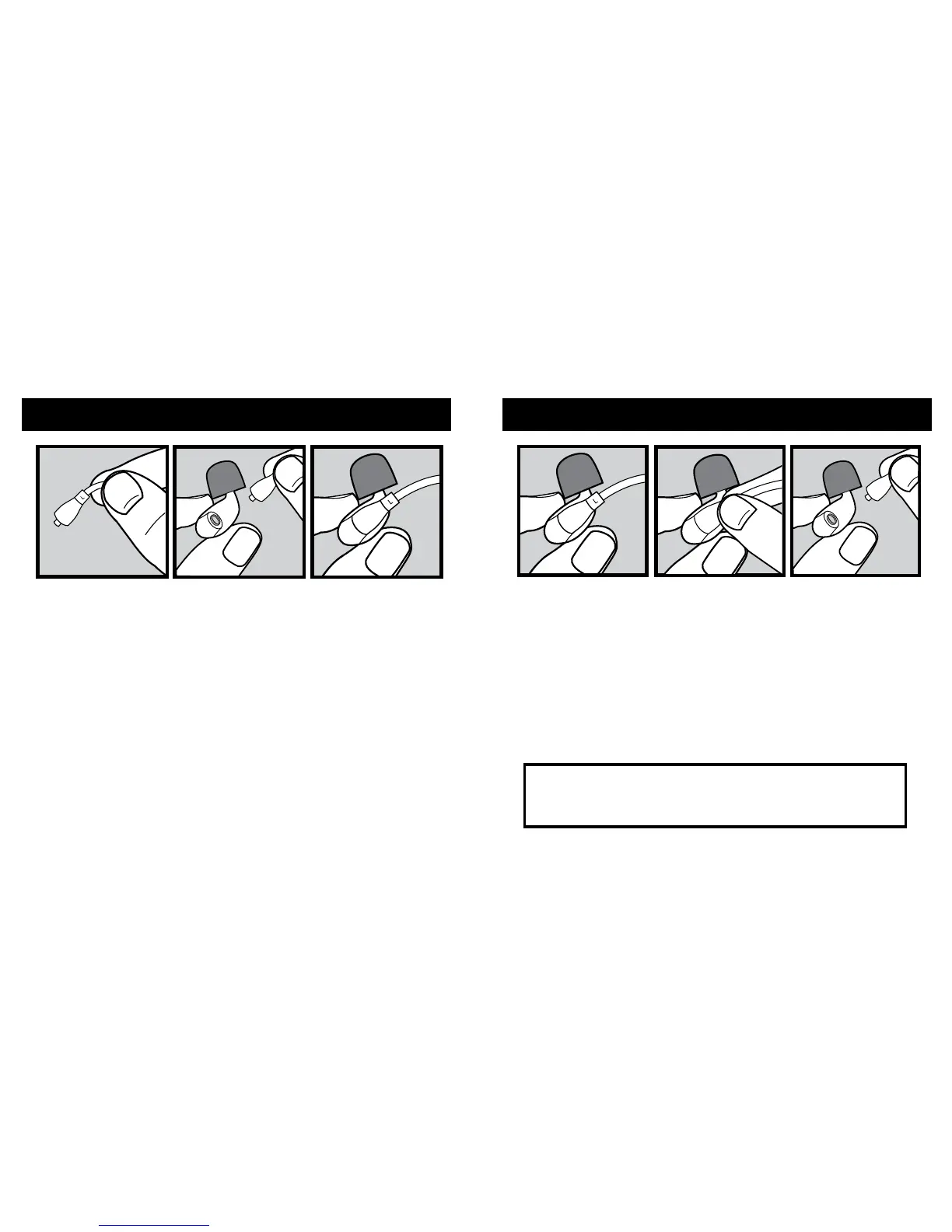
CONNECTING EARPHONES
DISCONNECTING EARPHONES
How to attach earphones to the cable:
1. Identify the right and left MMCX connectors,
each connector is marked “R” for right and “L” for left.
2. Identify the right and left earphones/earpieces. Match
the appropriate earphone to the correct cable,
right + right or left + left.
3. Grasp the MMCX connector and insert it into the
earphone/earpiece by pushing it into the female
MMCX
connector until it clicks into place.
4. Repeat for the other side.
How to disconnect earphones from the cable:
1. Hold the earphone/earpiece rmly with one hand,
and the MMCX connector with the other hand.
2. Pull the MMCX connector straight out of the
earphone/earpiece. Do Not pull at an angle, or the
connector will become harder to remove from the
female socket.
CAUTION:
Never try to remove the cable from the
earphone/earpiece by pulling directly on the cable.
This could damage or destroy the cable.


 To Next Page