EasyManua.ls Logo

WFCO WF-8900-AD-MBA Series - User Manual

WFCO WF-8900-AD-MBA Series
14 pages
Print Icon
To Next Page IconTo Next Page
Loading...
OPERATOR’S MANUAL
WF-8900-AD-MBA SERIES
WF-8935-AD-MBA | WF-8745-AD-MBA | WF-8955-AD-MBA | WF-8965-AD-MBA | WF-8975-AD-MBA
( The Power Center model number is located on the front panel label next to the breakers)
ARTERRA DISTRIBUTION
(877) 294-8997
wfcoelectronics.com
WARRANTY
warranty@wfcoelectronics.com
Fax (574) 294-8698
Distributed by Arterra in the U.S.A. and Canada
Question and Answer IconNeed help?

Do you have a question about the WFCO WF-8900-AD-MBA Series and is the answer not in the manual?

Summary

Safety Information and Warnings

Electrical Shock Risk

Disconnect all power supplies before making electrical connections to prevent severe injury or death.

Installation and Servicing Precautions

Product should be installed by a certified electrician to avoid electrical shock or bodily injury.

Hazard Alerts

Warnings for spark hazards, not being ignition protected, and the need for adequate ventilation.

General Information and Protection Features

Automatic Cooling Fan Operation

The cooling fan speed is controlled by the current drawn by the applied load for optimal cooling.

Over-Temperature Protection Mechanism

The unit automatically shuts down if internal temperature exceeds a critical point for component protection.

Electronic Current Limiting Behavior

Output current stays constant, while voltage drops if it exceeds the maximum rating.

Short-Circuit Protection Functionality

Voltage output drops to zero volts during a short circuit condition, resuming upon removal.

Circuit Protection Details

Reverse Battery Polarity Protection

Fuses protect the circuitry from permanent damage caused by incorrect battery polarity connection.

Operational Features and Charging Modes

Auto Detect Battery Type

Evaluates battery type to select the appropriate charging program for optimal performance.

Three-Stage Smart Charging

Maximizes battery life using Bulk, Absorption, and Float charging modes.

Absorption Mode Functionality

Provides a constant 13.6V output to power RV circuits and maintain charge.

Bulk Mode Functionality

Delivers 14.4V for rapid charging, active until current drops or timer expires.

Float Mode Functionality

Offers a trickle charge at 13.2V to maintain battery charge without overcharging.

Lithium Battery Charging

Two-Stage Voltage Output Modes

Explains the two voltage output modes (Bulk and Absorption) for lithium batteries.

Lithium Bulk Charging Mode

Boosts voltage to 14.6V for quick charging and balancing of lithium cells.

Lithium Absorption Charging Mode

Maintains 13.6V to provide a safe operating voltage for all RV loads.

Troubleshooting Instructions

Converter Output Voltage Check

Procedure for checking converter output voltage using a voltmeter.

DC Reverse Polarity Fuse Check

Inspects reverse polarity fuses for breaks or continuity issues.

AC Reverse Polarity Alarm Identification

Identifies an audible alarm indicating reversed AC neutral and lead wires.

Troubleshooting Flow Chart Guidance

Provides a visual guide to diagnose and resolve converter issues.

Replacing the Converter Section (MBA)

MBA Removal and Installation Steps

Detailed procedure for removing the Main Board Assembly (MBA) from the enclosure.

General Compliance Information

UL and cUL Listing

Confirms the product is UL-Listed and cUL-Listed (Canadian).

FCC Class B Compliance

Details FCC Part 15 rules for digital devices and potential radio frequency interference.

Installation Instructions

Mounting the Converter Section (MBA)

Refers to page 10 for complete removal and installation instructions of the MBA.

Consumer Limited Warranty

Warranty Exclusions and Limitations

Lists conditions and actions that void the warranty, such as unauthorized repair or misuse.

Warranty Claim Procedure

Outlines the steps for filing a warranty claim, including obtaining an RGA number.

Warranty Assistance and Specifications

Contact Information for Assistance

Provides contact details for dealers, OEM, and Arterra Distribution for warranty support.

Overview

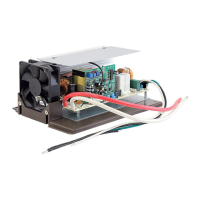
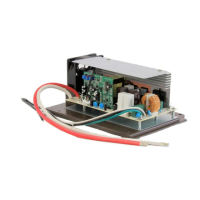
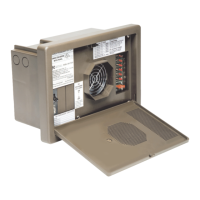
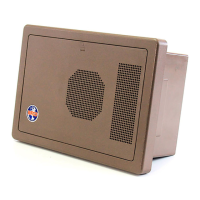
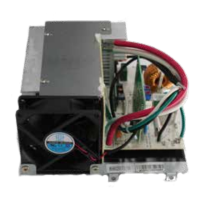
The WF-8900-AD-MBA Series is a main board assembly designed for use in RV power centers, providing essential power conversion, distribution, and battery charging capabilities. This series includes several models: WF-8935-AD-MBA, WF-8745-AD-MBA, WF-8955-AD-MBA, WF-8965-AD-MBA, and WF-8975-AD-MBA. The specific model number of the power center is typically found on the front panel label near the breakers.

Function Description

The primary function of the WF-8900-AD-MBA Series is to convert AC shore power into DC power to operate 12-volt RV appliances and charge the house battery. It integrates a smart battery charging system, circuit protection features, and various safety mechanisms to ensure reliable and safe operation within an RV environment.

Important Technical Specifications

The WF-8900-AD-MBA Series operates with an input voltage range of 105-130VAC at 60Hz. Output specifications vary by model:

  • WF-8935-AD-MBA:
    • Max Input Current @ 105VAC: 7A
    • Max Power: 600 watts
    • Continuous Power: 475 watts
    • Rated DC Output Voltage: 13.6V
    • Rated DC Current: 35A
  • WF-8945-AD-MBA:
    • Max Input Current @ 105VAC: 8A
    • Max Power: 770 watts
    • Continuous Power: 610 watts
    • Rated DC Output Voltage: 13.6V
    • Rated DC Current: 45A
  • WF-8955-AD-MBA:
    • Max Input Current @ 105VAC: 11A
    • Max Power: 940 watts
    • Continuous Power: 760 watts
    • Rated DC Output Voltage: 13.6V
    • Rated DC Current: 55A
  • WF-8965-AD-MBA:
    • Max Input Current @ 105VAC: 13A
    • Max Power: 1110 watts
    • Continuous Power: 880 watts
    • Rated DC Output Voltage: 13.6V
    • Rated DC Current: 65A
  • WF-8975-AD-MBA:
    • Max Input Current @ 105VAC: 15A
    • Max Power: 1280 watts
    • Continuous Power: 1020 watts
    • Rated DC Output Voltage: 13.6V
    • Rated DC Current: 75A

All models feature automatically controlled, microprocessor-driven charging. They boast a VA Efficiency of >80% (under 70% of load condition) and a regulation accuracy of ±1% against input or load changes.

Dimensions and Weight:

  • WF-8935/45/55 MBA (Typical): 7.10" W x 9.56" H x 9.60" D (181 mm W x 90 mm H x 243 mm D), weighing 2.5 lbs. / 1.14 kg.
  • WF-8965/75 MBA: 7.10" W x 10.73" H x 10.80" D (108 mm W x 113 mm H x 273 mm D), weighing 5.20 lbs. / 2.39 kg.

The units are designed for non-condensing environments and are UL458 and FCC Class B compliant.

Usage Features

Automatic Cooling Fan: The cooling fan is load-controlled, meaning its speed increases as the current drawn from the converter to the load increases, and decreases as the load decreases. This design provides better component cooling by avoiding temperature spikes, which can lead to premature component failure.

Auto Detect Charging: This exclusive feature evaluates the charging cycle of a battery, determines the battery type (Lead Acid, AGM, or Lithium), and then selects the appropriate charging program (profile) for optimal performance and maintenance.

Three-Stage Smart Charging (for Lead Acid and AGM batteries):

  • Bulk Mode: When the battery is discharged, the converter outputs 14.4 volts to quickly restore energy. This mode is maintained until the current draw drops to approximately five Amps or for four hours, whichever comes first.
  • Absorption Mode: The default operating mode, providing a constant target output voltage of 13.6 volts (nominal) to power branch circuits and continue charging. If output current reaches maximum, voltage drops to maintain current level.
  • Float Mode: After a long period of stable current draw, the voltage reduces to 13.2V, providing a "trickle charge" to preserve battery life and keep it ready for use.

Two-Stage Smart Charging (for Lithium batteries):

  • Bulk Mode: Boosts output voltage to 14.6 VDC to quickly restore energy and balance lithium cells. This stage can last from one to four hours, depending on battery and load current.
  • Absorption Mode: Reduces output voltage to 13.6 VDC, providing a safe operating voltage for all RV loads. This is the default or normal mode for lithium batteries, with no timer associated.

Electronic Current Limiting: If the output current exceeds the maximum rating, the output current remains constant while the output voltage drops. The unit recovers once loads are reduced.

Short-Circuit Protection: In the event of a short circuit, the converter drops the output voltage to zero volts. It resumes normal operation once the short-circuit condition is removed and no other faults are detected.

AC Reverse Polarity (Audible Alarm): The power center is equipped with an audible alarm that sounds if the incoming AC neutral wire and lead wire are connected backward, continuing until corrected.

Maintenance Features

Over-Temperature Protection: If the internal temperature exceeds a critical point, the converter will shut down to protect sensitive components from damage. It restarts once the temperature drops.

Reverse Battery Protection: Two reverse polarity fuses protect the MBA circuitry from permanent damage if a battery is connected backward. These fuses are located along the left-center edge of the DC fuse board below the VCC+ lug. Fuse values vary by model:

  • WF-8935-AD-MBA: 35A (1 fuse)
  • WF-8945-AD-MBA: 30A (2 fuses)
  • WF-8955-AD-MBA: 40A (2 fuses)
  • WF-8965-AD-MBA: 20A (4 fuses)
  • WF-8975-AD-MBA: 20A (4 fuses) These fuses should be replaced with ATC or ATO automotive type fuses (e.g., Littelfuse type 257, Bussmann type ATC).

Troubleshooting Instructions:

  • Converter Output Voltage Check: Disconnect battery cables, ensure AC source (105-130 Volts) is connected, and check converter output voltage at the battery cables with a voltmeter. A reading of 13.6-14.6V indicates proper function. If 0.0 VDC, check for open in-line fuses or loose wiring.
  • DC Reverse Polarity Fuses Check: If there is no DC output, visually inspect the reverse polarity fuses for breaks or use a continuity tester. Blown fuses indicate a reversed battery connection, which must be corrected before replacing fuses with the same type and amperage rating.

Replacing the Converter Section (MBA):

  1. Ensure no AC power is supplied to the RV.
  2. Remove Reverse Polarity Fuses to disconnect the converter section.
  3. Remove the door assembly by loosening two captive screws.
  4. Loosen NEG- lug (White wire) and VCC+ lug (Red wire) on the fuse board.
  5. Depress the tab at the bottom of the fuse board and pull it forward.
  6. Pull Red and White wires out of the lugs.
  7. In the AC section, locate the Black wire from the converter, ensure the converter breaker is OFF, and remove the wire from the breaker.
  8. Remove the converter's Green Ground wire from the AC Ground bar.
  9. Remove the converter's White Neutral wire from the AC Neutral bar.
  10. Remove two screws holding the MBA in place and slide it forward, routing wires through slots until it clears the enclosure. Installation of a replacement MBA involves reversing these steps.

WFCO WF-8900-AD-MBA Series Specifications

General IconGeneral
BrandWFCO
ModelWF-8900-AD-MBA Series
CategoryPower Supply
LanguageEnglish

Related product manuals