General Operating Instructions:
1. Ensure the Power Switch is set to “OFF” before connecting setup.
2. Select either ‘Stereo Mix’ or ‘Main Monitor’ by pressing the routing button.
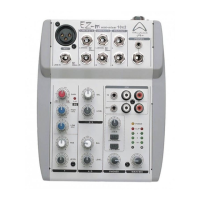
3. Connect your external components. You can connect a low-impedance microphone to the 3-pin
XLR type MIC inputs on the front panel on channel 1-7 or connect a high impedance unbalanced
microphone to the Hi-Z jack on channel 1-4, or to the super Hi-Z jack. Line level Signal should be
connected to the LINE jack.
If you are using a condenser microphone you will need to activate ‘PHANTOM POWER’ in order to
supply phantom power to the Low-Z inputs.
4. Make sure that all channels are turned down as well as the MASTER and MONITOR control
knob. Make sure that all EQ sliders are at center position.
5. If you are using a separate power amplifier for the monitor speakers, run a shielded patch cable
from the monitor LINE OUT JACK TO THE INPUT OF THE MONITOR POWER AMPLIFIER. If
you are using a separate graphic EQ for the monitors , run a shielded patch cable to the input of
EQ . then , another one from the EQ’s output to the input of the monitor power amplifier.
6. Position your main speakers at the front of the stage, pointing directly out at the audience.
Position your monitor speakers on the stage floor, in front of the mic stand, pointing up at the
backs of the mics.
7. Connect the AC power cord to a 120/240Volt AC grounded outlet.
8. Turn on the POWER switch on the rear of the unit –the LED on the front panel should show red
now.
9. Using one of the inputs, for example a CD or the microphone, test the unit is working.
10. Set the channel LOW, MID, and HIGH EQ at center. Set the channel GAIN/TRIM, MON, and
EFX control at 0.
11. Set the MAIN MASTER and MONITOR MASTER control to approximately 3 o’clock position.
The EFX to MAIN and EFX to MONITOR control to around 1 o’clock position, and EFX MASTER
set up to around 12 o’clock position.
12. While speaking into the microphone (or whilst playing the instrument), adjust the TRIM/GAIN
control so that the channel PEAK indicator occasionally illuminates (blinks) at the maximum vol-
ume.
13. Turn up the channel LEVEL controls slowly until each channel can be heard at the desired vol-
ume level through the main PA speakers.
14. Turn up the channel MON controls until the performers can hear themselves at adequate vol-
ume levels without feedback.
15. Turn up the EFX controls on those channels requiring effect. Usually this would be the lead
Page 10



 To Next Page