43
q
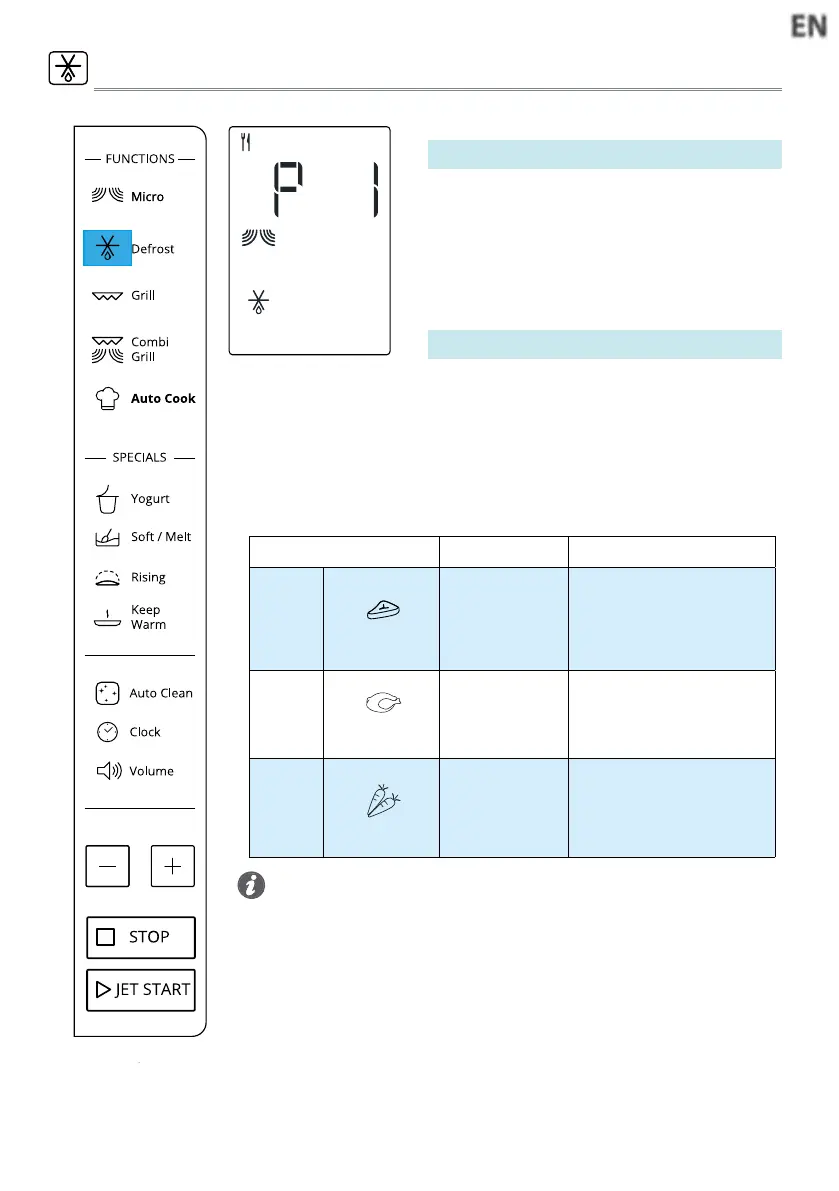
Press the Defrost button,display show
as left side,press JET START to conrm.
w
Press +/- button to set the cooking
time.
e
Press JET START to start.
DEFROST MENU
• For best result we recommend to defrost directly on the cavity bot-
tom.
• If the food is warmer than deep-freeze temperature (-18°C), choo-
se a lower weight than the food.
• If the food is colder than deep-freeze temperature (-18°C), choose
a higher weight than the food.
• Separate pieces as they begin to defrost. Individual slices defrost
more easily.
• Standing time after defrosting always improves the result since the
temperature will then be evenly distributed throughout the food.
Tips and suggestions:
FOOD TYPE WEIGHT SUGGESTED USE
p 2
Minced meat
100g - 2000g
Minced meat,cutlets, steaks
or roasts.
After cooking, allow food to rest
for at least 5 minutes for bet-
ter results.
p 3
Poultry
100g - 2000g
Whole chicken, pieces or fillets.
After cooking, allow food to
rest for 5-10 minutes for better
results.
p 4
Vegetables
100g - 1000g
Larger, medium and small cut
vegetables.
Before serving, allow food to
rest for 3-5 minutes for better
results.
To defrost manually (P1):
This function allows you to defrost food.
Defrost menu (P2-P4):
q
Press the Defrost button repeatly or +/-
button to select the food category in
below table.
w
Press JET START to conrm.
e
Press +/- button to set the food weight,
then press JET START button to start.




 To Next Page