Starting your washer
your washer.
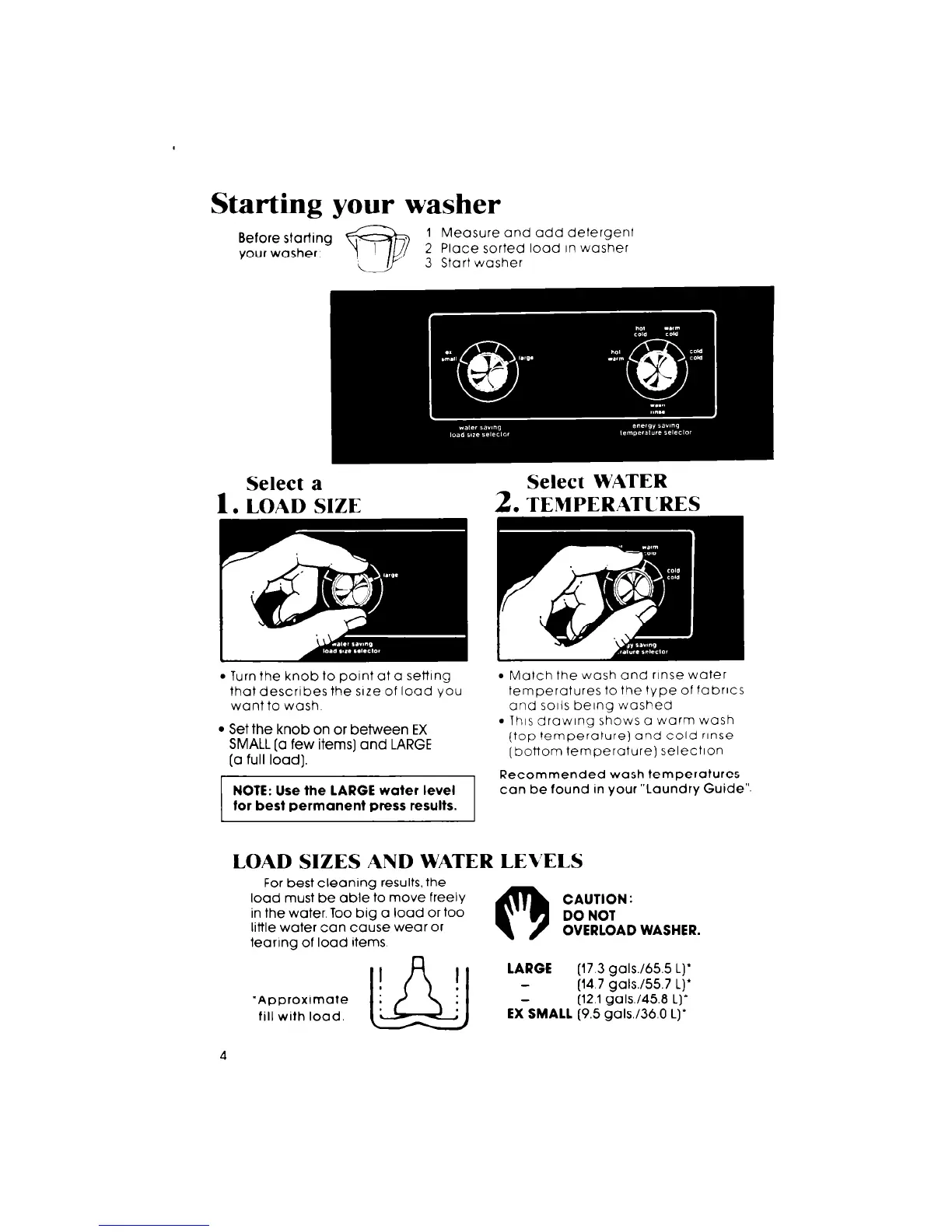
1 Measure and add detergent
2 Place sorted load In washer
3 Start washer
Select a
Select WATER
1. LOAD SIZE
2.
TEMPERATURES
l
Turn the knob to point at a set-lng
that describes the size of load you
want to wash
l
Set the knob on or between EX
SMALL [a few items] and LARGE
[a full load).
NOTE: Use the LARGE water level
for best permanent press results.
9 Match the wash and rinse water
temperatures to the type of fabrics
and solis being washed
l
This drawing shows a warm wash
(top temperature) and cold rinse
[bottom temperature) selection
Recommended wash temperatures
can be found in your “Laundry Guide”.
LOAD SIZES AND WATER LEVELS
For best cleaning results, the
load must be able to move freely
0
CAUTION :
in the water. Too big a load or too
DO NOT
little water can cause wear or
OVERLOAD WASHER.
tearing of load items
‘Approximate
fill with load.
(17.3 gals./655 L)’
(14.7 gals./557 L)’
(12.1 gals./45.B L]’
EX-SMALL (9.5 galU36.0 L)’
4



 To Next Page