DO THIS... THIS HAPPENS...
1.
Put food in the oven and
close the door.
. .
E
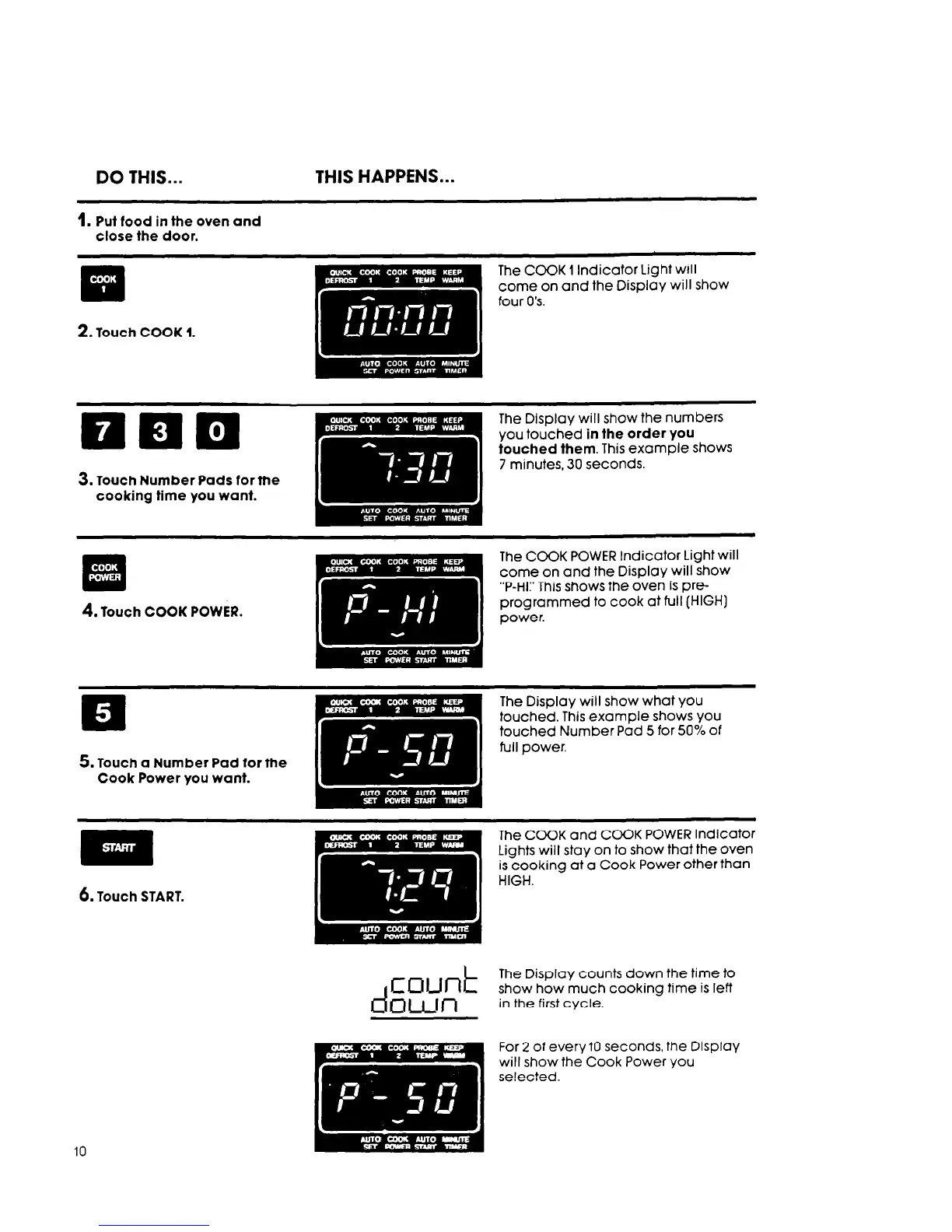
The COOK 1 Indicator Light will
come on and the Display will show
four 0’s.
2.
Touch COOK 1.
nnn
I
. . . . . . . . . .
The Display will show the numbers
you touched in the order you
touched them. This example shows
7 minutes, 30 seconds.
3. Touch Number Pads for the
cooking time you want.
4.
Touch COOK POWER.
p
.I
.*. ., >:.: ,I.
The COOK POWER Indicator Light will
come on and the Display will show
“P-HI:’ This shows the oven is pre-
programmed to cook at full (HIGH]
power.
5. Touch a Number Pad for the
Cook Power you want.
The Display will show what you
touched. This example shows you
touched Number Pad 5 for 50% of
full power.
The COOK and COOK POWER Indicator
Lights will stay on to show that the oven
is cooking at a Cook Power other than
HIGH.
d
EW-lk
awl-l
The Display counts down the time to
show how much cooking time is left
in the first cycle.
10
For 2 of every10 seconds, the Display
will show the Cook Power you
selected.



 To Next Page