Using your microwave oven
Microwave oven controls
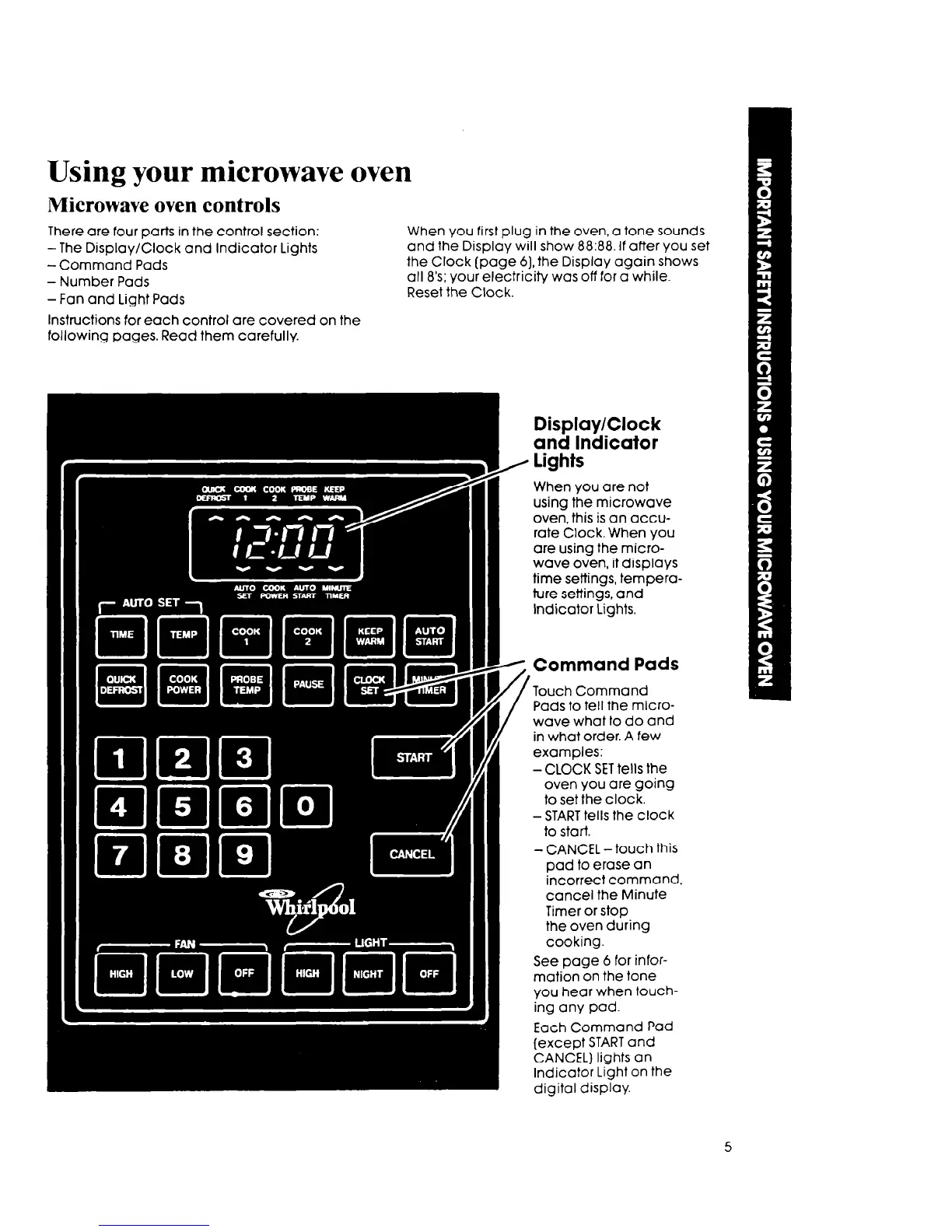
There are four parts in the control section:
-The Display/Clock and Indicator Lights
-Command Pads
- Number Pads
-Fan and Light Pads
Instructions for each control are covered on the
following pages. Read them carefully.
When you first plug in the oven, a tone sounds
and the Display will show 88:88. If after you set
the Clock (page 6) the Display again shows
all 8’s; your electricity was off for a while.
Reset the Clock.
Display/Clock
and Indicator
lights
When you are not
using the microwave
oven, this is an accu-
rate Clock. When you
are using the micro-
wave oven, it displays
time settings, tempera-
ture settings, and
Indicator Lights.
Command Pads
Touch Command
Pads to tell the micro-
wave what to do and
in what order. A few
examples:
-CLOCK SET tells the
oven you are going
to set the clock.
-START tells the clock
to start.
- CANCEL-touch this
pad to erase an
incorrect command,
cancel the Minute
Timer or stop
the oven during
cooking.
See page 6 for infor-
mation on the tone
you hear when touch-
ing any pad.
Each Command Pad
(except START and
CANCEL) lights an
Indicator Light on the
digital display.
5



 To Next Page