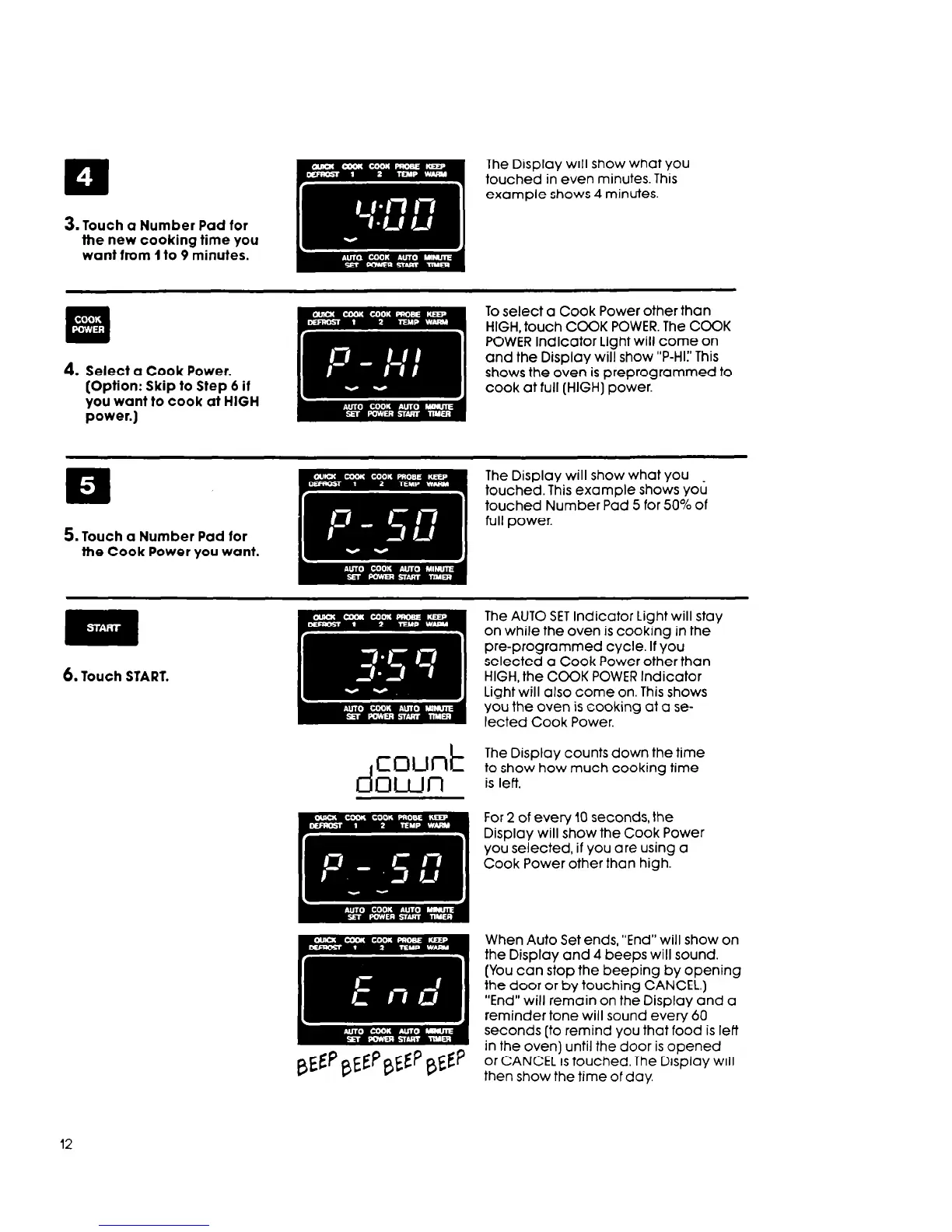
3. Touch a Number Pad for
the new cooking time you
want from 1 to 9 minutes.
4.
Select a
(Option:
you wan
power.)
Cook Power.
Skip to Step 6 if
t to cook at HIGH
To select a Cook Power other than
HIGH, touch COOK POWER. The COOK
POWER Indicator Light will come on
and the Display will show “P-HI:’ This
shows the oven is preprogrammed to
cook at full (HIGH) power.
The Display will show what you
touched. This example shows you
touched Number Pad 5 for 50% of
full power.
6. Touch START.
The AUTO SET Indicator Light will stay
on while the oven is cooking in the
pre-programmed cycle. If you
selected a Cook Power other than
HIGH, the COOK POWER Indicator
Light will also come on. This shows
you the oven is cooking at a se-
lected Cook Power.
The Display counts down the time
to show how much cooking time
is left.
For 2 of every IO seconds, the
Display will show the Cook Power
you selected, if you are using a
Cook Power other than high.
When Auto Set ends, “End” will show on
the Display and 4 beeps will sound.
(You can stop the beeping by opening
the door or by touching CANCEL.)
“End” will remain on the Display and a
reminder tone will sound every 60
seconds [to remind you that food is left
in the oven) until the door is opened
or CANCEL is touched. The Display will
then show the time of day.
12



 To Next Page