Using the Minute Timer
Your microwave oven can be used as a
kitchen timer. Use the Minute Timer for
timing up to 99 minutes, 99 seconds.
NOTES:
l
To see the time of day while the Minute
Timer is counting down, touch AUTO
START/CLOCK.
l
If you want to use other Command Pads
while the Minute Timer is counting down,
touch OFF/CANCEL to cancel the Minute
Timer.
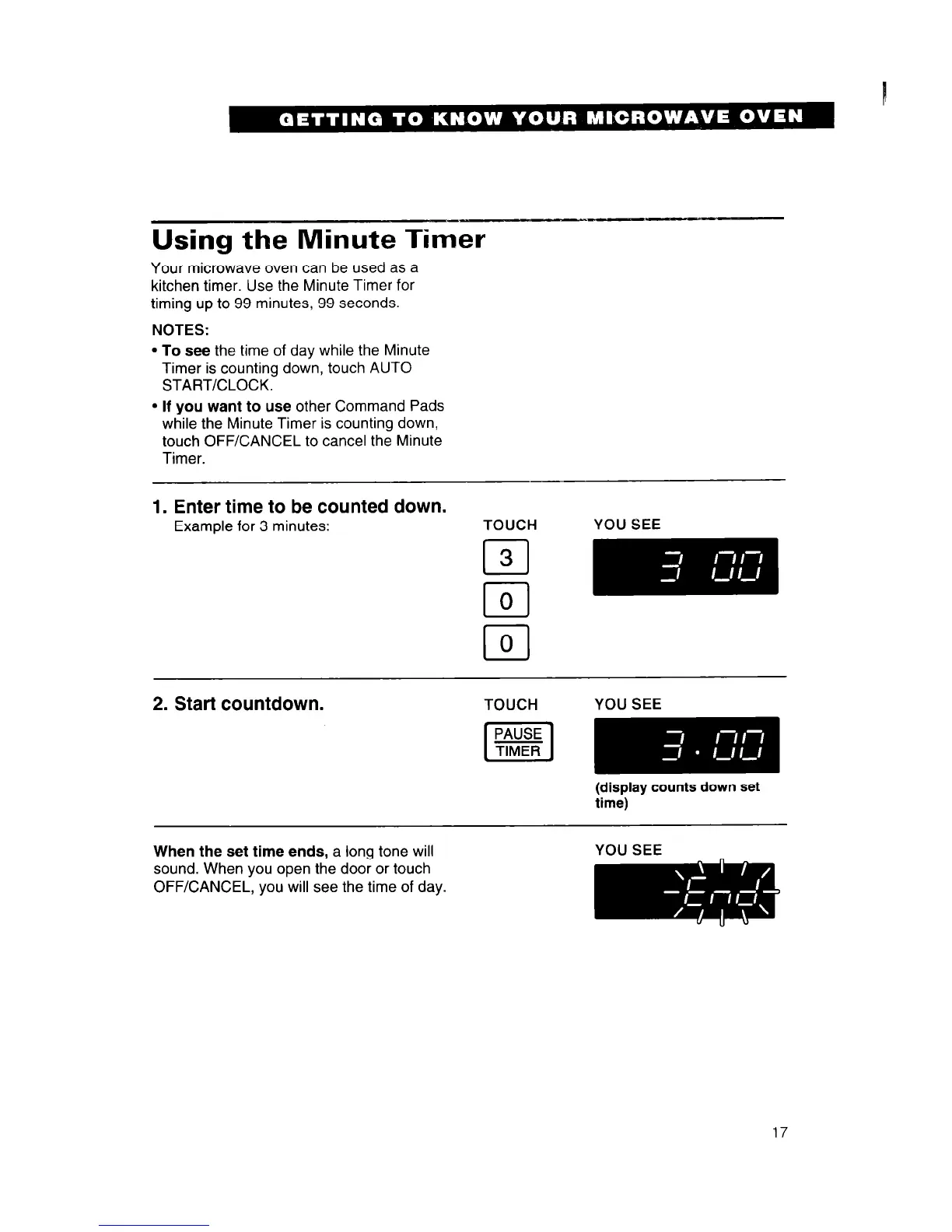
1. Enter time to be counted down.
Example for 3 minutes:
TOUCH YOU SEE
cl
3
r-l
0
I ,
cl
0
2. Start countdown.
TOUCH YOU SEE
(display counts down set
time)
When the set time ends, a long tone will
sound. When you open the door or touch
OFF/CANCEL, you will see the time of day.
YOU SEE
17




 To Next Page