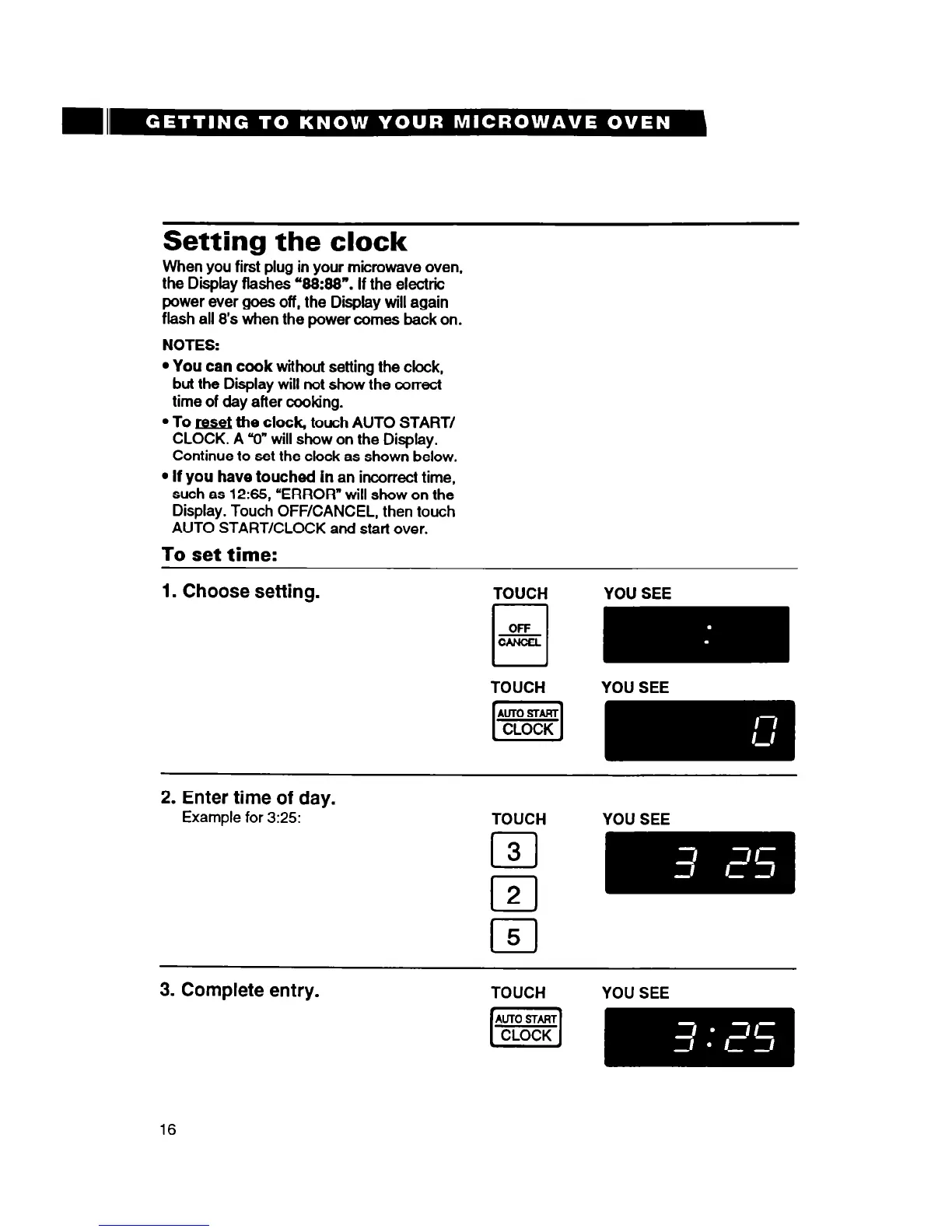
Setting the clock
When you first plug in your microwave oven,
the Display flashes ‘88:88”. If the electric
power ever goes off, the Display will again
flash all 8’s when the power comes back on.
NOTES:
l
You can cook without
setting the clock,
but the Display will not show the correct
time of day after cooking.
l
To M the clock, touch AUTO START/
CLOCK. A V” will show on the Display.
Continue to set the clock as shown below.
l
If you have touched in
an incorrect time,
such as 12335, “ERROR” will show on the
Display. Touch OFF/CANCEL, then touch
AUTO START/CLOCK and start over.
To set time:
1. Choose setting.
TOUCH
YOU SEE
2. Enter time of day.
Example for 3:25:
TOUCH
YOU SEE
3. Complete entry.
TOUCH YOU SEE
16




 To Next Page