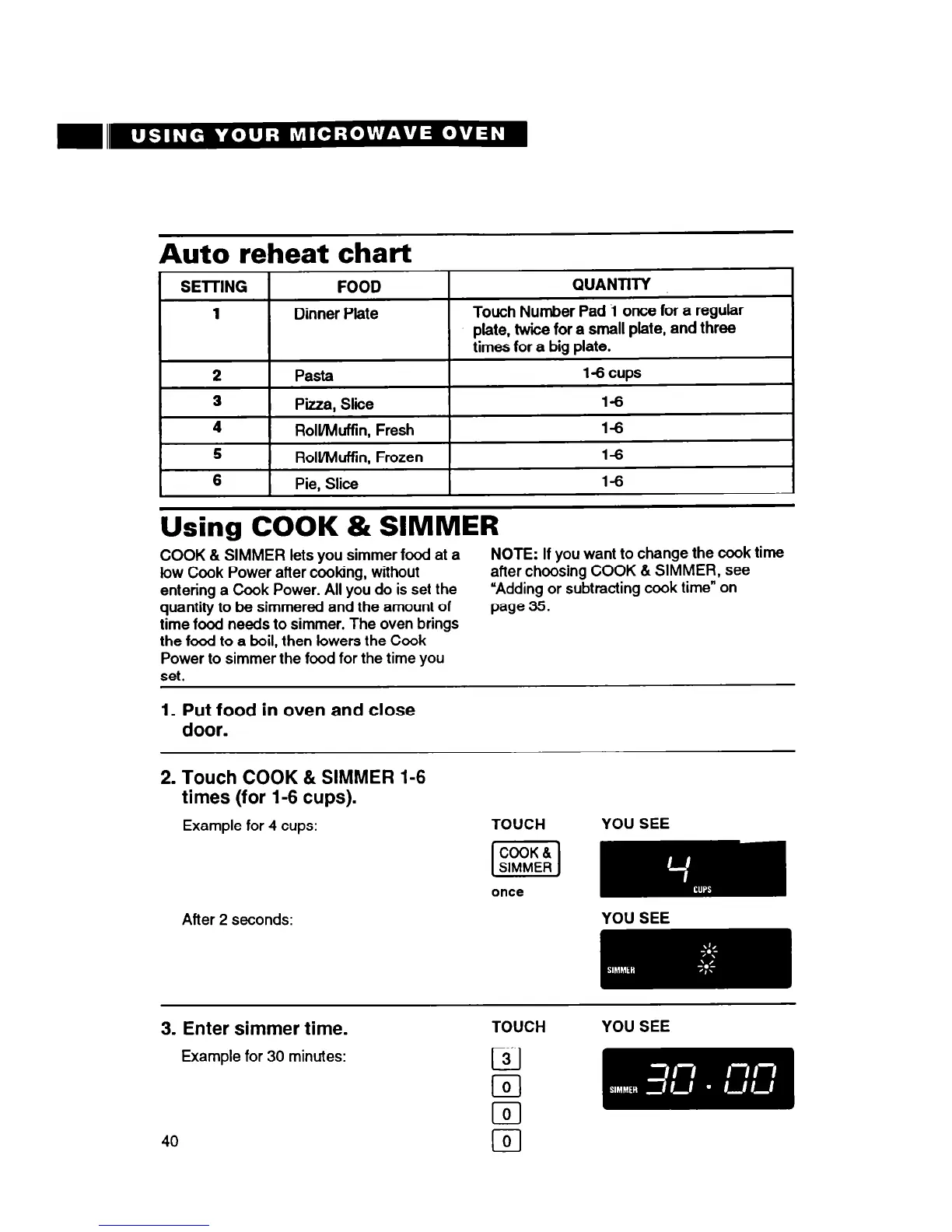
Auto
reheat chart
SElTING
FOOD
QUANTITY
1
Dinner Plate
Touch Number Pad i once for a regular
plate, twice for a small plate, and three
times for a big plate.
2
Pasta
1-6cups
3
P’kza,
Slice
l-6
4
Roll/Muffin, Fresh
l-6
6
Roll/Muffin, Frozen
l-6
6
Pie, Slice
l-6
Using COOK & SIMMER
COOK & SIMMER lets you simmer food at a
low Cook Power after cooking, without
entering a Cook Power. All you do is set the
quantity to be simmered and the amount of
time food needs to simmer. The oven brings
the food to a boil, then lowers the Cook
Power to simmer the food for the time you
set.
NOTE: If you want to change the cook time
after choosing COOK & SIMMER, see
“Adding or subtracting cook time” on
page 35.
1. Put food in oven and close
door.
2. Touch COOK & SIMMER 1-6
times (for 1-6 cups).
Example for 4 cups: TOUCH
YOU SEE
once
After 2 seconds:
YOU SEE
3. Enter simmer time.
Example for 30 minutes:
TOUCH
YOU SEE
cl
3
cl
0
cl
0
40
lo]




 To Next Page