Use the following chart as a guide for cookware material
characteristics.
COOKWARE CHARACTERISTICS
Aluminum • Heats quickly and evenly.
• Suitable for all types of cooking.
• Medium or heaw thickness is best for
most cooking tasks.
Cast iron • Heats slowly and evenly.
• Good for browning and frying.
• Maintains heat for slow cooking.
Ceramic or • Follow manufacturer's instructions.
Ceramic glass • Heats slowly, but unevenly.
• Ideal results on low to medium heat
settings.
Copper • Heats very quickly and evenly.
Earthenware • Follow manufacturer's instructions.
• Use on low heat settings.
• See stainless steel or cast iron.Porcelain enamel-
on-steel or cast
iron
Stainless steel
• Heats quickly, but unevenly.
• A core or base of aluminum or copper on
stainless steel provides even heating.
ELECTRONICOVEN
CONTROLS
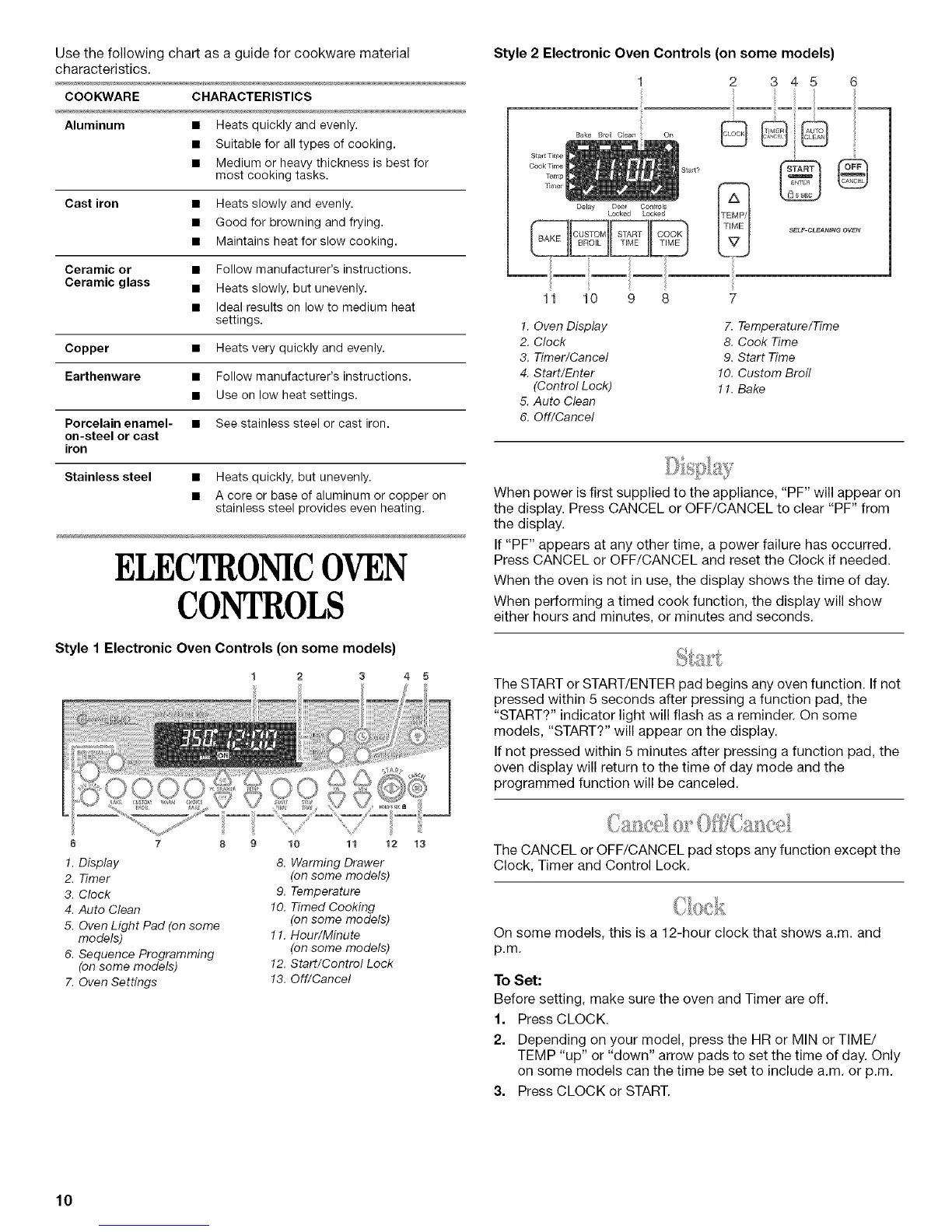
Style 1 Electronic Oven Controls (on some models)
I 2 3 4 5
6 7 8
1.Display
2. Timer
3. Clock
4.Auto Clean
5. OvenLight Pad (on some
models)
6. Sequence Programming
(onsome models)
7. OvenSettings
9 10 11 12
8. Warming Drawer
(on some models)
9. Temperature
10. Timed Cooking
(on some models)
11. Hour/Minute
(on some models)
12. Start/Control Lock
13. Off/Cancel
Style 2 Electronic Oven Controls (on some models)
345 6
Bake Broil Clean
Delay Door Controls
Locked Locked
On
11 10 9 8
!
IP/
SELF CLEAt,J_N_ OVEN
1. Oven Display 7. Temperature/Time
2. Clock 8. Cook Time
3. Timer/Cancel 9. Start Time
4. Start/Enter 10. Custom Broil
(Control Lock) 1!. Bake
5. Auto Clean
6. Off/Cancel
When power is first supplied to the appliance, "PF" will appear on
the display. Press CANCEL or OFF/CANCEL to clear "PF" from
the display.
If "PF" appears at any other time, a power failure has occurred.
Press CANCEL or OFF/CANCEL and reset the Clock if needed.
When the oven is not in use, the display shows the time of day.
When performing a timed cook function, the display will show
either hours and minutes, or minutes and seconds.
The START or START/ENTER pad begins any oven function. If not
pressed within 5 seconds after pressing a function pad, the
"START?" indicator light will flash as a reminder. On some
models, "START?" will appear on the display.
If not pressed within 5 minutes after pressing a function pad, the
oven display will return to the time of day mode and the
programmed function will be canceled.
The CANCEL or OFF/CANCEL pad stops any function except the
Clock, Timer and Control Lock.
On some models, this is a 12-hour clock that shows a.m. and
p.m.
To Set:
Before setting, make sure the oven and Timer are off.
1. Press CLOCK.
2. Depending on your model, press the HR or MIN or TIME/
TEMP "up" or "down" arrow pads to set the time of day. Only
on some models can the time be set to include a.m. or p.m.
3. Press CLOCK or START.
10



 To Next Page