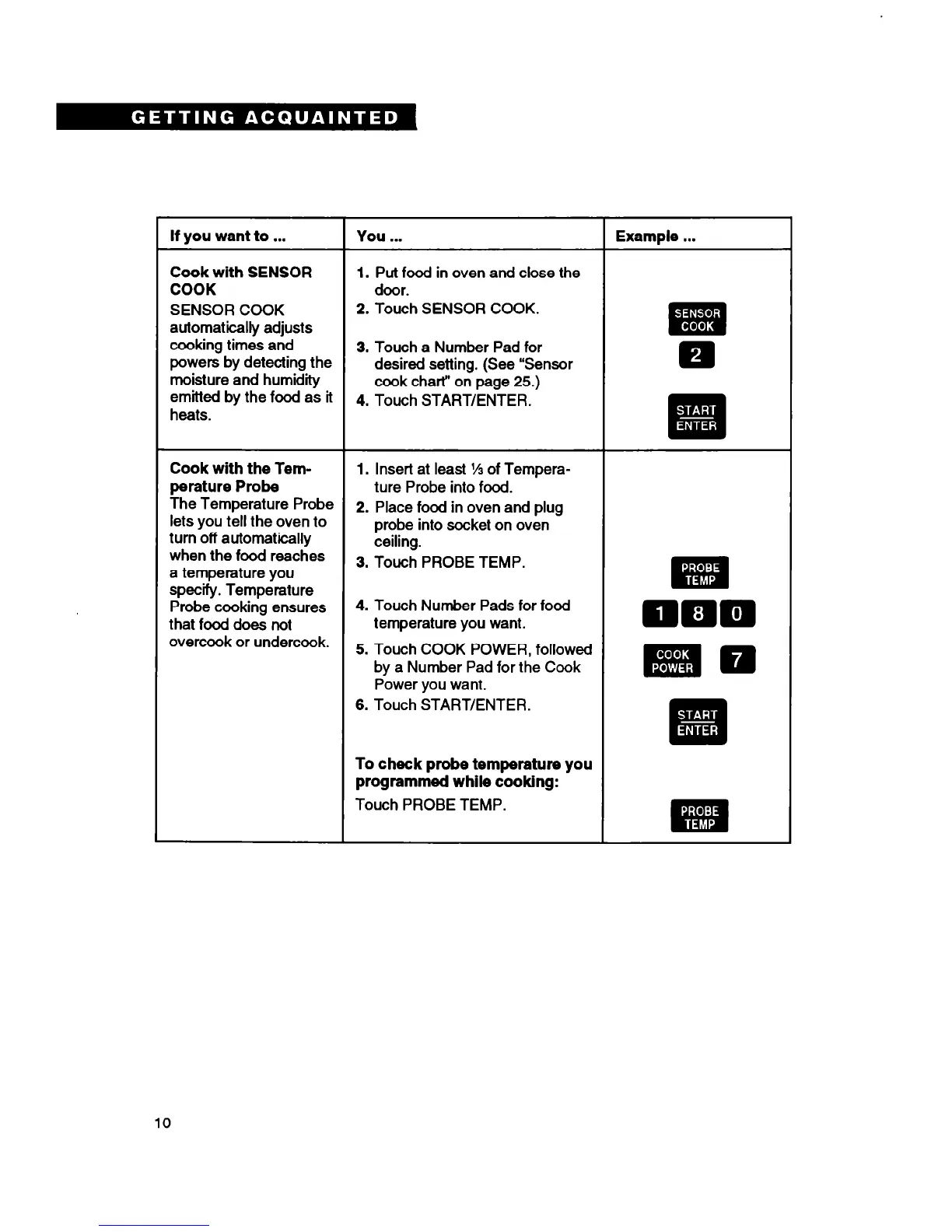
If you want to . . .
You . . .
Example . . .
Cook with SENSOR
1.
Put food in oven
and
close the
COOK
door.
SENSOR COOK
2. Touch SENSOR COOK.
0’
automatically adjusts
m
#I
cooking times and
3. Touch a Number Pad for
powers by detecting the
desired setting. (See “Sensor
m
moisture and humidity
cook chart” on page 25.)
emitted by the food as it
4. Touch START/ENTER.
heats.
. -
q
.
Cook with the Tem-
1.
Insert at least % of Tempera-
perature Probe
ture Probe into food.
The Temperature Probe
lets you tell the oven to
2. Place food in oven and plug
turn off automatically
probe into socket on oven
when the food reaches
ceiling.
a temperature you
3. Touch PROBE TEMP.
“I:
specify. Temperature
wa
.
Probe cooking ensures
4. Touch Number Pads for food
that food does not
temperature you want.
DDD
overcook or undercook.
5. Touch COOK POWER, followed
by a Number Pad for the Cook
mm
Power you want.
6. Touch START/ENTER.
To check probe temperature you
programmed while cooking:
Touch PROBE TEMP.
10





 To Next Page